

What is a virtual data room? A plain-English guide for NZ
You will most likely meet the term in a lawyer’s email: “We’ll set up a data room for diligence.” It sounds like enterprise jargon. It is not.
The idea is old and plain, and once you have run a live deal through one, sending confidential files as email attachments starts to feel reckless.
This is a long guide because the term hides a lot of practical decisions: cost, security, the law, and whether you even need one. Here is the at-a-glance version you can act on before reading a word more.
Your quick checklist, before you commit to anything:
- Confirm there is a deal. A VDR earns its keep during a sale, raise, merger or listing, not for everyday file storage.
- Count the outside parties. One trusted buyer under an NDA may not need one. Two or more competing bidders almost always do.
- Flag the sensitive files. Financials, customer lists and staff records raise both the commercial and the legal stakes.
- Match the tier to the deal, not the brand. A NZD $50 room suits a simple sale; a contested acquisition does not.
- Check the charging model. Per-user, per-page and per-gigabyte pricing can each blow out; a flat rate is easier to budget.
- Insist on the controls. Per-file permissions, watermarking, two-factor login, an audit trail and independent certification.
- Keep your Privacy Act duties in view. The room holds your personal data; the responsibility stays with you.
- Plan the close. Agree upfront how you will export the audit log and revoke access when the deal ends.
The rest of this guide unpacks each of those points, with real NZD numbers, the New Zealand deal process and the law wrapped around them.
So what is a virtual data room, really?
Strip out the marketing and here is the whole concept: a virtual data room is a secure, permission-controlled website where you share confidential business documents with a specific group of outside parties, and log everything they do.
The word “room” is a leftover from the 1980s.
Back then a company selling itself would fill a physical room with ring binders. Each bidder was let in one at a time, watched by a lawyer, no photocopying allowed. The virtual version does exactly the same job online: controlled entry, controlled copying, and a record of who looked at what.
Everything else, the encryption, the watermarks, the analytics, exists to recreate that one supervised room on the internet.
People also call it a VDR, a deal room, or just “the data room”. Same thing every time.
Two things make it a category of its own, rather than storage with a login screen.
First, it assumes distrust by default. A shared drive assumes everyone with the link is welcome. A data room assumes the opposite and makes you grant access one folder, one person and one permission at a time.
Second, it produces evidence. When the deal is done, the value is not the files; it is the ability to prove precisely who saw each document, when, and what they were allowed to do with it.
Hold on to those two ideas. Almost every feature below is just one of them made concrete.
How does a virtual data room actually work?
The flow is identical whether you are selling a Tauranga logistics business or syndicating a commercial building in Christchurch. There are five moving parts, and only one of them has no equivalent in the consumer tools you already use.
The five steps inside a live room
From an empty room to a closed, exported audit log, this is what actually happens on an NZ deal.
- 1
Upload into a clean structure
Load your documents into a folder tree: corporate records, financial statements, cap table, leases, material contracts, IP and employment files. A tidy structure matters more than people expect; a messy room reads as a messy company.
- 2
Set permissions per person
Decide, folder by folder and user by user, whether each file is invisible, view-only, printable or downloadable. This is the control that has no equivalent in Dropbox or Google Drive.
- 3
Invite the parties
Each person gets their own secure login, usually with two-factor authentication. No shared links, no forwarded passwords, no guessing who is behind an account.
- 4
Let them review online
Sensitive files open inside the browser under a dynamic watermark: the viewer's email and a timestamp printed across every page, which sharply discourages leaks and screenshots.
- 5
Watch the audit trail, then close the room
Every view, download and login is time-stamped. When the deal completes or dies, you export the log as a permanent record and revoke all access in one click.
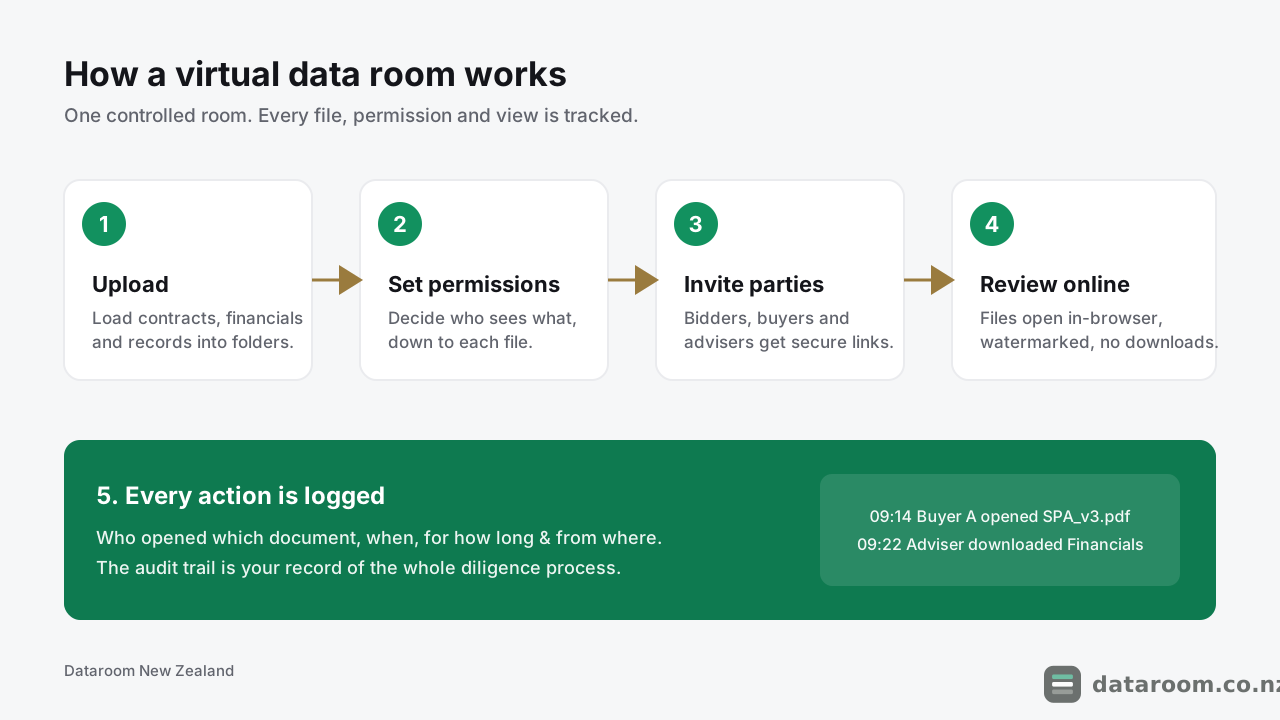
The fifth step is the quiet superpower.
The audit trail tells you which bidder is serious, the one reading the material contracts at 11pm, and gives you a defensible record if a dispute surfaces later.
It also changes how you negotiate. When you can see that a buyer has opened the customer contracts four times, you know where their real concern sits before they say a word.
For a deeper walkthrough of the mechanics, read how does a virtual data room work.
Which features make it a data room and not a folder?
If a tool is missing several of the rows below, it is a storage product wearing a costume. These are the features that separate a genuine deal room from a folder with a fancy login.
| Feature | What it does | Why it matters on an NZ deal |
|---|---|---|
| Granular permissions | Sets view, print or download rights per file and per user | Stage disclosure as bidders progress; never over-share in round one |
| Dynamic watermarking | Stamps the viewer's identity and time on each page | Deters leaks and screenshots of confidential material |
| Audit trail | Time-stamped log of every view, download and login | Proof of who saw what; signals which bidders are serious |
| Built-in Q&A | Structured questions routed to the right expert | Keeps diligence questions off email and organised |
| Two-factor login | A second identity check beyond a password | The baseline control any adviser now expects |
| Instant revocation | Cuts a party's access immediately | Lock out a bidder the moment they exit the process |
| Bulk upload & indexing | Loads and auto-numbers large document sets | Saves hours when a room holds hundreds of files |
The Q&A workflow is the feature people underestimate.
In a live deal, buyers fire dozens of questions at you. Handled over email, they scatter across inboxes and get answered inconsistently.
A data room keeps them in one threaded, auditable place. Each question is routed to the right expert, answered once, and logged.
Our guide on managing data room Q&A covers how to run it without losing control.
The one feature with no consumer equivalent
Watch that first row again: granular permissions.
Every other feature has a rough cousin somewhere. Two-factor login exists on your bank app. Version history exists in Google Docs.
But no consumer tool lets you say “this person may read this contract on screen, may not print it, may not download it, and may not even see the folder next to it.” That single control is why deal-makers pay for a room.
Why not just use Dropbox, Google Drive or email?
This is the question almost everyone asks first. You already pay for cloud storage, so why buy something else?
The short version: consumer file-sharing is built to make sharing easy. A data room is built to make sharing safe and provable. Those are opposite design goals.
A shared Drive folder assumes you trust everyone with the link. A data room assumes you do not, at least not yet, and gives you the controls to match.
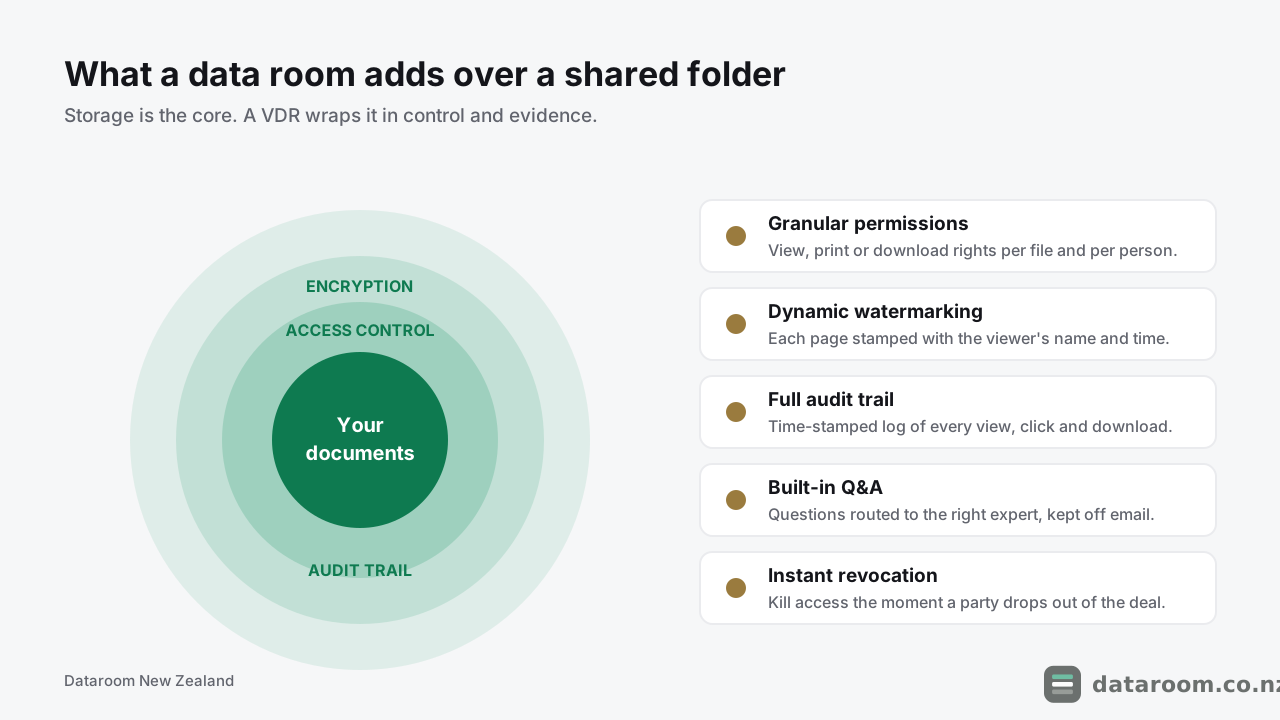
You can let a bidder read a contract on screen but not download it. Stamp their name across every page. See exactly how long they spent on the financials. Cut them off the instant they walk away from the deal.
None of that is possible with a Google Doc.
Cloud storage answers “can they get the file?” A data room answers “who saw it, what did they do with it, and can I prove it?” On a deal, the second question is the one that matters.
There is a subtler risk with the folder approach, too. Link-sharing leaves you with no reliable record. If a confidential document turns up somewhere it should not, a shared Drive can rarely tell you who leaked it.
A data room can, to the minute.
We go deeper in our comparisons of a virtual data room vs Dropbox and a virtual data room vs Google Drive. The recurring theme: a folder is fine right up until the day something leaks and you cannot say who leaked it.
VDR vs shared folder vs email: which does what?
For the “do I really need this?” question, it helps to see the three ways NZ businesses share deal documents laid out against each other.
The matrix marks capability, not quality. Email works; it is just wildly exposed.
| Capability | Email attachments | Shared cloud folder | Virtual data room |
|---|---|---|---|
| Per-file view / download control | ✗ | ✗ | ✓ |
| Watermark on every page | ✗ | ✗ | ✓ |
| Audit trail of who viewed what | ✗ | ✗ | ✓ |
| Revoke access after sending | ✗ | ✓ | ✓ |
| Built-in Q&A workflow | ✗ | ✗ | ✓ |
| Two-factor access per user | ✗ | ✓ | ✓ |
| Handles hundreds of files cleanly | ✗ | ✓ | ✓ |
| Costs nothing extra | ✓ | ✓ | ✗ |
The bottom row is the honest trade-off: a data room is the only option here that costs money.
Whether that cost is justified depends entirely on the size and sensitivity of your deal, which we tackle head-on in is a virtual data room worth it.
Read the middle column carefully, though. A shared cloud folder ticks more boxes than email, which is why so many small NZ deals start there. It falls down on the three rows that decide a contested deal: per-file control, watermarking and the audit trail.
What does a virtual data room cost in New Zealand?
Pricing surprises people in both directions. Entry rooms are cheaper than expected; enterprise M&A platforms are dearer.
The NZD figures below are indicative; confirm current pricing with the provider before you budget.
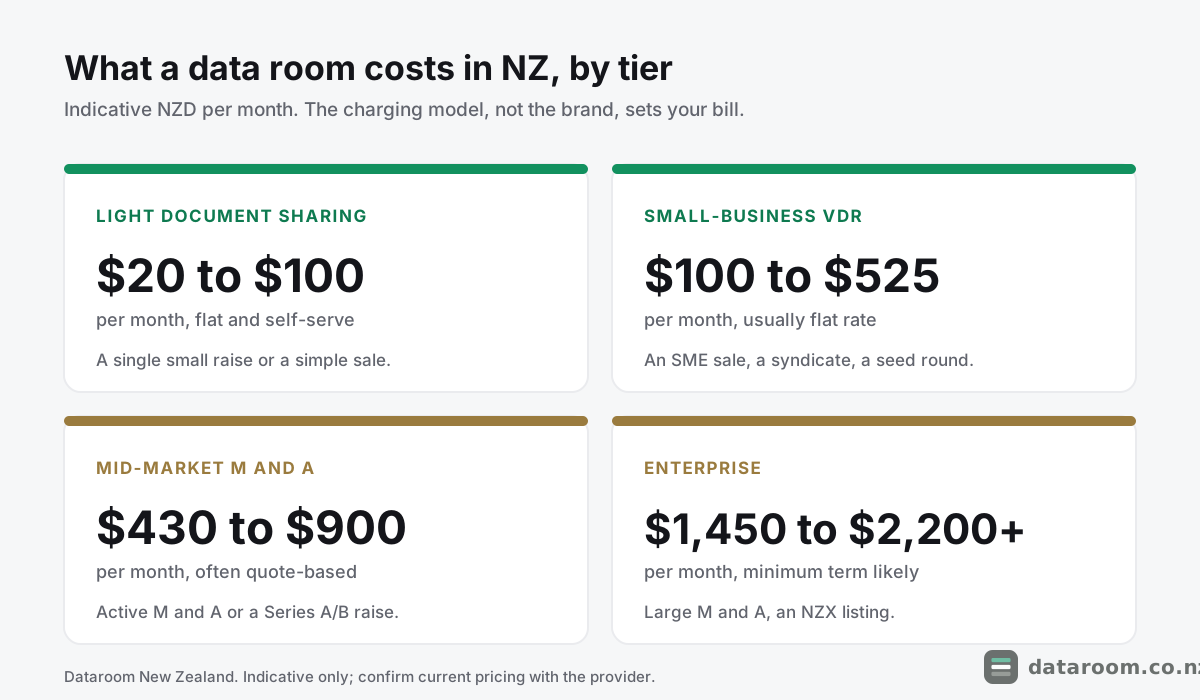
The four price bands, plainly
Below roughly NZD $250 a month you are in flat-rate, self-serve territory built for a single workstream. You swipe a card, open a room and load documents the same afternoon.
- Light document sharing: ~NZD $20 to $100 a month. A single small raise or a simple sale. Entry tools such as DocSend sit here.
- Small-business VDR: ~NZD $100 to $525 a month. An SME sale, a property syndicate, a seed round. A modern all-in room starts around NZD $99 a month with a 14-day free trial.
Above roughly NZD $400 a month you are usually buying a quote-based transaction platform with a sales call and a minimum term attached.
- Mid-market: ~NZD $430 to $900 a month. Active M&A or a Series A/B raise. Names such as Ansarada and iDeals sit in this band.
- Enterprise: ~NZD $1,450 to $2,200+ a month. Large M&A, an NZX listing, complex diligence. Platforms such as Intralinks and DealRoom sit at the top.
The charging model matters more than the sticker price
Two rooms with the same headline price can produce wildly different bills, because they meter different things.
| Charging model | You pay for | Where it bites |
|---|---|---|
| Flat monthly rate | A fixed price for the room, all-in | Easiest to budget for a fixed-length deal; little to watch |
| Per user | Each person you invite | A dozen advisers on both sides can double the cost fast |
| Per page | Each page uploaded to the room | Scanning a filing cabinet of contracts can balloon the bill |
| Per gigabyte | Storage used | Large PDFs and data-heavy files push you over the cap |
The lesson: match the model to your deal shape.
A flat rate is far easier to budget for a fixed-length transaction. Per-page pricing can be fine for a lean raise and punishing for a document-heavy acquisition.
The costs the sticker price hides
Three line items catch NZ buyers out.
The first is a minimum term. Quote-based platforms often want three, six or twelve months, which is awkward when your deal runs six weeks.
The second is overage. A storage cap or a page allowance that looks generous can tip into per-unit charges the moment a large scanned bundle lands.
The third is tax and currency. Many providers bill in US dollars, so your NZD cost moves with the exchange rate, and GST treatment depends on how the supply is made. Read the quote, not just the headline.
The practical guard is simple: for a short, fixed deal, prefer a flat monthly rate with no lock-in, and confirm the total before you load a single file.
We break the whole market down in the NZ virtual data room pricing guide, and round up the budget end in cheapest virtual data rooms for NZ small deals.
See indicative NZD pricing side by side
Compare monthly cost, charging model and what each tier includes for a New Zealand deal.
What does a data room look like inside a real NZ deal?
Definitions land better with a concrete example. Picture a founder selling a NZD $3 million Auckland services business to a trade buyer.
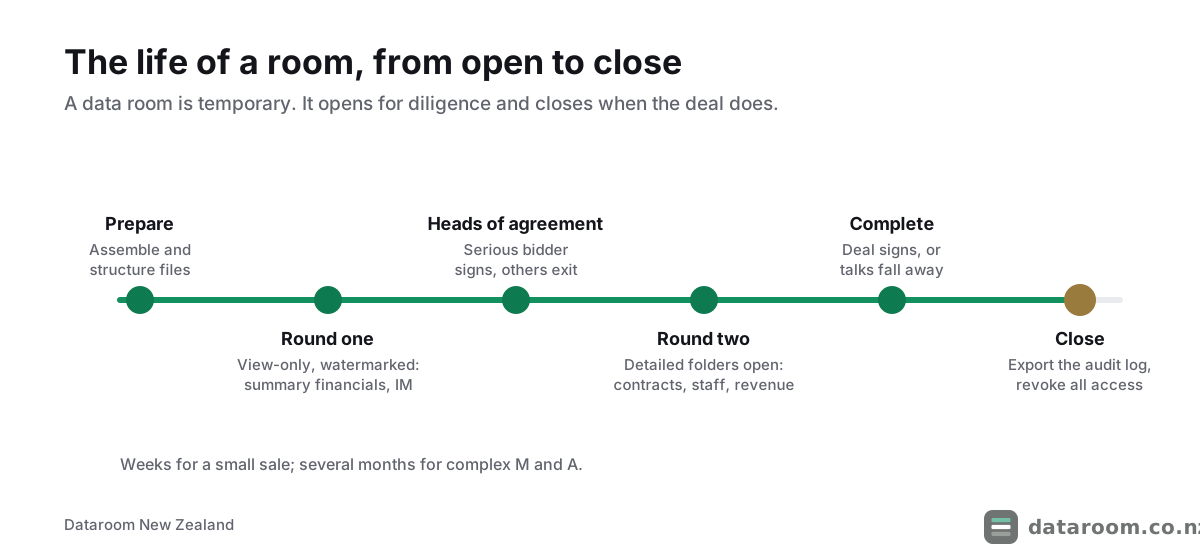
Before anything is shared, the seller and their accountant assemble the material: three years of financial statements, the shareholders’ agreement, the top ten customer contracts, the office lease, employment agreements and the IP register.
They build a folder tree that mirrors the due diligence checklist for New Zealand deals, so nothing is missed and nothing sits in the wrong place. Our folder structure template shows a layout that suits NZ deals.
Two bidders emerge.
Early on, each gets access only to a “round one” folder: summary financials and an information memorandum, view-only, watermarked, no download.
The audit trail earns its keep immediately. One bidder logs in twice and skims for ten minutes; the other reads every document twice and returns three nights running.
The seller now knows, on evidence rather than instinct, which conversation to prioritise.
The serious bidder signs a heads of agreement. Only then does the seller open the detailed folders: the full contracts, the customer-by-customer revenue, the employee list.
Because the customer contracts and staff records contain personal information, the seller keeps them download-disabled and view-only. That is both a commercial safeguard and a sensible step under their Privacy Act 2020 obligations.
Questions flow through the room’s Q&A rather than a tangle of emails, so every answer is logged and consistent.
The deal completes. The seller closes the room, exports the full audit log as a permanent record of exactly what was disclosed and to whom, and revokes all access in one click.
If a dispute over disclosure ever surfaces, that log is the seller’s evidence.
Notice how much of the value showed up before a price was agreed. The seller learned which bidder was serious, saw where the buyer’s real concerns sat, and kept the personal data locked down throughout. A shared folder would have delivered the files and none of that.
None of this is exotic. The point of a data room is not that it stores your files; it is that when the deal is done, you can prove precisely who saw each document, when, and what they were allowed to do with it.
Compare data rooms built for New Zealand deals
Security, pricing model, Q&A and NZ-hours support, scored side by side.
How secure is a virtual data room, and what does NZ law require?
Security is the entire point of the category, so the bar is high.
The security controls to insist on
A credible data room encrypts your files in transit and at rest, enforces two-factor login, isolates each customer’s data, and lets you wipe access remotely.
The serious providers back this with independent certification, most commonly SOC 2 Type II and ISO 27001.
Those are audited proof that the controls actually work, not marketing claims.
Ask three blunt questions of any provider: where is my data hosted, who can access it, and can you show me a current certification report. A vague answer to any of them is an answer.
We explain what the badges mean in ISO 27001, SOC 2 and VDR certifications, explained, and set out what to demand in virtual data room security for a New Zealand deal.
Your Privacy Act 2020 duties
There is also a legal layer specific to New Zealand.
The moment your room contains personal information about identifiable people, staff records, customer lists, shareholder details, you are handling personal information under the Privacy Act 2020.
That brings duties around how you collect, hold, share and disclose it. If you send data to an overseas provider, you remain responsible for its protection under that provider’s arrangements.
The Office of the Privacy Commissioner sets out those duties at privacy.org.nz, and we translate them for deal-makers in sharing data in a deal: your Privacy Act 2020 obligations.
If a privacy breach causes serious harm, you may have a mandatory notification duty. CERT NZ (cert.govt.nz) is the national body for reporting a cyber incident, alongside the regulator.
Where is my data actually hosted?
Most major data room providers store data offshore, often in Australia, the United States or the European Union.
That is not disqualifying, but it is worth knowing. The Privacy Act 2020 lets you send personal information overseas, provided the receiving environment offers comparable safeguards or you have the individuals’ informed consent.
Ask the provider three things: which country your files sit in, whether you can pin hosting to a region, and how they handle a lawful access request from a foreign government.
For a deal touching regulated data, health records or a government counterparty, data residency can move from a nice-to-have to a requirement. Raise it before you sign, not after the room is full.
The honest security takeaway
A good data room is usually far safer than the email-and-Dropbox setup it replaces.
But the legal responsibility for the personal data inside it stays with you. The tool reduces the risk; it does not transfer the duty.
Who actually needs a data room in New Zealand?
Not every business, and not all the time.
You need one when confidential documents have to leave your organisation and you must be able to control and prove access. Work through the two questions below and most cases resolve themselves.
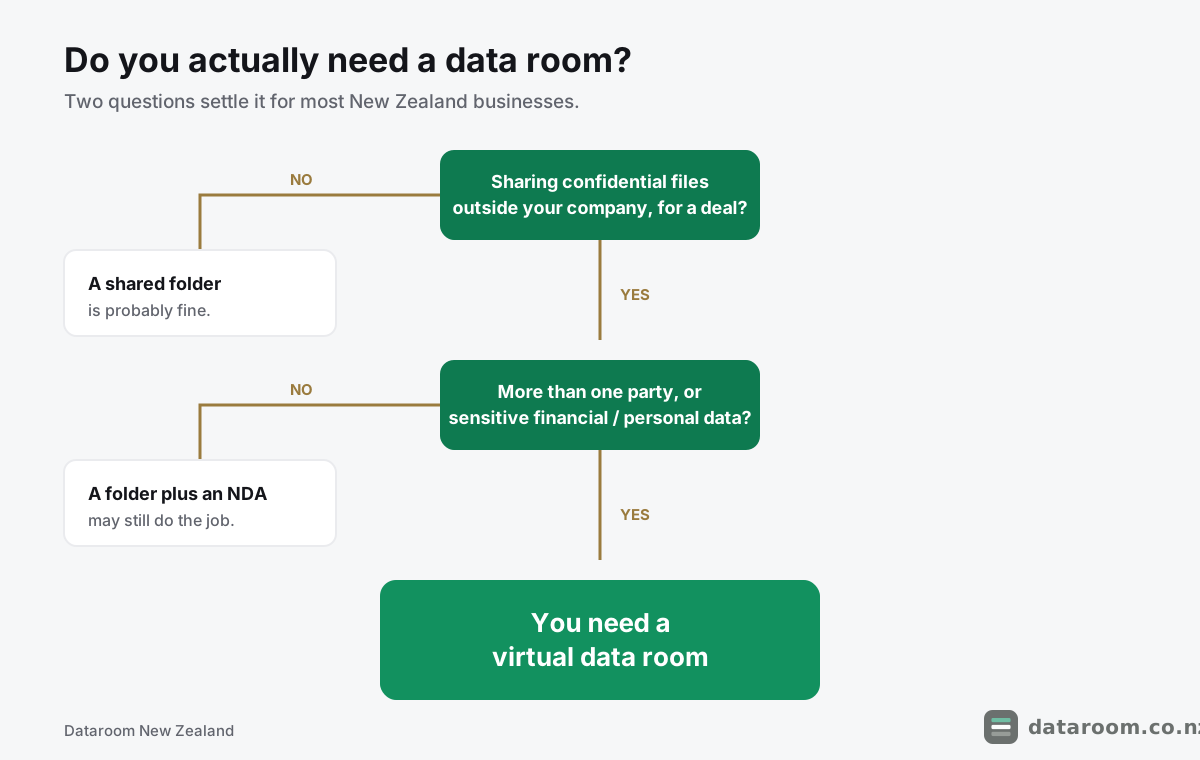
In practice, the recurring situations are these.
- Selling a business. Buyers and their accountants comb through your financials and contracts. See selling a business in New Zealand.
- Raising capital. Investors run diligence before they wire funds; a tidy room signals a well-run company. See VDRs for NZ startup fundraising.
- Mergers and acquisitions. The classic use case, on both the buy and sell side. See virtual data rooms for M&A in New Zealand.
- Property syndication. Sharing offer documents with many investors at once. See property syndication and capital raising.
- An NZX listing or other regulated process. Where the Financial Markets Authority and the exchange expect a controlled, auditable disclosure trail. See VDRs for an NZX listing.
- Bank and lender diligence. A refinance or a new facility means handing a lender the same financial pack a buyer would want, under the same need for control.
The industries that reach for one most
Some sectors show up again and again in New Zealand deal rooms.
Professional services and SaaS firms selling on recurring revenue. Primary-sector and agribusiness operators with land, plant and supply contracts. Construction and property groups syndicating buildings. Health and fintech companies whose files are dense with regulated personal data.
The common thread is not size. It is the mix of outside scrutiny and sensitive documents.
If your “deal” is one buyer, three PDFs and a signed NDA, you may genuinely not need one; the honest cost-benefit is in is a virtual data room worth it. For a broader look, read who needs a virtual data room in New Zealand.
How long does a room stay open, and what goes inside it?
A data room is not permanent.
It opens when diligence begins and closes when the deal completes or dies. That is anywhere from a few weeks for a small sale to several months for complex M&A.
Our guide on how long due diligence takes in New Zealand puts realistic timeframes on each deal type.
What actually goes in the room
The contents depend on the deal, but the spine is consistent across NZ transactions:
- Corporate records. Constitution, share register and your Companies Office details.
- Financials. Audited or reviewed statements, management accounts and forecasts.
- Material contracts. Customer, supplier and partnership agreements.
- Property and leases. Titles, lease terms and any resource consents.
- Intellectual property. Trade marks, domains, software and the IP register.
- People. Employment agreements, the org chart and key-person arrangements.
- Legal and regulatory. Any litigation, disputes or compliance matters.
A private company must keep certain records under the Companies Act 1993, and you can confirm your own public record at the Companies Register before you start.
For a checklist organised by deal type, see what documents go in a data room, and pair it with the due diligence checklist for New Zealand deals.
How do I choose a provider and set the room up?
Once you accept that you need a room, two practical questions remain: which provider, and how to stand it up.
Choosing: match the tool to the deal
Match the tool to the deal rather than the brand.
A NZD $50-a-month room is perfect for a simple sale and wildly under-specified for a contested acquisition. An enterprise platform is overkill and overpriced for a seed raise.
Weigh five things:
- Security and certification. SOC 2, ISO 27001 and where your data is hosted.
- Pricing model against deal length. Flat rate for a fixed deal; watch per-user and per-page.
- Q&A and permission depth. The controls you will actually live in day to day.
- NZ-hours support. Someone reachable when a bidder is stuck at 4pm on a Friday.
- Ease of setup. How fast you can go from sign-up to a structured, live room.
The government’s own guidance on running a business, at business.govt.nz, is a sensible reference point for the wider sale and diligence process.
Our buyer’s guide to choosing a virtual data room turns those five into a scorecard, and best virtual data rooms in New Zealand ranks the current field.
Setting up: mostly preparation
The setup work is mostly preparation, not software.
Agree a folder structure. Gather and redact documents. Decide your permission tiers. Then invite parties in stages rather than all at once.
Most modern rooms are live the same day; some enterprise ones take a sales call first.
The step-by-step is in how to set up a virtual data room, and the errors that quietly slow deals down are in 10 data room mistakes to avoid.
What do people still get wrong about data rooms?
A few myths lead people to either overspend or take real risks. Worth clearing up.
“It is just expensive storage.” No. You are paying for control and evidence, the permissions, watermarks and audit log, not the gigabytes. Judge a room on those, not on storage size.
“Only big corporates use them.” Increasingly untrue. Entry pricing now suits a solo founder or an SME, and buyers of any size expect a professional room. See virtual data rooms for small businesses in New Zealand.
“They are all basically the same.” They are not. The gap between a document-sharing tool and a genuine deal platform is wide, especially on permissions, Q&A and certification. If none of the mainstream names fit, weigh the alternatives for NZ businesses.
“Setting one up takes weeks.” The software does not. The document prep can, if you leave it late. Start assembling files before you pick a provider.
“The provider is responsible for my data.” Only for the platform. Under the Privacy Act 2020, the responsibility for the personal information you load stays with you.
Virtual data room FAQ
What is a virtual data room in simple terms?
It is a secure website where you share confidential documents with a chosen group of outsiders during a deal, while controlling exactly what each person can see or download and logging everything they do. Think of it as a supervised, locked room for files rather than an open shared folder.
Is a virtual data room the same as cloud storage?
No. Cloud storage such as Dropbox or Google Drive is built to make sharing easy. A data room is built to make sharing controlled and provable, with per-file permissions, watermarking, an audit trail and instant revocation that consumer storage does not offer.
How much does a virtual data room cost in New Zealand?
Indicatively, from around NZD $20 to $100 a month for a light room, up to NZD $1,450 to $2,200 or more a month for enterprise M&A, depending on the charging model and deal size. These figures are indicative; confirm current pricing with the provider.
Do I need a data room for a small NZ deal?
Not always. If you are sharing a handful of documents with one trusted party under an NDA, a well-managed folder may be enough. Once multiple bidders are involved, or the files include sensitive financials and personal information, the control and audit trail of a data room usually justify the cost.
Are virtual data rooms secure and legal to use in New Zealand?
Reputable providers encrypt data in transit and at rest, enforce two-factor login and hold independent certifications such as SOC 2 and ISO 27001. Using one is entirely legal, but if the room holds personal information you remain responsible under the Privacy Act 2020 for how it is stored and shared, including with overseas providers.
How long does it take to set up a data room?
Most modern data rooms can be live within a day, and some within an hour. The real work is preparation: organising your folder structure, gathering and redacting documents, and deciding permission tiers before you invite anyone in.
What happens to the data room when the deal ends?
You export the audit log as a permanent record of who saw what, then revoke all access in a single action. Reputable providers let you close or archive the room so nothing lingers with access it should no longer have.