

10 data room mistakes that slow down NZ deals
The data room gets blamed for slow deals far more often than it deserves, and almost never for the right reason. It is rarely the software that stalls a New Zealand transaction; it is the ten habits below, nearly all of them locked in before the first buyer logs in. A Tauranga logistics business proved the point last year: it went to market at about $8 million with tidy numbers, three trade buyers and an experienced adviser, and still took five months to close a sale that should have run three. The tools were fine. The seller had loaded eight years of files into a shared folder in no order, granted blanket access on day one, and answered questions by email whenever someone remembered. By week six the lead bidder’s lawyers had lost faith in the disclosure and trimmed their offer.
That is the pattern behind most stalled deals, and it is oddly consistent across sectors: the same errors surface on a Marlborough winery sale, a Dunedin software raise and a Wellington property syndication alike, because they are quirks of preparation rather than of any one industry. What follows are the ten that cost NZ dealmakers the most time, and how to close each door before it swings open.
Which mistakes actually cost the most working days?
Most of the lost time is spent in the first fortnight, on decisions about timing, structure and access. The table below ranks the ten by their typical cost in working days on a small to mid-market New Zealand deal. These are editorial estimates rather than laboratory numbers, but the order matches what advisers report again and again: by the time you are haggling over a per-page bill or a stale spreadsheet, the real damage, a buyer’s confidence, has usually already been done. Read from the top and roughly two thirds of the delay clusters in the setup and access rows.
| # | Mistake | Typical delay | One-line fix |
|---|---|---|---|
| 1 | Building the room after diligence starts | ~10 days | Stand it up before you go to market |
| 2 | Q&A run by email, with no owner | ~7 days | Use the in-room Q&A workflow with assignment |
| 3 | Permissions too wide or too narrow | ~6 days | Map access by party before inviting anyone |
| 4 | Data dump with no folder structure | ~5 days | Build the index first, then upload to it |
| 5 | Stale documents and no version control | ~4 days | One source of truth; replace, do not duplicate |
| 6 | Using Dropbox or Drive as the deal room | ~4 days | Use a tool with audit trails and granular access |
| 7 | Ignoring Privacy Act 2020 obligations | ~3 days | Redact or gate personal information up front |
| 8 | Signing the wrong pricing model | ~2 days | Match the charging model to your deal size |
| 9 | No audit trail or engagement analytics | ~2 days | Turn on logging; read buyer interest signals |
| 10 | Leaving the room open after close | Risk, not delay | Revoke access and export the record on signing |
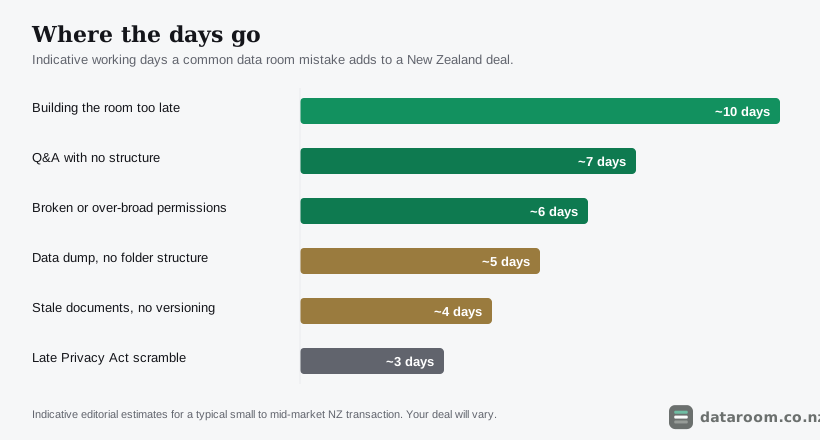
Fix the top four and most deals find their rhythm again, because the mistakes travel in packs. A late room breeds inbox Q&A; a dump breeds version chaos; a cheap consumer tool breeds a privacy scramble. Treat the room as a single system, planned once before anyone logs in, and the whole chain of failures loses its grip at the same time.
Why does a late room cool a buyer faster than a low price?
The single most expensive habit is treating the data room as something you assemble once a buyer asks for it. By then the clock is already running, and every day you spend scanning leases and chasing your accountant for three years of accounts is a day the buyer sits idle and cools. On a competitive sale that idle time is not neutral; it is when a bidder quietly lines up an alternative target, or when a rising interest rate nudges their offer down. Momentum is a real asset: a buyer who is moving quickly forgives small gaps, while one left waiting starts to wonder what the delay is hiding. The government’s own guidance on selling or closing a business treats preparation as a stage in its own right, and the room belongs squarely inside it.
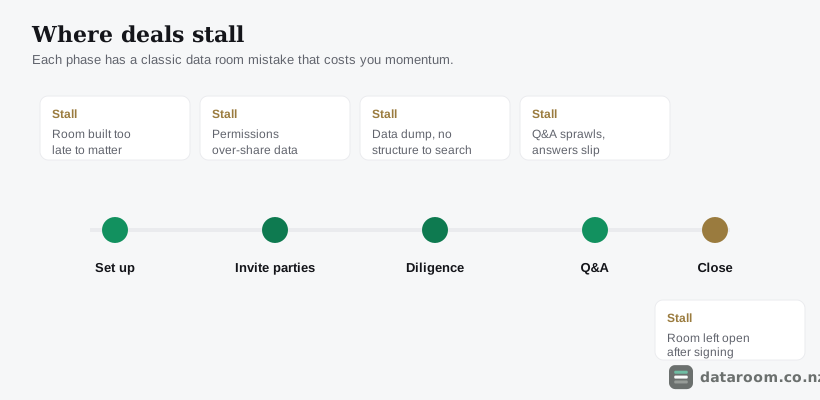
Every phase of a deal has a signature stall, and reading the timeline above the right way round is the whole trick. Build the room while you are still preparing to go to market, not after, so it is ready to open the moment the first serious buyer says yes. For a Central Otago horticulture business selling in the narrow window after harvest, or a Canterbury contractor timing a sale to a finance approval, that readiness can be the difference between catching a season and missing it. The work is identical whether you do it in calm week zero or panicked week three; only the cost of the delay changes, and it only ever moves one way. Our guide to how to set up a virtual data room walks the sequence that keeps that runway clear.
The clock on a deal does not start when the room is ready. It starts when the buyer says yes, and every day the room is not ready is a day the buyer spends cooling.
What does a document dump quietly do to your sale price?
A buyer’s team judges your business partly by the state of your room, and the judgement is unforgiving. Open a folder holding 900 files named “scan_final_v2” with no structure, and a lawyer’s first unspoken thought is that the rest of the business is run the same way. That impression is expensive: it shows up as a lower price, a longer list of conditions or a fatter indemnity, because uncertainty is something a buyer prices in rather than waves away. Structure also has a hard practical payoff, since documents that sit in a logical index let buyers answer their own questions instead of raising them, which cuts your Q&A load and speeds the whole process. Build the index first, then upload into it; a tested data room folder structure and a due diligence checklist for New Zealand deals tell you what each folder should hold before a buyer even asks.
The dump has a close cousin in stale documents with no version control. Diligence runs for weeks, and documents change underneath it: a financial model gets refreshed, a supply contract is re-signed, and if three versions coexist with no way to tell which is current, you have created exactly the discrepancy a buyer’s lawyer is trained to pounce on. One source of truth is the rule: when a document changes, replace it in place so the room always shows the current file, and lean on the version history rather than stacking “final_v3” beside “final_v2”. A single contradictory number, spotted late, can reopen a point you thought was closed and cost you a week.
A buyer cannot see how well you run your business, only how well you run your room. They assume the two match, and they are usually right.
Where does New Zealand law turn a slow mistake into a risky one?
Two of the ten mistakes stop being merely slow and start being risky the moment you remember which country you are dealing in. The first is running the deal out of Dropbox or Google Drive. Consumer file-sharing tools are excellent at what they do, but a confidential transaction is not it: they lack the granular, group-based permissions a multi-bidder process needs, the watermarking that deters leaks, and above all the audit trail that proves who saw what and when. That gap is not academic here. If a dispute arises, or you need to show you handled a bidder’s confidential information properly, a folder-share history will not stand up the way an access log does, and CERT NZ’s advice on protecting business information points the same way. We compare the two in virtual data room vs Dropbox and virtual data room vs Google Drive.
The second is treating the Privacy Act 2020 as an afterthought, when almost every deal file contains personal information: employee records, customer lists, contracts naming individuals. Under the Privacy Act 2020 you carry obligations about how that information is collected, shared and protected, and a room is a place where it is very much being shared. The mistake is leaving privacy to the end, then scrambling to redact a payroll file at the exact moment a buyer is waiting. Handle it up front: decide what personal information genuinely needs to be in the room, redact or aggregate what does not, and gate the rest behind tighter permissions until a buyer is bound by confidentiality. The Office of the Privacy Commissioner’s guidance at privacy.org.nz is the plain-English starting point, and our Privacy Act 2020 obligations guide turns it into room-level practice. The stakes climb again on a regulated raise: on a public capital raise or a step toward an NZX listing the room becomes part of the record of what you told investors and when, so version drift on an offer document is a gap in your disclosure under the Financial Markets Conduct Act, not just an untidy shelf.
Do you need a deal-ready room, or will a basic one do?
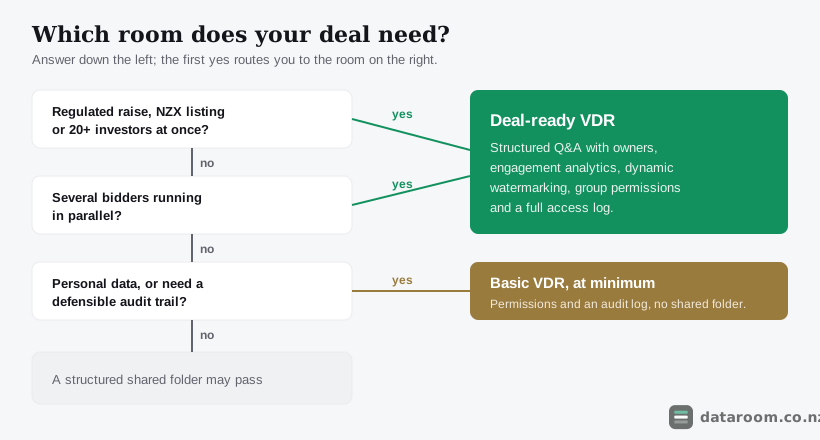
Not every tool prevents every mistake, and that gap is the clearest reason a real deal room beats an ad-hoc folder share. The decision below routes your deal to the smallest room that still closes the doors that cost the most time, so you neither overpay for a fund-grade platform on a simple trade sale nor under-equip a forty-investor raise. Answer down the left, and the first yes decides it.
The matrix puts the same logic on a feature grid, mapping three common setups against the capabilities that head off the mistakes above. Read it as a shopping list rather than a scorecard. A Nelson seafood exporter running a single trade sale may never touch dynamic watermarking, but it cannot do without an audit trail or group permissions, so a basic room clears the bar. A Wellington fund inviting forty prospective investors needs the structured Q&A and engagement analytics that only the last column offers, because at that scale the manual approach collapses under its own volume.
| Capability that prevents a mistake | Email + shared folder | Basic VDR | Deal-ready VDR |
|---|---|---|---|
| Granular, group-based permissions | ✗ | ✓ | ✓ |
| Full audit trail and access log | ✗ | ✓ | ✓ |
| Structured Q&A with assignment | ✗ | ✗ | ✓ |
| Version control on live documents | ✗ | ✓ | ✓ |
| Dynamic watermarking | ✗ | ✗ | ✓ |
| Engagement analytics on buyers | ✗ | ✗ | ✓ |
| One-click access revocation at close | ✗ | ✓ | ✓ |
If you are weighing options, how to choose a virtual data room turns this into a buyer’s checklist, and virtual data room alternatives for NZ businesses covers what to do when a full platform is more than a small deal needs.
Compare data rooms built for NZ deals
See permissions, audit trails, Q&A and indicative NZD pricing for every provider we track, side by side.
What does the wrong pricing model quietly cost you?
The last cluster of mistakes is the quiet one, because none of it announces itself until the invoice or the dispute arrives. Choosing a room on sticker price alone is how a nine-week deal ends up on a twelve-month, per-page contract that costs more than the adviser’s time. The charging model, per page, per user, flat per room or per gigabyte, matters far more than the headline number. If you cannot predict your page count within a wide margin, do not pay by the page: a single scanned lease bundle can run to hundreds of pages, and onboarding fees of $500 to $1,500 plus a long minimum term stack on top. As a rough NZD guide, a small business sale under $5M on one workstream suits a flat per-room plan at about $99 to $300 a month; a seed or Series A raise sits near $99 to $350; a property syndication with many investors runs $250 to $700 on flat or pooled-user pricing; and mid-market M&A between $10M and $50M lands around $700 to $2,200. All figures are indicative and GST-exclusive; NZ GST of 15% is usually added on top, and our virtual data room pricing in New Zealand guide walks the fees hiding beneath each model.
What do you lose by ignoring the audit trail and the close-out?
The ninth mistake is throwing away the intelligence a good room hands you for free. Every view, download and search is logged, and that log does double duty: it is your evidence if a confidentiality question ever arises, and it is a live read on which bidder is serious. A buyer whose team spends hours in the financial and legal folders is doing real work; one who logged in once and never returned is not the horse to back, and reading those signals lets you point your best terms at the party most likely to close. The tenth is a door left open: by signing day everyone has moved on, but a room full of your confidential information, still reachable by under-bidders who no longer need it, is a standing risk with no upside. On completion, revoke access for the parties who are out, export a full copy of the room and its audit log, and archive it to your retention policy. It takes an hour.
How do you avoid all ten in a twenty-minute pre-flight?
You can head off most of the delay above with a short pre-flight before you send a single invite. Work through these five steps and the room becomes a source of momentum rather than stalls.
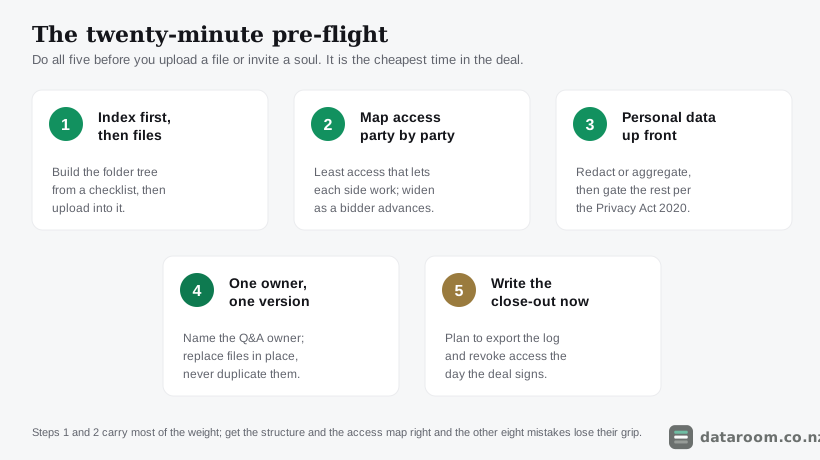
The five-step pre-flight
Do this before you upload anything or invite anyone. It is the cheapest twenty minutes in the whole deal.
- 1
Build the index before the files
Sketch the folder structure from a checklist first, then upload documents into it. A room that mirrors how a buyer thinks cuts questions and signals a well-run business.
- 2
Map access party by party
List every group, your side, each bidder, each set of advisers, and decide which folders they see. Default to the least access that lets each party work, and plan how you will widen it as a bidder advances.
- 3
Handle personal information up front
Identify personal information in the file, redact or aggregate what is not needed, and gate the rest behind tighter permissions to meet your Privacy Act 2020 obligations before a buyer is waiting.
- 4
Set one Q&A owner and one version rule
Name the person who owns the Q&A queue, and agree that documents are replaced in place, never duplicated, so the room always shows a single current file.
- 5
Write the close-out step now
Decide in advance that on completion you will export the room and its audit log, then revoke access. Putting it on the plan means it actually happens.
Two of those steps carry most of the weight: build the structure before you fill the room, and map access before you invite anyone. Get those right and the other eight mistakes have far less room to take hold. For the transaction-specific version, our guides to data rooms for M&A in New Zealand and selling a business in New Zealand apply the same discipline to a live sale.
A straightforward room for a straightforward NZ deal
Flat monthly pricing, a 14-day free trial, and the permissions and audit trail a deal actually needs.
Data room mistakes FAQ
What is the most common data room mistake in NZ deals?
Disorganised uploads and late setup. The most damaging single habit is building the room after buyers have already started asking questions, which can add around ten working days and cools a buyer's interest. A close second is dumping documents with no folder structure, which slows every search and signals a poorly run business to the buyer's advisers.
Can a bad data room actually lower my sale price?
Yes, indirectly but reliably. When a buyer's lawyers cannot trust the disclosure, because documents are missing, stale or contradictory, they price the uncertainty into their offer or add conditions and indemnities. A clean, well-structured room does the opposite: it builds confidence, which supports both price and pace.
Is it a mistake to use Dropbox or Google Drive for a deal?
For a confidential transaction, usually yes. Consumer file-sharing tools lack the group-based permissions, dynamic watermarking and detailed audit trail a deal needs, and that audit gap matters under the Privacy Act 2020. See our comparisons of a virtual data room versus Dropbox and versus Google Drive for the detail.
How do permission mistakes slow a deal down?
Both directions cost time. Access set too wide risks a bidder seeing a rival's information or staff learning of the sale early; access set too narrow means advisers email you for files instead of using the room, which reintroduces attachments and version chaos. Mapping access group by group before inviting anyone prevents both.
Does a regulated capital raise change the risk?
It raises it. On a public raise or an NZX listing the data room becomes part of your disclosure record under the Financial Markets Conduct Act, so version drift on an offer document or product disclosure statement is a legal problem, not just an untidy one. Keep one source of truth and an access log you can stand behind.
What should I do with the data room after the deal closes?
Close it out deliberately. On completion, export a full copy of the room and its audit log for your records, then revoke access for every party who is no longer involved and archive the room to your retention policy. Leaving it open is a standing confidentiality risk with no benefit.