

Virtual data room pricing in New Zealand (2026): what you'll actually pay
A virtual data room is a permission-controlled online repository where a company shares confidential documents with a defined group of outsiders and keeps a full record of who saw what, and its price is set almost entirely by how the provider chooses to count that activity. That last clause is the whole game. Two rooms holding the identical folder of leases, accounts and contracts can bill a New Zealand seller a few hundred dollars or the better part of ten thousand, and the difference is rarely a feature you can point to. It is an accounting decision baked into the plan, made before you ever uploaded a page. This guide gives you the real NZD numbers first, then spends the rest of its length making sure you never pay the wrong one of them by accident.
Why does the same deal cost so little or so much?
The market splits cleanly into two worlds that barely overlap, and knowing which one your deal belongs in is more than half the battle. Below roughly $250 a month you are in self-serve, flat-rate territory built for a single workstream: you swipe a card, open a room and load documents the same afternoon, with no call and no contract to negotiate. Above roughly $400 a month you are usually buying a quote-based transaction platform with a sales process, an onboarding session and a minimum term attached to the signature. Neither world is automatically correct, and the expensive mistake is not choosing the pricier one on purpose; it is landing there by accident because a bidder mentioned a brand and nobody stopped to size the deal first.
Consider a Waikato engineering firm being sold for about $4 million, a scenario we will return to with hard numbers later. Two directors, a corporate adviser, a law firm on each side, three trade buyers doing due diligence over about nine weeks. The seller’s accountant treats the data room as a rounding error and picks the first enterprise name a bidder drops into an email. Six weeks later the invoice lands: a per-page platform, a chunky onboarding fee, and eight named users on a minimum twelve-month term. The room ends up costing more than a fortnight of the adviser’s time, on a deal that closed in nine weeks, and a flat-rate tool that would have done the identical job sat available the whole time at a tenth of the price. That gap, and how to close it, is the entire subject of what follows.
The sticker price tells you almost nothing. The charging model tells you what the room will actually cost once real documents and real bidders arrive.
So what will you actually pay, in plain numbers?
Start with the shape of the market rather than any single quote, because the shape is what stays true when exchange rates and promotions move. The chart below plots indicative monthly NZD entry pricing across the tools New Zealand advisers meet most often, and the thing to read is not the individual bars but the enormous spread between them. A document-sharing tool opens at around twenty dollars a month; a legacy enterprise platform can run past two thousand for materially the same core job of storing files and logging access. That is roughly a hundredfold range for a product category, which almost never happens when the underlying capability is genuinely a hundred times better. It happens here because the meter, not the machinery, is doing most of the pricing.
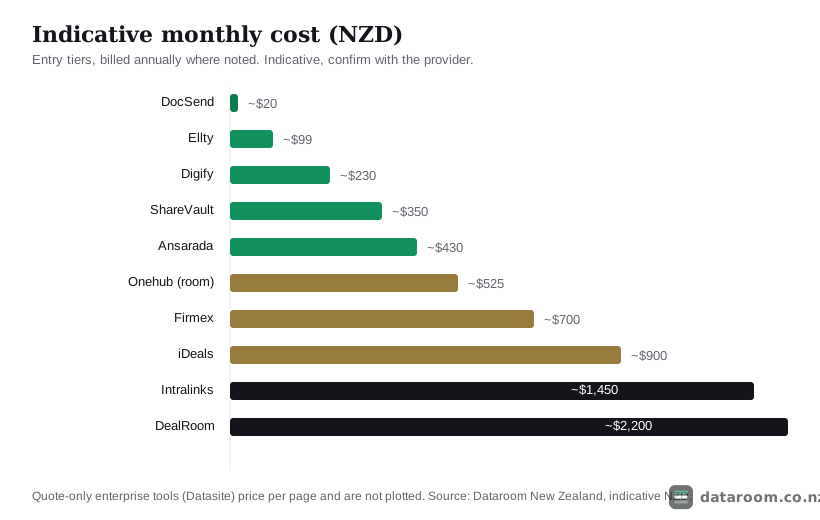
The practical takeaway from that spread is a warning against anchoring. If the first number you hear is an enterprise quote, every cheaper option starts to feel flimsy by comparison, and if the first number is twenty dollars, every serious platform feels like a rip-off. Both instincts are wrong, because the right spend is set by your deal, not by whichever figure happened to land in your inbox first. A founder raising a seed round and a listed company running a takeover are not shopping in the same market, even though they will both type “virtual data room pricing” into the same search box. Fix your own position on this ladder before you let anyone quote you, and the rest of the negotiation gets far easier.
How much do the main providers charge in New Zealand?
Indicative entry-tier pricing in NZD is the fastest way to orient yourself, so treat the table below as the opening line of your own negotiation rather than a fixed rate card. Vendors bundle and discount on term length, and most publish in US dollars, which means the New Zealand figure moves with the exchange rate between the day you read the brochure and the day you sign the order form. The point of the table is not the exact cents; it is the third column. Read down the charging models and the market’s real structure appears, clustered into a cheap self-serve band and an expensive quote-based band with surprisingly little in between.
| Provider | Indicative from (NZD/mo) | Charging model | Self-serve trial |
|---|---|---|---|
| DocSend | ~$20 | Per user, document sharing | Free trial |
| Ellty | ~$99 | Flat per room | 14-day free trial |
| Digify | ~$230 | Flat per room, tiered | 7-day free trial |
| ShareVault | ~$350 (indicative) | Quote-based | Free trial |
| Ansarada | ~$430 (12-mo term) | Per page / room | 14-day free trial |
| Onehub | ~$525 (Data Room) | Per user, tiered | Free trial |
| Firmex | ~$700 (indicative) | Quote-based, per room | Free trial |
| iDeals | ~$900 (indicative) | Quote-based | Demo & trial room |
| Intralinks | ~$1,450 (indicative) | Quote-based, per page | Demo only |
| DealRoom | ~$2,200 (indicative) | Quote-based | Demo on request |
| Datasite | Quote only | Per page, enterprise | Custom demo |
Notice how the enterprise names refuse to publish a rate at all. That is not coyness; it is a direct consequence of the model. When a platform bills per page or per user and tailors the number to your specific deal, there is no single figure to print, so the price hides behind a demo and a discovery call. That routing serves large, tightly controlled transactions well, because those buyers genuinely need a scoped proposal. For a straightforward New Zealand deal it more often means you are being sized up for scale you will not use. Our guide to the cheapest virtual data rooms for NZ small deals drills into the bottom of this range, and if you are still weighing whether to spend anything at all, is a virtual data room worth it for a small NZ deal? argues both sides honestly.
Which of the four charging models are you actually on?
Almost every quote in the market reduces to one of four models, or a blend of them, and identifying which one you are on tells you exactly where your budget risk sits. This is the single most useful lens in the whole guide. The four cards below lay them out with the line that tends to surprise buyers on each, and the sections that follow unpack when each one works in your favour and when it quietly turns against you. Read them as a diagnostic: your job over the next few paragraphs is to place your own deal in one of these four boxes and then stress-test the fit.
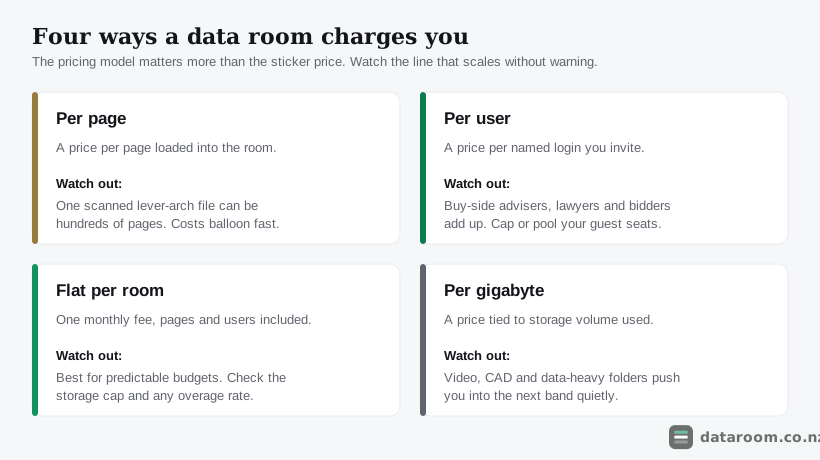
Per page
You pay a set amount for each page loaded into the room, which looks tidy right up until you remember that one scanned lease or a set of engineering drawings can run to hundreds of pages. Legacy enterprise platforms such as Datasite, and some tiers of Intralinks, price this way, and the model genuinely suits very large, document-controlled transactions where a syndicate of banks is footing the bill and the page count is curated line by line. It punishes a small-business owner who scans a filing cabinet, because every page of historical paper becomes a charge on the meter regardless of whether a single bidder ever opens it. The rule writes itself: if you cannot predict your page count within a wide margin, do not agree to be billed by the page.
Per user
You pay for each named login, which is common on document-sharing tools and on tiered plans like Onehub, and the exposure is that a real deal invites a crowd well beyond your own team. Your lawyer, your accountant, the buy-side adviser and every bidder’s people all need access, so a plan that looks affordable at five seats can double the week due diligence opens up. The defence is to look specifically for plans that pool or cap guest users, so external parties do not silently inflate the bill at exactly the moment you have the least attention to spare. Count the peak, not the quiet setup phase, because per-user pricing charges you for the busiest day, not the average one.
Flat per room
You pay one monthly fee, with pages and a generous user count included, and this is the predictable option that has pulled market share toward lean, modern rooms on New Zealand small and mid-market deals. The cost goes into a budget and stays there, which is worth more on a short transaction than almost any feature, because it removes a variable from a number you are trying to keep boring. Your only real homework is to read the storage cap and the overage rate underneath the headline figure, since the word “unlimited” occasionally carries an asterisk once you add video walkthroughs or a large financial model. For most sub-$50M New Zealand deals, this is the model that ends up being both cheapest and calmest.
Per gigabyte
You pay for storage volume, which is perfectly reasonable for a text-heavy legal bundle and quietly dangerous the moment you add video, CAD files or a data-heavy model. Those formats nudge you into the next storage band without any obvious warning, so a per-GB plan rewards discipline in what you upload and penalises the habit of dumping everything in case a bidder asks. If your document set is media-light and stable, it can be genuinely cheap; if it is not, price it as carefully as you would a per-page deal, because both models share the same trap of turning volume directly into cost.
What drives the bill more than the brand ever does?
Strip a data room quote down to its inputs and only four of them move the number that matters. The diagram below shows the charging model, your peak user count, your document volume and your contract term feeding into a single monthly bill, with the provider brand sitting deliberately outside the flow. This is not a rhetorical flourish. When New Zealand sellers overpay, it is almost never because they chose a bad brand; it is because they left one of these four levers on a setting that suited the vendor rather than the deal. Get all four right and a modest tool outperforms an expensive one on the only measure that counts, which is cost per outcome.
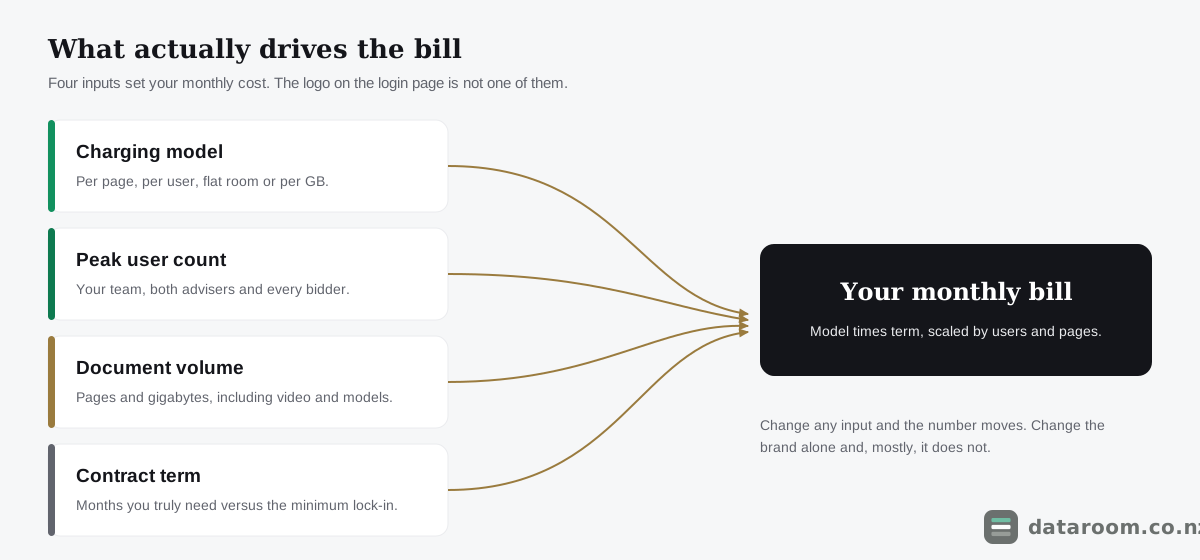
The reason this reframing matters is that it changes what you negotiate. A buyer fixated on the brand argues about logos and feature lists, which is exactly the conversation the sales team is trained to win. A buyer who understands the four drivers argues about term length, guest-user pooling and page bundling, which are the levers where real money actually lives. When you walk into a quote already knowing your peak headcount and your rough page count, you are no longer a prospect to be sized; you are a customer who can call a proposal expensive for a specific, defensible reason. That shift in posture is worth more than any discount code, and it costs nothing but twenty minutes of preparation before the call.
What do you actually get as the price climbs?
Two rooms at the same price can offer very different protection, and two rooms with the same feature list can price wildly apart, so the sensible question is not “how much” but “how much for what”. The matrix below shows what tends to ship as standard at each tier, and you should read it in both directions. Use it to check that a cheap plan is not cheap because it quietly dropped something your bidders will demand, and equally to check that an expensive one is not charging you for redaction and enterprise metering that a nine-week trade sale will never touch. The goal is a plan that matches your deal’s actual demands, not the most or the least you could possibly buy.
| Capability | Entry (~$20 to $100) | Mid (~$250 to $700) | Enterprise (~$900+) |
|---|---|---|---|
| Granular folder and file permissions | ✓ | ✓ | ✓ |
| Full audit trail and access logs | ✓ | ✓ | ✓ |
| Dynamic watermarking | ✗ | ✓ | ✓ |
| Q&A workflow with assignment | ✗ | ✓ | ✓ |
| Bulk upload and auto-indexing | ✗ | ✓ | ✓ |
| Redaction tools | ✗ | ✗ | ✓ |
| ISO 27001 / SOC 2 certification | ✗ | ✓ | ✓ |
| Dedicated NZ-hours support desk | ✗ | ✗ | ✓ |
| Per-page or per-user metering | ✗ | ✓ | ✓ |
The two rows that decide most NZ deals
Certification and structured Q&A are the lines worth staring at before anything else, because they are where a cheap plan most often falls short in a way a bidder will notice. Certification, unpacked in ISO 27001, SOC 2 and VDR certifications explained, tends to appear from the mid tier up, and it is what a bidder’s lawyers will ask about the moment the target holds sensitive personal or commercial information. A proper Q&A workflow is the feature that turns a document store into an actual deal room, because it routes questions to the right owner and keeps a clean record of who answered what. If your bidders expect assigned Q&A and your plan only offers a shared inbox, you will feel that gap on day one, no matter how low the monthly rate looked on the way in.
Where paying more stops buying you anything
The flip side matters just as much on a small deal, because over-buying is as common as under-buying and costs more. Redaction tooling, a dedicated account manager and bank-grade per-page metering are genuine capabilities, but a sub-$5M business sale rarely touches any of them, and paying an enterprise tier to unlock a single feature that a mid plan also includes is one of the most reliable ways New Zealand sellers overspend. Before you accept a higher tier, isolate the exact capability that forced the jump and ask the vendor directly whether it can be added to a lower plan instead. Nine times out of ten the honest answer is yes, and the tier bump was a packaging decision rather than a technical necessity.
What should a deal your size actually cost?
Price should track the shape of the deal rather than the ambition of the brochure, so the most grounding exercise is to match your scenario to a sensible spend and treat any quote that strays far from it as a flag to investigate. A sub-$5M business sale and an NZX-listed capital raise are not on the same spectrum, and a plan built for one is almost always wrong for the other. Work from the deal you actually have in front of you, not the one the vendor’s case studies describe, and the right band of spending usually becomes obvious within a few minutes.
Founders and early-stage raises
For a founder, the number should feel almost boring, because a fundraising room’s job is unglamorous and specific. A startup fundraising room needs airtight permissions and clean analytics far more than it needs a six-figure enterprise platform, so a flat plan under NZD $350 a month usually does the whole job through seed and Series A. The analytics matter here in a way they do not elsewhere: knowing which investor spent nine minutes on your cap table and which never opened it is genuine signal for how you run the raise. There is a cash-flow argument too, since an early-stage company is spending its own runway, and every hundred dollars a month locked into an oversized room is a hundred dollars not spent on the product or the next hire. Spend the saved money on the pitch, not the plumbing.
Property syndication and widely-held raises
A property syndication sits at the opposite end of the user axis and is the clearest case where per-seat pricing becomes a trap. These deals may invite eighty or a hundred prospective investors to read the same trust deed, valuation and product disclosure statement, so a model that charges per named login turns a routine raise into a runaway bill. This is the scenario that pushes you firmly toward pooled-user or flat plans, where inviting the ninetieth reader costs nothing extra. If a vendor cannot tell you plainly how guest users are counted, treat that silence as a price you have not yet been quoted.
Mid-market M&A
A mid-market M&A process in the $10M to $50M band is the one place where a fuller platform genuinely earns its higher monthly rate. Here the structured Q&A, tighter permission controls and cleaner audit trail do real work, because the deal has enough moving parts and enough legal scrutiny that a shared inbox and basic logs would create risk rather than save money. A spend of $700 to $2,200 a month is proportionate rather than wasteful at this level, provided you still match the term to the timeline. Paying mid-market rates is fine; paying them on a twelve-month lock-in for a four-month process is not.
Listed companies and regulated raises
At the top of the New Zealand market the calculus changes again, because price stops being the constraint and compliance takes over. A transaction involving an NZX-listed company, or a raise that must satisfy the Companies Act 1993 record-keeping and directors’ duties obligations, needs a room whose audit trail and access controls will stand up to later scrutiny from regulators, auditors or a disputing shareholder. At that level the enterprise tier is not an indulgence, because the cost of a weak evidentiary record dwarfs any monthly saving. Even here, though, the four drivers still apply: negotiate the term, pool the guest users and bound the page count, because a listed-company deal is exactly where a per-page meter and a long lock-in can turn a justified spend into an unjustified one.
How does the cost accrue across a nine-week deal?
The monthly rate is only half the story, because when the cost lands matters as much as how much it is. The timeline below traces a typical nine-week New Zealand trade sale and marks where each charge actually falls: a setup fee paid in full before the room is useful, a subscription that starts when documents load, overage and extra-user pressure at the due diligence peak, and a quiet tail of billing that runs on long after everyone has logged off. Seeing it laid out in time rather than as a monthly figure makes the two genuine dangers obvious, because both of them live at the edges of the deal rather than in the middle.
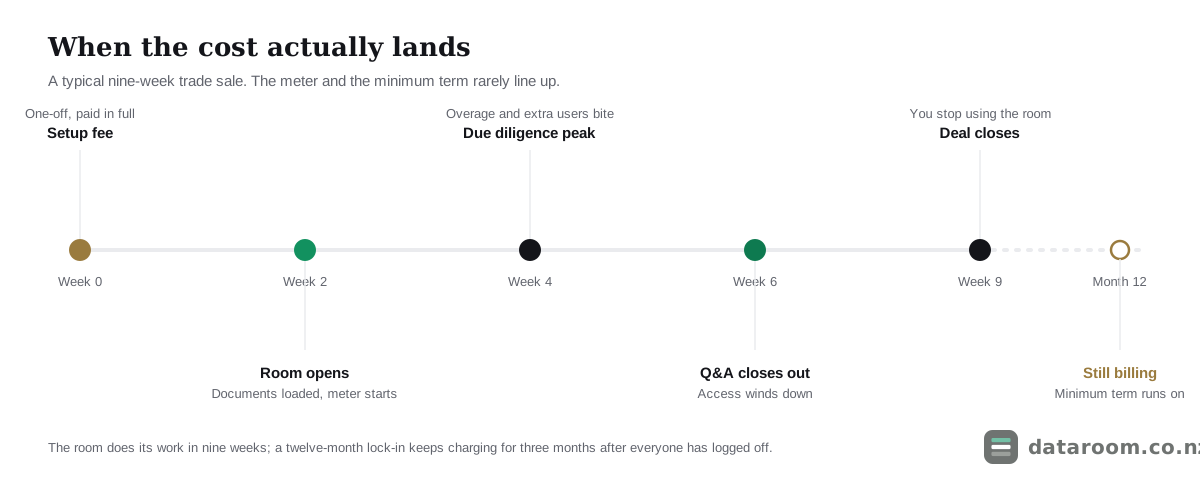
The first danger is the front-loaded fee, which distorts the true cost more than the headline subscription does, because you pay it in full regardless of how briefly you use the room. On a nine-week deal a one-off onboarding charge that rivals two months of base rate is effectively a surcharge for the privilege of starting. The second danger is the tail: a room you genuinely need for nine weeks can arrive locked to a twelve-month contract, so the meter keeps running for three months after the deal has closed and everyone has stopped logging in. Model both ends of this timeline, not just the busy middle, and you will catch the two costs that ambush the most careful buyers.
Which hidden costs quietly blow the budget?
The lines that turn a tidy quote into an ugly invoice are almost always the ones that were never quoted, so ask about each of these in writing before you sign, while you still have the leverage of a prospect rather than the weakness of a customer. Hidden costs are not usually hidden out of malice; they are simply left off the headline because the headline is a marketing surface and the fine print is where the real economics live. Your task is to drag them into the open, one by one, and price the deal on the total rather than the teaser.
The one-off fees that front-load the cost
Enterprise platforms often add a one-off onboarding or implementation charge, and on a short deal that single fee can rival two or three months of the base rate, which is a lot to pay for a room you have not yet used. Premium support and training sit in the same family: priority support or a named account manager frequently hides behind a higher tier or a paid add-on rather than being included. These charges are the ones most worth challenging up front, because a vendor keen to win a new logo will often waive or fold in an onboarding fee that they would never refund once you are a signed customer. Ask the question before you sign, not after.
The metered lines that scale without warning
Storage overage, page overage and extra-user charges all share one nasty property: they grow with the deal, right at the moment you have the least attention to spare. A plan includes X gigabytes or Y pages or Z seats, and going over triggers the meter, usually during the busiest week of due diligence when late disclosure requests land and every adviser suddenly wants access. The defence is to model the peak rather than the quiet setup phase, and to ask the vendor in writing what a page, a gigabyte and an extra seat each cost once you cross the included allowance. The fix is unglamorous but reliable: get the quote itemised, in NZD where you can, and confirm exactly what happens if the deal runs long or the document set doubles. Our guide on how to choose a virtual data room has a fuller checklist for pressure-testing a proposal before you commit.
Do you pay GST on a virtual data room in New Zealand?
Usually, yes, and the 15% matters more to your cash flow than most buyers expect. If the provider is registered for New Zealand GST, or supplies remote services to New Zealand consumers, GST generally applies on top of the price, so a plan advertised at a clean round number lands 15% heavier than it reads on the page. Many international vendors quote GST-exclusive USD, which means the true landed cost is the headline figure converted to NZD and then grossed up by that 15%. For a business that is itself GST-registered the tax is typically claimable as an input credit, but it still affects cash flow during the deal, because you pay it now and recover it later. The government’s plain-English overview of GST on business expenses is the sensible first stop, and the rules for offshore suppliers of remote services sit in the Goods and Services Tax Act 1985.
Currency is the quieter cost that hides just behind GST, and on a longer term it can move real money. A plan billed at USD $600 a month is not a fixed New Zealand figure, and a swing in the exchange rate across a twelve-month contract can shift your annual spend by hundreds of dollars in either direction without a single line item changing. Where a provider offers NZD billing on a monthly rolling term, that predictability is worth a genuine premium on a short transaction, because it strips two variables, tax and currency, out of a budget you are trying to keep boring. On a nine-week deal, paying slightly more for a price that will not surprise you is usually the rational trade.
When does per-page pricing make sense, and when does it burn you?
Per-page pricing is not a scam; it is a model built for a specific world, and inside that world it earns its keep. In a very large, tightly controlled transaction, where a syndicate of banks and a room of lawyers work methodically through a curated document set, paying per page aligns the cost with a volume that is managed from the start. The platform is charging for workflow, security and support at a scale where those things genuinely move the deal, and the page count is predictable enough that the meter holds no surprises. If your transaction looks like that, per-page pricing is not the enemy; it is a reasonable way to buy exactly what you need.
It burns a New Zealand small-business seller for precisely the opposite reasons. Those deals run on scanned paper: leases, resource consents, historical accounts, plant registers and employment files, which is exactly the material that inflates a page count while needing none of the machinery a per-page enterprise tool charges for. For the Waikato firm we opened with, a flat per-room plan would have capped the cost no matter how many pages the accountant fed the scanner, whereas the per-page model turned every sheet of legacy paper into a line on the bill. The heuristic is blunt and it holds: if your document set is old, paper-heavy and hard to bound, keep well clear of paying by the page.
See our current pricing for a straightforward NZ deal
A flat monthly plan, a 14-day free trial, and no per-page metering to model.
How do you size a plan before you buy?
You can head off almost every nasty surprise with twenty minutes of estimation before you ever speak to a vendor, and the discipline is always the same: estimate the drivers of cost first, then match a plan to them rather than letting a salesperson match a plan to your enthusiasm. The five steps below turn the four cost drivers into a short worksheet, and the value of doing them in advance is not just a tighter budget. It is that a vendor negotiates very differently with a buyer who already knows their own user count, page count and timeline, because there is nothing left to inflate.
Size your plan in five steps
Estimate the drivers of cost first, then match a plan to them rather than the other way around.
- 1
Count your real users
List everyone who will need a login at the busiest point: your team, both sets of advisers and every bidder. That peak headcount, not the setup-phase count, is what drives per-user pricing.
- 2
Estimate your document volume
Rough out the page count and total gigabytes, including any video or large models. If you cannot bound it, steer away from per-page and per-GB models where volume equals cost.
- 3
Set your true timeline
Decide how many months you actually need the room open, then check the minimum term against it. A nine-week deal should not sign a twelve-month lock-in without a concrete reason.
- 4
List the non-negotiable features
Mark which capabilities are essential, such as Q&A, watermarking or certification, and which are merely nice to have. Do not pay an enterprise tier for one feature a mid plan also includes.
- 5
Get the quote itemised in NZD plus GST
Ask for onboarding, overage and extra-user rates in writing, and confirm whether GST and currency are included. Compare the all-in landed cost, never the headline number alone.
What did the Waikato deal really cost?
It is worth putting hard numbers on the scenario we opened with, because the abstraction only lands once you see the two invoices side by side. The Waikato engineering sale was a sub-$5M deal with two directors, advisers on both sides and three trade buyers, running for about nine weeks. The document set was ordinary for a business of that size, leases, resource consents, plant registers, five years of accounts and a pile of employment files, scanned to roughly 900 pages. The board below shows how that identical deal lands on two different charging models, and the gap is not a rounding error but the difference between a line the accountant forgets and one the directors query at the next meeting.
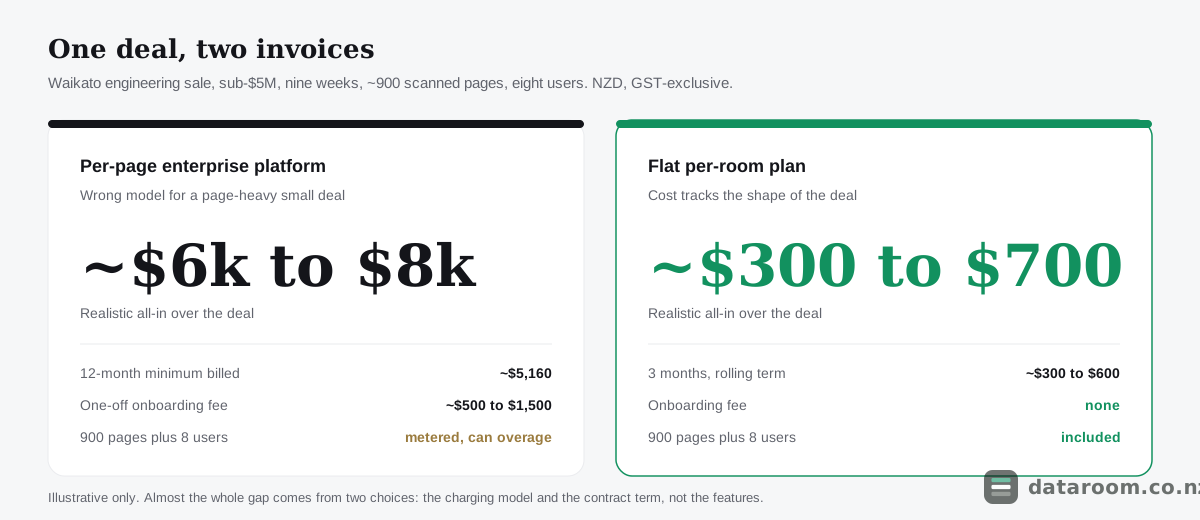
| Cost line | Per-page enterprise platform | Flat per-room plan |
|---|---|---|
| Base subscription | ~$430/mo on a 12-mo term | ~$99 to $199/mo, rolling |
| Minimum term billed | 12 months (~$5,160) | 3 months (~$300 to $600) |
| Onboarding / setup fee | ~$500 to $1,500 one-off | None |
| 900 pages loaded | Metered, often bundled then overage | Included |
| 8 named users | Sometimes extra per seat | Included in room |
| Realistic all-in | ~$6,000 to $8,000+ | ~$300 to $700 |
Almost the entire difference comes from two decisions, not from any feature the pricier room delivered. The seller agreed to a per-page model for a document set that was always going to be page-heavy, and signed a twelve-month minimum for a room needed for nine weeks, and neither choice bought anything of value. A sub-$5M trade sale does not need a bank-grade platform’s metering and workflow, so the flat-room total simply tracks the real shape of the deal instead of a scale that never applied. This is the whole of virtual data room pricing in New Zealand compressed into one line: the model you agree to, multiplied by the term you lock into, decides the bill far more than the brand printed on the login page.
How do you spend less without cutting corners?
Spending less follows directly from everything above, and none of it involves buying a worse room. Organise the content before the meter runs, because a tidy data room folder structure and a clear due diligence checklist mean you upload the right documents once rather than paying to store the wrong ones twice. Match the term to the deal, using realistic timeframes from how long does due diligence take in New Zealand? to push back on a long minimum with a specific number rather than a feeling. Each of these moves is free, and together they usually save more than any discount a salesperson will offer.
The one economy to avoid is the false one. Do not swap a real room for a consumer file-sharing tool to save a few dollars, because as virtual data room vs Dropbox explains, an option that lacks audit trails and granular permissions becomes expensive the instant a dispute or a Privacy Act 2020 obligation surfaces. The Office of the Privacy Commissioner expects reasonable security safeguards over the personal information you hold, and when a target’s files include employment records and customer data, a proper room is not an indulgence but the cheapest form of insurance you will buy on the whole deal. A leak from a poorly controlled folder is not a hypothetical either: the practical guidance from CERT NZ on protecting sensitive information makes clear that access control and logging are basic hygiene, not premium features, and a deal that exposes a target’s data can cost far more in remediation and reputation than the entire room ever would. Spend on the room that fits the deal, save on the model and the term, and the total takes care of itself.
Compare data room pricing side by side
See indicative NZD pricing, charging models and trials for every provider we track, in one table.
Virtual data room pricing FAQ
How much does a virtual data room cost in New Zealand?
Indicatively, from about NZD $20 to $250 a month for a lean, flat-rate room suited to a small deal, and roughly $430 to $2,200 or more a month for a full transaction platform. The final figure depends on the charging model, user count and document volume, and is usually quoted GST-exclusive. Always confirm the current quote with the provider.
Is there a genuinely cheap option for a small NZ deal?
Yes. For a sub-$5M business sale or an early-stage raise, a flat per-room plan under NZD $250 a month typically covers permissions, an audit trail and enough users. Our guide to the cheapest virtual data rooms for NZ small deals compares the bottom of the market in detail.
Why do some providers only give a quote?
Enterprise platforms price per page or per user and tailor the number to your deal, so they route you through a demo and a sales process rather than publishing a rate. That suits large, controlled transactions; for a straightforward NZ deal it often means paying for scale you do not need.
Does GST apply to a virtual data room subscription?
Generally yes. New Zealand GST of 15% applies to most subscriptions supplied to NZ businesses, and many overseas vendors quote GST-exclusive USD. A GST-registered business can usually claim it back as an input, but it still affects cash flow. See business.govt.nz on GST for the basics.
What hidden costs should I ask about?
Onboarding or setup fees, storage and page overage rates, per-extra-user charges, minimum contract terms and premium support add-ons. Ask for the quote itemised in NZD and confirm what happens if the deal runs long or the document set doubles.
Should I pay per page or a flat monthly fee?
If you cannot predict your page count, choose a flat per-room plan so the cost is capped. Per-page pricing suits very large, tightly managed transactions; it tends to punish New Zealand small-business sellers whose scanned documents run to hundreds of pages.