

Cheapest virtual data rooms for New Zealand small deals
Picture a Marlborough vineyard partnership selling a 40 percent stake to an offshore buyer. Three owners, two lawyers, an accountant and two bidding teams. Five years of accounts, land titles, water consents, supply contracts and a shed full of scanned records. The deal is worth about NZD $6 million and runs roughly ten weeks. Nobody in that room is an enterprise buyer, and nobody wants to spend enterprise money on the software that holds the documents. That deal frames this whole guide, because it is exactly the shape where “cheapest” gets misread.
New Zealand deals are small by global standards. Most sit under NZD $10 million, run a few weeks, and involve under ten people. The cheap end of the market clusters in a narrow band. Read it as three tiers:
- Budget, roughly $20 to $100 a month. Per-user tools and light rooms. Fine for a deck and a thin diligence pack.
- Mid, roughly $230 to $430 a month. Flat-rate rooms and adviser-supported plans. The home of most real NZ small deals.
- Enterprise, $900 and up. Per-GB and per-page platforms built for large M&A. Rarely the cheapest for a sub-$10 million deal.
The Marlborough deal is a mid-tier deal wearing a budget-tier budget. That tension is where people overpay, and the rest of this guide walks it out.
What does the cheapest NZ data room cost right now?
Entry pricing is easy to list and easy to misread. Here is what the common providers charge to open a room, the model each uses, and the deal it genuinely suits.
| Provider | From (NZD/mo) | Model | Best fit for a small deal |
|---|---|---|---|
| DocSend | ~$20 | Per user | Fundraising decks, very light diligence |
| Onehub | ~$25/user | Mixed | Simple file sharing, small SMB rooms |
| Ellty | ~$99 | Per user | M&A, diligence and fundraising rooms |
| Digify | ~$230 | Flat-rate | Lean startup and SME deals |
| ShareVault | ~$350 | Flat-rate | Life-sciences and mid-size diligence |
| Ansarada | ~$430 | Per GB | ANZ M&A with adviser support |
Read the model column, not just the number. Three points decide which row is truly cheapest for you:
- A $20 per-user tool is cheap for one or two seats only. Add a lawyer, an accountant and two bidding teams and the “cheapest” row quietly becomes mid-priced.
- Most providers publish in US dollars. The NZD you actually pay drifts with the exchange rate across the whole deal, not just at signup.
- Most quote GST-exclusive. New Zealand GST of 15 percent is generally added on top, claimable as an input if you are registered, but still a cash-flow line during the transaction.
The Marlborough room does not need the cheapest sticker. It needs the cheapest total for two owners plus six advisers and bidders across ten weeks. Those are different plans.
Why is the lowest sticker rarely the lowest total?
The sticker is one line in a bill that usually has four or five. A plan advertised at $20 can finish a deal costing more than one advertised at $99, because the cheap plan meters something your deal will breach.
A cheap headline hides cost in predictable places. Check each before you sign:
- Storage overage. The base plan includes a few GB; go past it and a per-GB rate kicks in. Scanned records and video are the usual triggers.
- Extra-user charges. On per-user plans every added adviser or bidder is a new line. Model your busiest diligence week, not the quiet setup phase.
- Setup and onboarding fees. A one-off implementation charge can equal a month or two of subscription on a small room.
- Admin and adviser time. A messy room means more questions and more billable hours. That cost never lands on the data room invoice, but you pay it.
The stack below is what a small NZ deal actually pays. The visible sticker is the short bar at the bottom.
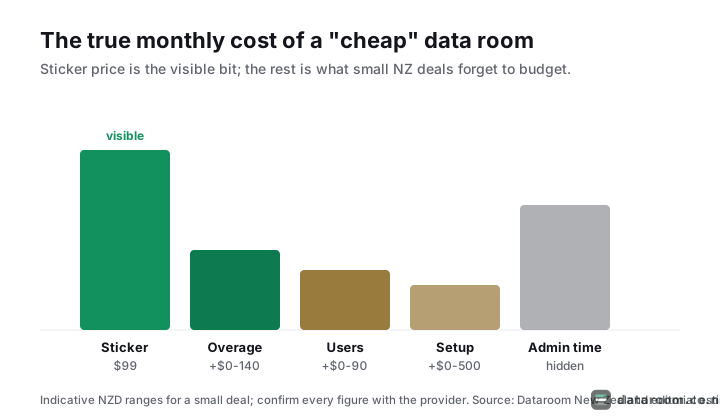
Put rough numbers on it. A Northland cafe-chain sale takes a $20 per-user tool, then reality lands:
- Two owners, two advisers and three bidders is seven seats, roughly $140 a month.
- A scanned lease and consent bundle tips storage into overage, adding $40 to $80.
- A one-off onboarding fee the vendor bundled adds $150 spread across a three-month deal.
- The “cheapest” plan now runs near a flat-rate room that quoted $230 all in and metered nothing.
The right comparison is total cost across the whole deal, breach charges included, not the first month’s headline.
The currency and GST lines everyone forgets
Two lines move the total that never appear on the pricing page. Both are easy to plan for once you name them:
- You are billed in USD. A $99 headline is a moving NZD figure across a ten-week deal. If the dollar slips, a plan you budgeted at $160 lands at $175, and on a six-month room that drift compounds. A short deal barely feels it; a long one should build in a small buffer.
- GST sits on top. Most providers quote GST-exclusive, so add 15 percent to every figure here for your cash-flow view. If you are registered you claim it back as an input, but it is still money out the door while the deal runs, and it is real to a vendor who is not registered.
Neither line changes which model is cheapest. Both change the number you actually write into the deal budget, so bake them in before you sign rather than after the first invoice surprises you.
See the pricing model that fits your deal
Compare data rooms side by side on price model, security and support in one table.
Which pricing model is cheapest for your deal shape?
Pricing comes in four shapes. The same deal is cheapest or dearest depending on which you pick. Start from your deal, not the pricing page.
The decision is really four questions. This is the whole logic on one page.
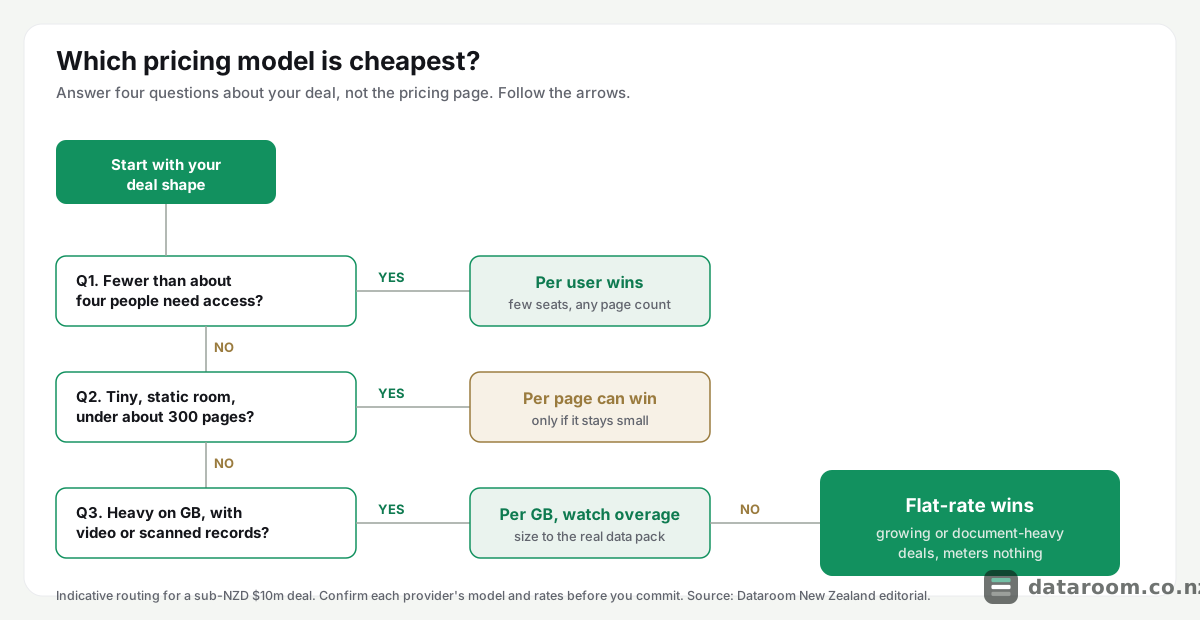
The four models, and when each wins
Take a small deal of roughly 3,000 pages, 4 GB, six users, open for one month, and watch it land very differently:
- Flat-rate meters nothing beyond a fixed room fee, around ~$230 to $400/mo. Cheapest when documents and users grow.
- Per user meters seats, around ~$99 to $600/mo. Cheapest with few users at any document volume.
- Per GB meters storage, around ~$350 to $900/mo. Cheapest for small, tidy file sets.
- Per page meters document pages, from ~$450/mo and up. Cheapest for tiny, static rooms only.
Per-page is the one that surprises people. It was built for enterprise M&A where the buyer pays, and it punishes document-heavy deals.
The same deal, four bills
Run that 3,000-page, 4 GB, six-user deal through each model and the spread is stark:
- Flat-rate: near $230 to $400 for the month, page count irrelevant.
- Per user: six seats at roughly $99 each lands around $300 to $600, flat no matter how many pages you scan.
- Per GB: 4 GB sits inside most base tiers, so you pay the $350 to $500 headline unless video pushes you over.
- Per page: 3,000 pages metered at even a modest rate clears four figures fast, often more than double the flat-rate total.
Back to Marlborough. Leases, spray diaries, plant registers and five years of accounts reach roughly 1,800 pages. On a flat-rate plan the ten-week room is capped near $230 to $400 a month whatever the page count. On a per-page platform the same 1,800 pages can meter into four figures before the first offer lands. Same documents, same deal, a very different bill, decided only by the model. The lesson is not “avoid per-page”. It is “match the model to your deal shape”.
Is a free file tool a cheaper substitute?
Consumer file sharing gives you storage and links, not deal control. On a confidential sale or raise, that gap is a risk, not a saving.
A shared Dropbox or Google Drive folder lacks the controls a deal needs:
- No per-file view tracking, so you cannot see who read what.
- No dynamic watermarking to deter forwarding and leaks.
- No structured question-and-answer workflow for bidder queries.
- No audit trail you can hand a lawyer or a buyer.
There is a Privacy Act 2020 dimension too. If your documents hold personal information about staff, customers or shareholders, you are accountable for how it is shared. The Office of the Privacy Commissioner expects reasonable security safeguards, and a link anyone can forward is hard to defend as reasonable. We cover this in sharing data in a deal: your Privacy Act 2020 obligations.
The Companies Act 2013 adds another layer. A vendor has to produce clean statutory records: the share register, minute books, the interests register and financial statements. A buyer’s lawyer will test those against what is filed on the Companies Register. A loose folder makes that reconciliation slow and error-prone, and every hour of it is billed. A structured room with a clear index does the opposite; it lets the buyer tick off the statutory pack without a single email.
Can I just reuse my accountant’s shared drive?
Often it is where the documents already live, so the temptation is real. It fails the same tests as any consumer drive: no watermarking, no per-file log, no clean way to cut a bidder’s access the moment they drop out. On a competitive sale you want to grant and revoke access per party, and prove afterwards who saw what. A shared accounting drive cannot do either. Copy the pack into a proper room and leave the drive as your working archive.
If you are weighing it up directly, we compare both head to head in virtual data room vs Dropbox and virtual data room vs Google Drive. The short version: a free tool is cheaper only until something leaks.
How much security do you give up at the cheap end?
Less than the myth suggests. The core controls are table stakes across the market, including the affordable end. What you pay more for is depth, not fundamentals.
| Security control | Budget (~$20-100) | Mid (~$230-430) | Enterprise ($900+) |
|---|---|---|---|
| Encryption in transit and at rest | ✓ | ✓ | ✓ |
| Two-factor authentication | ✓ | ✓ | ✓ |
| Granular access permissions | ✓ | ✓ | ✓ |
| Full audit trail | ✓ | ✓ | ✓ |
| Dynamic watermarking | ✗ | ✓ | ✓ |
| Redaction and remote wipe | ✗ | ✓ | ✓ |
| ISO 27001 or SOC 2 certified | ✗ | ✓ | ✓ |
Read the matrix as two blocks. The top four rows are the floor:
- Encryption in transit and at rest, two-factor authentication, granular permissions and a full audit trail should appear on every serious plan regardless of price.
- If a budget plan is missing any of them, that is a reason to walk, not a discount to celebrate.
The bottom three rows are the premium you climb the ladder for:
- Dynamic watermarking, redaction and remote wipe arrive in the mid tier.
- Formal ISO 27001 or SOC 2 certification, plus single sign-on, tend to sit higher still.
- None of that forces weak fundamentals on a cheap plan; it is depth, not a different baseline.
One caveat lifts the floor. If the buyer is an NZX-listed company, or the target feeds into a listed acquirer’s disclosure, the diligence pack becomes price-sensitive information, and leak control stops being optional. Watermarking and a tight audit trail move from “nice to have” into the security floor for that specific deal, even if the deal itself is small. Let the counterparty, not just the sticker, set your minimum tier.
Does the cheapest room have to store data in New Zealand?
Not usually, and insisting on it can rule out good-value rooms for no real gain. What matters is that the provider encrypts data, holds a recognised certification and can tell you which region hosts it. Reputable rooms run on major cloud regions in Australia, the United States or the EU. For most NZ deals that is fine; the Privacy Act follows the information, not the server. Ask where data is held and how it is deleted at close, then judge on the answer rather than the postcode.
If certifications matter for your deal, and for anything touching regulated data they should, read what the standards mean in ISO 27001, SOC 2 and VDR certifications, explained and our checklist in virtual data room security for a New Zealand deal. New Zealand’s national cyber agency, CERT NZ, publishes plain guidance on the controls any business handling sensitive documents should expect.
Which myths quietly turn a cheap plan expensive?
Some costs never make the pricing page. On a small deal they move the ranking of “cheapest” more than the headline rate does.
The cheapest data room is the one that closes your deal without a security incident or a surprise invoice. Price the whole deal, not the first month.
Myth one: small rooms escape setup fees
Some providers charge implementation, onboarding or “project” fees regardless of room size, and a few bundle mandatory support you cannot decline. A one-off setup fee can equal a month or two of subscription on a small room.
Myth two: buying the biggest storage tier is safe
It is mostly waste. Diligence documents are text PDFs, spreadsheets and contracts, which are small. A complete room for a sub-$10 million deal often sits under 5 GB. Buying 100 GB “to be safe” pays for headroom you never touch.
Before you sign, ask three questions:
- Is there a setup or onboarding fee, and can it be declined?
- Is support included, or billed on top?
- What does it cost to add a user or extra storage mid-deal?
The smarter move on storage is to size to your actual data pack, then check the overage rate rather than pre-buying capacity. The exception is a genuinely data-heavy deal, such as a Southland forestry block or a Nelson marine-services sale loaded with scanned records, drawings or video, where storage really is the driver and a per-GB plan can bite. A self-serve room with a 14-day free trial also removes assisted-onboarding fees, because you stand the room up yourself in an afternoon.
When in the deal does cost actually pile up?
Cost is not spread evenly across the weeks. A small-deal room is quiet at both ends and busy in the middle, and the busy middle is when a metered plan bills hardest.
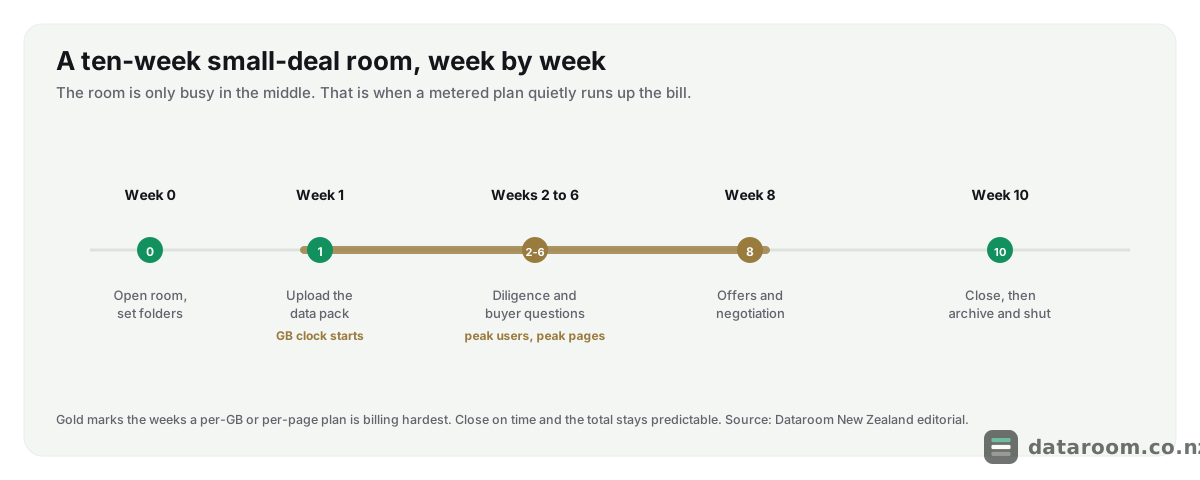
The timeline carries a practical lesson. Read it in three parts:
- The ends are cheap. Setup and archive weeks add little; few people, few queries.
- The middle is dear. Diligence and question-and-answer is peak users and peak pages, so a per-GB or per-page plan runs up its bill precisely then.
- A slow close is expensive twice. Every extra week is another month of subscription and more adviser hours, so a room that drifts costs more than the sticker implies.
On flat-rate the shape does not matter, the fee is the fee. On metered plans the shape is the cost, which is another reason a growing or slow-moving deal usually lands cheapest on flat-rate.
Where the money really goes
The invoice is only part of the total. The rest is your time and your advisers’ time, which a cheap-but-messy room quietly inflates.
Two habits cut the hidden cost more than any discount code:
- Use a proven data room folder structure. Buyers find documents without asking, which trims adviser hours and page churn.
- Run a disciplined question-and-answer process. The same query is not answered five times, and the room closes faster.
Both are free, and a faster close is a real saving even though it never shows on the data room bill. In the Marlborough deal, a tidy room that let bidders self-serve the water consents and supply contracts saved more in adviser time than the entire subscription cost.
What should each NZ deal scenario budget?
Cost tracks deal size and complexity more than sector. Use these indicative monthly ranges to sanity-check any quote.
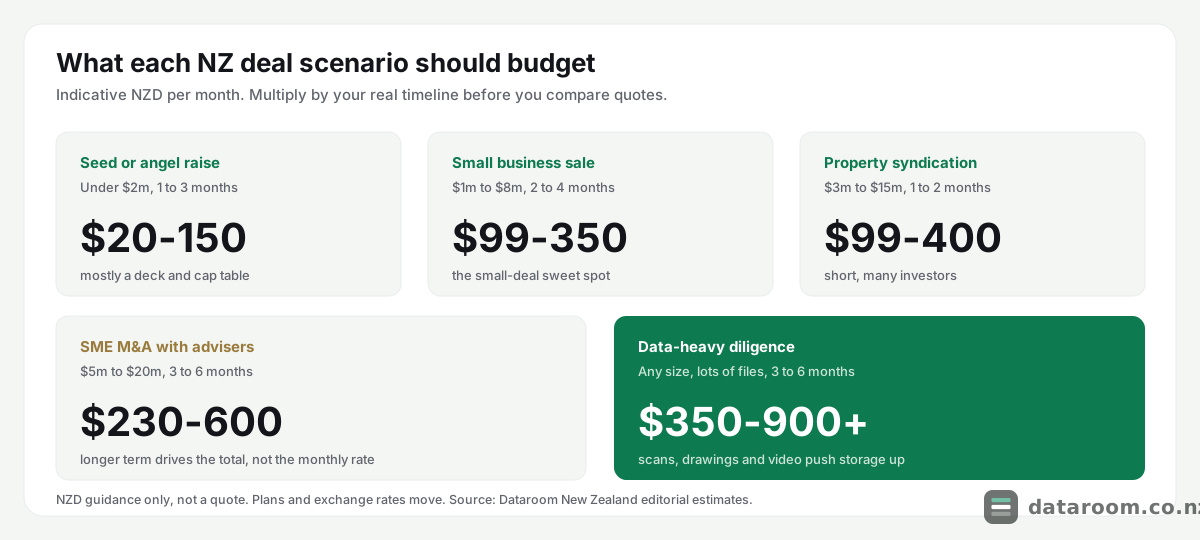
The same ranges, with the deal shape spelled out:
| Scenario | Deal size | Typical term | Indicative NZD/mo |
|---|---|---|---|
| Seed or angel raise | Under $2m | 1 to 3 months | ~$20 to $150 |
| Small business sale | $1m to $8m | 2 to 4 months | ~$99 to $350 |
| Property syndication | $3m to $15m | 1 to 2 months | ~$99 to $400 |
| SME M&A with advisers | $5m to $20m | 3 to 6 months | ~$230 to $600 |
| Data-heavy diligence | Any size | 3 to 6 months | ~$350 to $900+ |
Read each range as a starting point, then adjust for two things:
- Term length. A one-month seed room and a six-month M&A room at the same monthly rate are very different totals. Multiply the monthly figure by your real timeline before comparing quotes.
- Document weight. A raise that is mostly a pitch deck and a cap table sits at the bottom of its range. A sale carrying scanned leases, consents and five years of accounts sits near the top, or spills into the data-heavy band.
The pattern holds across industries. An iwi-owned aquaculture venture raising capital, a Canterbury dairy succession, a Gisborne SaaS founder running a Series A: the driver is always document volume and user count, not the sector.
Try a room before you pay for one
Start a 14-day free trial, load your real data pack, and see the total cost for your deal with no setup fee.
If you are still unsure a paid room earns its keep, we argue it both ways in is a virtual data room worth it for a small NZ deal? and round up the affordable options in virtual data rooms for small businesses in New Zealand. For the full field, see our best virtual data rooms in New Zealand roundup.
Should a short NZ deal pay monthly or annually?
It depends, and assuming one answer fits every deal is the trap. Month-to-month is often right for a short deal, but not because it is always cheaper.
The trade-offs are simple to weigh:
- Many providers discount annual billing heavily, sometimes 20 to 40 percent.
- A few only publish their low headline rate on the annual plan.
- A four-week Otago property syndication room should almost never buy a year.
- A Manawatū fundraise that drifts across two quarters sometimes should, then downgrade later.
Read the billing terms, not just the per-month figure. Check the minimum term and the cancellation notice before you sign, because a “cheap” monthly rate on a locked 12-month contract is not cheap for a nine-week deal.
How do you actually pick the cheapest room?
Work the problem in order, from your deal shape to the plan, never from the pricing page down. This sequence keeps you out of every trap above.
A five-step method to price a small-deal room
Follow these in order. Each step removes a way that cheap plans get expensive.
- 1
Size the deal honestly
Estimate document pages, total GB and the number of people who need access. Most small NZ deals are under 5 GB and under 10 users. These three numbers decide which pricing model is cheapest.
- 2
Match the model, not the sticker
Few users means per-user wins. Tiny static room means per-page can win. Growing or document-heavy means flat-rate or per-GB. Pick the model that suits your numbers before you compare prices.
- 3
Add the hidden lines
Ask each provider about setup fees, per-user and per-GB overage, minimum term and whether support is included. Add those to the monthly figure to get a real total for your deal length.
- 4
Set the security floor
Require encryption, two-factor authentication, granular permissions and an audit trail as non-negotiables. Only compare plans that clear that bar, then let price decide among them.
- 5
Trial before you commit
Use a free trial to upload your real data pack and test the room with one adviser. You will spot missing features and clumsy workflows before any money changes hands.
Where do the real cheap-room savings come from?
Pull the myths together and the cheapest room for a New Zealand small deal is almost never the one with the smallest headline. Three things decide it:
- A pricing model that matches your document volume and user count.
- A security floor solid enough that you never pay for a breach.
- Extras such as setup, overage and support that stay at or near zero.
Get those right and a small deal runs a fully controlled, audit-ready room for the price of a couple of billable hours a month. Get them wrong and a “cheap” plan can cost more than a mid-tier one that just quoted honestly. Business.govt.nz has useful general guidance on selling or buying a business that sits alongside the room; the data room is one line in that budget, and it should be a small, predictable one.
Cheapest virtual data room: common questions
What is the cheapest virtual data room for a small NZ deal?
For a small New Zealand deal, entry plans start around NZD $20 to $100 a month, with per-user tools like DocSend at the low end and flat-rate rooms from roughly $230. The genuinely cheapest option depends on your document volume and user count, not the headline price. Match the pricing model to your deal shape, and confirm current NZD figures with the provider.
Is a free tool like Dropbox or Google Drive good enough instead?
For a confidential deal, no. Free file-sharing gives you storage and links but no per-file tracking, watermarking, question-and-answer workflow or audit trail, and it is hard to square with your Privacy Act 2020 duty to keep personal information secure. It is cheaper only until a document leaks or a buyer asks for an access log you cannot produce.
Why is per-page pricing sometimes expensive?
Per-page plans bill by document count, so cost scales with your data pack. A tiny room can be cheap on per-page, but a diligence room of a few thousand pages can outrun a flat-rate plan in a single month. Estimate your page count first, then compare per-page against flat-rate and per-user before committing.
Does a cheap data room mean weaker security?
Not for the fundamentals. Encryption, two-factor authentication, granular permissions and an audit trail are standard even on affordable plans from reputable providers. What you pay more for is depth: dynamic watermarking, redaction, remote wipe, single sign-on and formal ISO 27001 or SOC 2 certification. Set those fundamentals as a floor and let price decide among the plans that clear it.
What hidden costs should I check before signing?
Ask about four things: a one-off setup or onboarding fee, the charge to add a user, the per-GB storage overage rate, and the minimum term and cancellation notice. On a small deal any of these can move the total more than the monthly headline does. A self-serve room with a free trial and no setup fee usually keeps the total lowest.
How long will I need the room, and does that change the price?
Most small NZ deals need a room for one to four months. Short deals often suit month-to-month billing, but check whether an annual plan carries a large discount you could use and cancel later. Read the minimum term before you assume monthly is cheaper, since some providers only publish their lowest rate on an annual commitment.