

Best virtual data rooms in New Zealand (2026)
A virtual data room is a secure online space for sharing confidential deal documents with controlled, audited access.
That one sentence carries the whole category. “Secure” means encryption and certification you can verify. “Controlled” means permissions granular down to a single file. “Audited” means a log that records who opened what, and when.
New to the term itself? Our plain-English guide to what a virtual data room is sets the groundwork before you weigh vendors.
Everything else in this guide is a consequence of that definition, run through the specific numbers of a New Zealand deal. A corporate financier on a $40M trade sale, a founder raising a seed round, and an accountant selling a panelbeating shop all reach for a data room. Almost nothing about the right tool is the same across those three.
So this guide does not crown one winner. It works the criteria, tells you which type of room wins for which deal, and hands you worked NZ examples so you can see your own transaction in the pattern.
The most expensive room is rarely the best one. For most New Zealand deals, the best room is the cheapest one that still clears your security, privacy and workflow bar.
What does “best” actually mean for a New Zealand deal?
“Best” is the room that does the job for your deal without charging you for capability you will never touch, and without dropping a control you cannot do without.
A room that handles a bank-run auction beautifully can be the wrong buy for a nine-week trades-business sale. The reverse is just as true. The word only means something once you attach it to a transaction.
Six criteria do almost all of the sorting. The trick is to weight them by your deal rather than by a vendor’s feature grid.
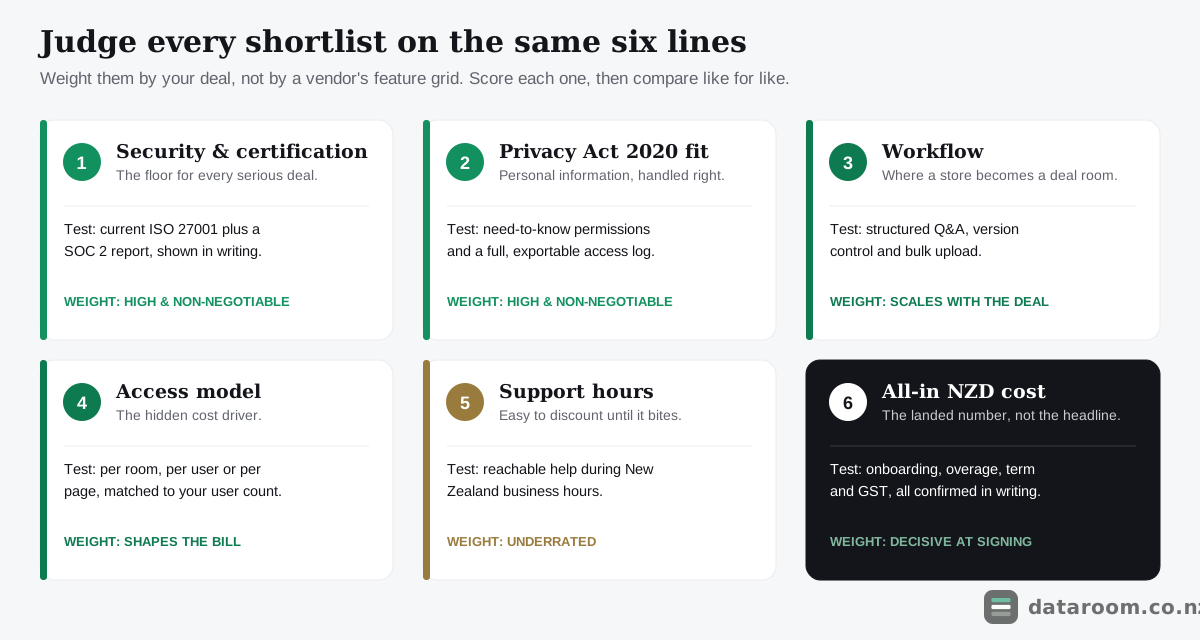
The three below carry the most weight for a New Zealand transaction, so they earn a closer look before any comparison table opens.
Security you can actually verify
Do not take a marketing page at its word. Ask for evidence.
Two credentials carry weight. ISO 27001 is an international standard for an information security management system. A SOC 2 report is an independent audit of a provider’s controls in practice. A room holding current, verifiable versions of both has been examined by someone other than its own sales team.
Beyond the badges, the practical controls matter just as much: encryption in transit and at rest, permissions granular to the single file, view-only and no-download modes, dynamic watermarking that stamps the viewer’s identity onto every page, and the ability to revoke access the instant a party leaves the deal.
Privacy Act 2020 fit
Every real deal moves personal information: employee files, customer lists, director details, contracts naming individuals.
The moment you share that inside a room, the Privacy Act 2020 governs how you collect, disclose and protect it. No data room discharges that duty for you. What the right one does is make the duty easy to meet.
Granular permissions let you disclose personal information only to parties with a genuine need, which is the heart of the Act’s disclosure principles. A complete audit trail gives you a defensible record of exactly who accessed what and when, ready if a subject asks or a dispute arises.
Treat a room that cannot show you those two features as a room that failed the criterion, not one that scored a little low.
Workflow that matches the deal
Workflow is where a document store becomes a deal room.
Structured Q&A, bulk upload, auto-indexing and version control are the machinery that keeps hundreds of bidder questions and thousands of pages from collapsing into a spreadsheet nobody trusts by week three.
A small sale barely touches this layer. A mid-market auction lives inside it. So the honest question is not whether a room has the deepest workflow, but whether its workflow matches the deal you are running. Our full how to choose a virtual data room buyer’s guide turns all six criteria into a scorecard you can run against any shortlist in an afternoon.
How do the leading rooms compare, capability by capability?
The fastest way to see the field is to line up the providers New Zealand teams most often shortlist against the capabilities that decide a deal.
Read the columns as archetypes as much as brands. The flat-rate room, the certified mid-market platform and the enterprise per-page suite each behave the way their column suggests. Once you see the pattern, you can slot any vendor not listed here into the right band.
| Capability | Ellty | Ansarada | iDeals | Firmex | Datasite |
|---|---|---|---|---|---|
| Published, flat monthly pricing | ✓ | ✗ | ✗ | ✗ | ✗ |
| Self-serve trial you can start today | ✓ | ✓ | ✓ | ✓ | ✗ |
| Granular folder and file permissions | ✓ | ✓ | ✓ | ✓ | ✓ |
| Full audit trail and access logs | ✓ | ✓ | ✓ | ✓ | ✓ |
| Structured Q&A workflow | ✗ | ✓ | ✓ | ✓ | ✓ |
| Dynamic watermarking | ✓ | ✓ | ✓ | ✓ | ✓ |
| Built-in redaction tools | ✗ | ✓ | ✓ | ✗ | ✓ |
| ISO 27001 certified | ✓ | ✓ | ✓ | ✓ | ✓ |
| SOC 2 Type II reported | ✗ | ✓ | ✓ | ✓ | ✓ |
| AI or deal-analytics insights | ✗ | ✓ | ✓ | ✗ | ✓ |
| No mandatory 12-month term | ✓ | ✗ | ✗ | ✗ | ✗ |
| Suited to a sub-$5M NZ deal | ✓ | ✗ | ✗ | ✓ | ✗ |
Read that grid and a shape emerges.
The enterprise platforms win on depth, redaction, analytics and process control, and they price accordingly. The flat-rate room wins on transparency, speed and cost, and gives up some of the heavy transaction machinery a small deal never opens. The mid-market names sit between the two, which is exactly where the bulk of New Zealand deals live.
No column is best outright. The right column is the one whose trade-offs match your transaction. The temptation to buy up a tier “to be safe” is precisely how sellers of small businesses overpay by thousands.
If you want the underlying vendor table with prices and trials, our virtual data room pricing in New Zealand guide lays out the full field, while the comparison table on our home page tracks it live.
Which room actually fits your deal?
Name the deal first, then let that dictate the tier. It is far quicker than working up from a longlist of vendors, and it stops a sales process from framing the choice for you.
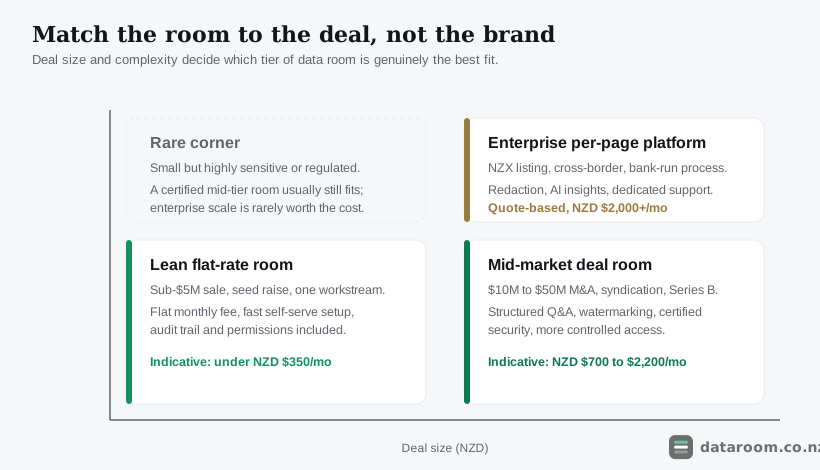
The snapshot below maps common New Zealand scenarios to the type of room that tends to win, with an indicative monthly spend to sanity-check any quote you receive.
| Your deal | Best-fit room type | What to prioritise | Indicative NZD/mo |
|---|---|---|---|
| Selling a sub-$5M business | Lean flat-rate room | Audit trail, permissions, simple setup | $99 to $300 |
| Startup seed or Series A raise | Lean flat-rate room | Investor analytics, clean access control | $99 to $350 |
| Property syndication offer | Flat or pooled-user room | Many investor logins, watermarking | $250 to $700 |
| Mid-market M&A, $10M to $50M | Certified mid-market room | Structured Q&A, SOC 2, redaction | $700 to $2,200 |
| Capital raise with regulated docs | Certified mid-market room | Version control, disclosure discipline | $700 to $2,000 |
| NZX listing or cross-border sale | Enterprise per-page platform | Redaction, AI insight, dedicated support | Quote, $2,000+ |
Notice how rarely the enterprise tier is the answer. It earns its keep on the largest, most tightly controlled transactions, and it is overkill, and overpriced, for the great majority of deals done in this country.
A horticulture exporter with three trade buyers does not need per-page metering. It needs airtight permissions, a clean log and a predictable bill.
Contrast a $30M software roll-up, where fifteen to forty users work a full diligence set with structured Q&A and redaction. That deal genuinely belongs in the $700 to $2,200 mid-market band, and paying less would starve it of the workflow it depends on.
The scenario column is not a discount hunt. It is a fit test, and both under-buying and over-buying show up as friction once the deal is live.
Compare every provider side by side
Indicative NZD pricing, charging models, security marks and trials for every room we track, in one table.
What does a New Zealand deal actually look like, week by week?
A room is not a filing cabinet you fill once. It works across the whole transaction, and the shape of that transaction decides which features you lean on.
A typical NZ trade sale runs eight or nine weeks from a room going live to a signed agreement.
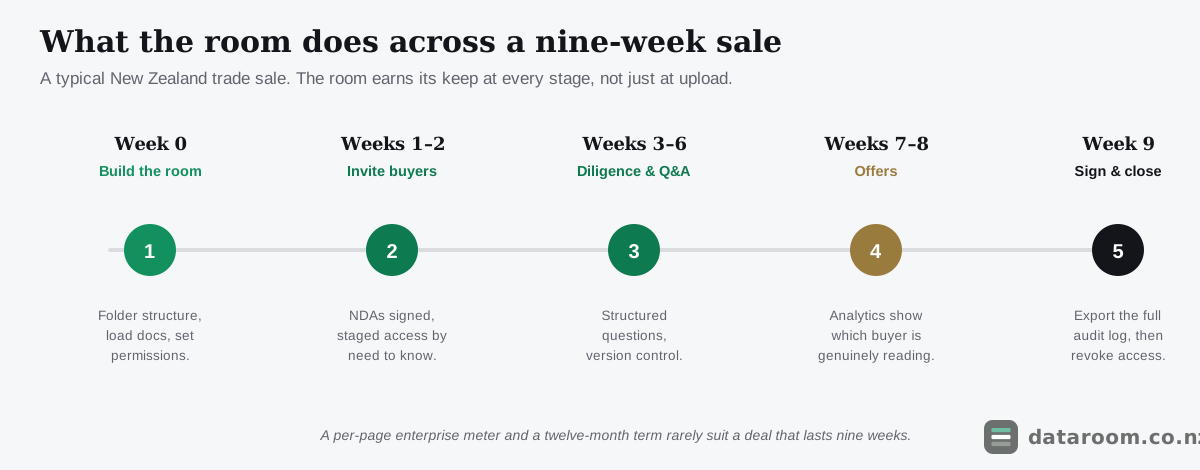
Week zero is preparation. You build the folder structure, load documents and set permissions before a single buyer sees anything. This is the week that decides pace later.
Weeks one and two are access. Buyers sign an NDA and are let in by need to know, often with commercially sensitive folders held back until a shortlist forms.
Weeks three to six are the grind. Diligence questions arrive, structured Q&A routes them, and version control keeps everyone on the current draft rather than an email attachment from Tuesday.
Weeks seven and eight are offers. This is where analytics quietly earn their place, telling a seller which buyer actually read the financial model rather than which one talks the most.
Week nine is the close. The room exports a full index, the documents and the complete audit log as a closing record, then access is revoked so nothing lingers.
That archive is not a nicety. It is the evidence trail you may need if a warranty claim or a Privacy Act request surfaces months later.
How much do the best data rooms cost in New Zealand?
Price spans two orders of magnitude across this field, because the category stretches from a document-sharing add-on to a full transaction platform.
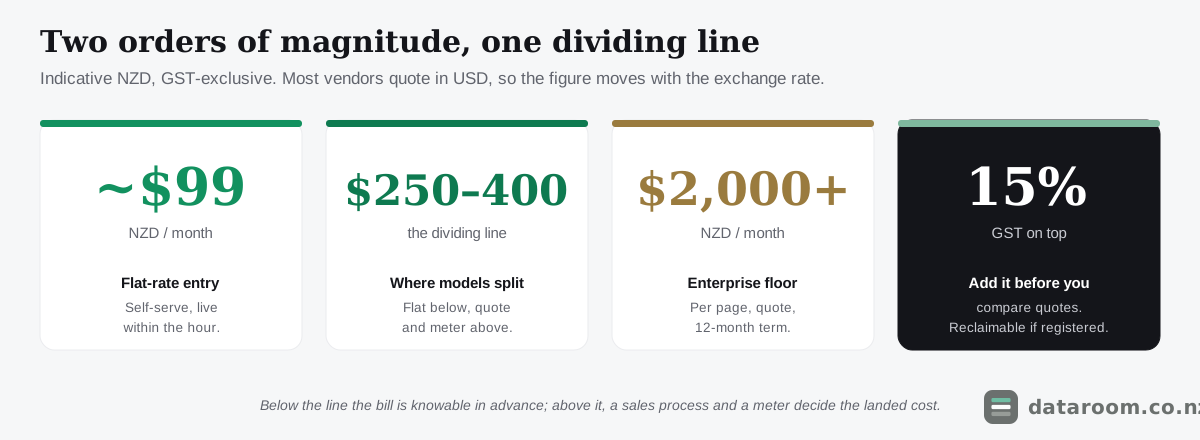
The table below is an indicative snapshot of entry-tier monthly pricing in NZD. Read every figure as a starting point rather than a fixed rate. Vendors negotiate, discount on term length, and most publish in US dollars, so the New Zealand figure moves with the exchange rate.
| Provider | Indicative from (NZD/mo) | Charging model | Trial |
|---|---|---|---|
| Ellty | ~$99 | Flat per room | 14-day free trial |
| Digify | ~$230 | Flat per room, tiered | 7-day free trial |
| Ansarada | ~$430 (12-mo term) | Per page / room | 14-day free trial |
| Onehub | ~$525 (Data Room) | Per user, tiered | Free trial |
| Firmex | ~$700 (indicative) | Quote-based, per room | Free trial |
| iDeals | ~$900 (indicative) | Quote-based | Demo and trial room |
| Intralinks | ~$1,450 (indicative) | Quote-based, per page | Demo only |
| Datasite | Quote only | Per page, enterprise | Custom demo |
The dividing line sits around NZD $250 to $400 a month.
Below it you are in self-serve, flat-rate territory built for a single workstream. A plan is live within the hour and the bill is knowable in advance.
Above it you are usually buying a quote-based platform with a sales process, a per-page or per-user meter and a minimum term attached. That is proportionate for scale and punishing for a small, page-heavy deal.
For a deeper read on the charging models and the fees that hide beneath the headline, see our virtual data room pricing in New Zealand guide. If budget is the whole question, cheapest virtual data rooms for NZ small deals drills into the bottom of the range.
How do the four charging models compare?
Pricing confusion is nearly always model confusion. Four models cover the market, and each suits a different shape of deal.
| Charging model | How it bills | Watch out for | Best-fit deal |
|---|---|---|---|
| Flat per room | One monthly fee, unlimited pages | User caps on lower tiers | Small sale or early raise |
| Per user / seat | Priced by named login | Costs blow out with many investors | Small, tightly held deal |
| Per page | Billed per page uploaded | Scanned documents inflate fast | Curated enterprise M&A |
| Quote-based | Negotiated, often 12-mo term | Onboarding and overage fees | Large or cross-border deal |
The per-page model is the one that catches New Zealand sellers out.
A trades business with five years of scanned accounts, employment files and resource consents can run to thousands of pages before diligence even opens. On a per-page meter that ordinary bulk becomes a bill that has nothing to do with deal value.
A per-seat model breaks the opposite way. It is fine for four buyers, and quietly ruinous for a syndication inviting a hundred investors.
Match the model to your two biggest numbers: page volume and user count.
How do you choose between your final two?
Once the scenario table has pointed you at a tier, the job is to narrow to two credible candidates and let a genuine pilot break the tie.
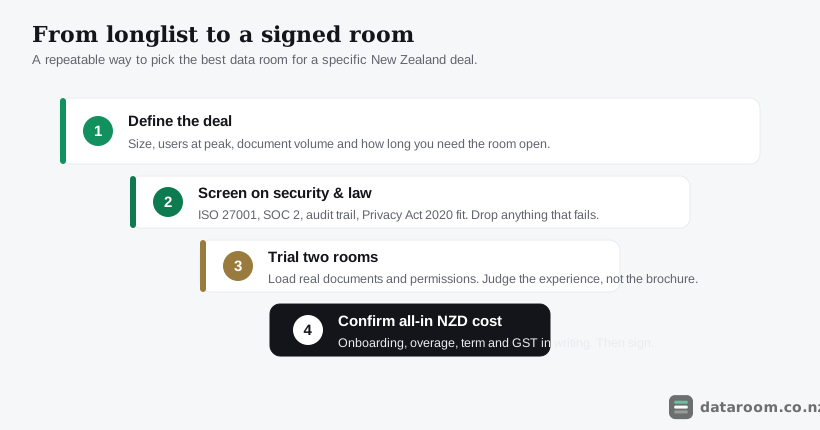
Work through the sequence below and you will buy on evidence rather than on a brand’s reputation or a sales rep’s enthusiasm.
The order matters. Defining the deal and screening on security should happen before you ever watch a demo, because a demo is designed to make every room look essential and every feature look load-bearing.
Choose your room in five steps
Define the deal first, screen on the non-negotiables, then let a real trial decide between your final two.
- 1
Define the deal on paper
Write down the deal size, the number of users at peak, the rough document volume in pages and gigabytes, and how many months you actually need the room open. These four numbers drive every pricing model.
- 2
Screen on security and law
Cut any provider that cannot show current ISO 27001 and, for a serious deal, a SOC 2 report, a full audit trail, and a clear answer on Privacy Act 2020 fit. This usually halves the list.
- 3
Match the tier to the deal
Use the scenario table above. Do not shortlist an enterprise per-page platform for a sub-$5M sale, and do not put a consumer drive on the list for a regulated raise.
- 4
Trial your final two with real documents
Load a genuine folder and set real permissions in each. Judge the upload experience, the Q&A flow and the analytics, not the sales demo. Involve the person who will run it daily.
- 5
Confirm the all-in NZD cost, then sign
Get onboarding, overage, extra-user rates, minimum term and GST in writing. Compare the landed cost, not the headline, and prefer a rolling term for a one-off deal.
Before you load a single file, get the structure right. Momentum in due diligence comes from organisation more than from any single feature.
A clean data room folder structure and a due diligence checklist for New Zealand deals will do more for a deal’s pace than the shiniest item on a vendor’s brochure. They also let your two trial rooms be judged on a realistic set rather than the tidy sample a vendor curated for the demo.
What are you paying extra for at the enterprise tier?
The premium platforms are premium for real reasons. It is worth knowing what those reasons are before you either pay for them or rule them out.
They were built for transactions where a curated document set moves through a syndicate of banks, several bidder teams and a room full of lawyers, and where a single mishandled disclosure carries consequences measured in millions.
That heritage shows up as capability, not polish.
- Built-in redaction strips personal or commercially sensitive lines before a page ever goes live.
- AI and analytics surface which bidder is reading which folder and how deeply, which is genuine intelligence in a competitive auction.
- Structured Q&A routes hundreds of questions to the right subject expert without a spreadsheet buckling under the load.
Datasite and Intralinks sit at the top of this world. Ansarada and iDeals bring much of the same depth to a slightly broader mid-market, and our Ansarada vs iDeals comparison weighs those two directly for a New Zealand deal.
The catch is the commercial model. These platforms typically price per page or by negotiated quote, route you through a demo and a sales process, and attach a minimum term, usually twelve months.
For a $50M raise that is entirely proportionate, and the analytics alone can pay for themselves by telling a seller which bidder is serious. For a nine-week sale of a small trades business, you are renting an aircraft carrier to cross the harbour.
Redaction and AI analytics look impressive in a demo, but a small deal is far better served by rock-solid permissions, a clean audit trail and instant revocation. Match the protection to the risk.
How do you check a room is secure, not just marketed that way?
Security and privacy are the two criteria a buyer’s lawyers will press hardest, so they deserve a check you can defend rather than a claim you have taken on faith.
Both reduce to a small number of concrete questions. A provider that cannot answer them cleanly has told you something useful.
The certifications that carry weight
ISO 27001 certifies that a provider runs a managed information security system. A SOC 2 report is an independent audit of whether its controls actually operate as described. Both are explained in plain terms in our ISO 27001, SOC 2 and VDR certifications explained guide.
Ask for current, verifiable versions rather than a logo on a marketing page. A lapsed or absent report is a genuine finding you can act on.
New Zealand’s national cyber agency, CERT NZ, publishes practical guidance on the controls any business should expect from a system holding sensitive data. It is a useful neutral yardstick when a vendor’s own literature reads like everyone else’s.
Privacy Act 2020 and the residency question
The Privacy Act 2020 governs personal information the instant it enters the room. The Office of the Privacy Commissioner’s guidance at privacy.org.nz is the authoritative reference for what reasonable safeguards look like, and our Privacy Act 2020 obligations guide translates it into deal-room practice.
Data residency is a fair question but rarely a blocker.
Most reputable providers host in secure offshore data centres under recognised standards, which the Act permits provided the information stays adequately protected. Ask where your data lives and under what certification, then weigh the answer against the room’s other controls rather than treating location as a pass-fail test.
The stronger question is not “is it stored in New Zealand”. It is “who can reach it, how is that logged, and how fast can I revoke it”.
What do buyers underweight: support, onboarding and exit?
The head-to-head grid captures features. It cannot easily show the three things that often decide which room is genuinely best once a deal is live: how fast you can stand it up, who answers when something breaks, and how cleanly you get your documents back at the end.
Onboarding speed is the first. A flat-rate room is usually live within an hour of signing up. An enterprise platform frequently routes you through a scoping call, a template build and a managed import, which is worth a week when a specialist team is curating a syndicated auction and a wasted week when you just need to share forty files with two bidders.
Ask any shortlist a blunt question: how long from payment to a bidder logging in.
Support in New Zealand hours is the second, and it is easy to discount until it bites. When a room goes live on a Sunday night before a Monday deadline, a support queue three time zones away is a real risk.
Data export and closing is the third. The best rooms make it trivial to export the full index, the documents and the complete audit log, then shut the room down so nothing lingers.
One last check sits outside the room entirely. A data room protects your documents, but it does not vet who is on the other side of the table. Before you grant a would-be buyer access, a quick look at the Companies Office register confirms the entity exists, who its directors are and whether it is in good standing. General guidance for buyers and sellers at business.govt.nz is a useful companion when a first-time seller is finding their feet.
Which room wins for a Bay of Plenty kiwifruit sale?
This is the archetypal small trade sale, and it belongs firmly in the flat-rate tier.
Advisers sit on both sides, one accountant handles the numbers, and perhaps four trade buyers work through diligence over eight or nine weeks. The document set is ordinary but bulky: leases, orchard registers, resource consents, five years of accounts and a stack of employment files scanned to hundreds of pages.
A flat room at $99 to $300 a month, billed for three months on a rolling term, covers it comfortably and closes cleanly. A per-page enterprise platform would meter every scanned page and lock the seller into twelve months for a deal that lasts nine weeks.
The priorities here are airtight permissions, a clean audit log and a knowable bill, not redaction or bidder analytics.
Which room wins for a SaaS Series A raise?
A founder’s raise looks small in dollars but leans on a specific feature: investor analytics.
The room may hold a pitch deck, a cap table, customer contracts and a financial model, shared with ten to twenty-five investors and their advisers. Knowing which fund actually opened the model tells the founder where the real interest sits.
A flat plan under $350 a month usually does the job, provided its analytics and access control are genuinely granular.
Our best virtual data rooms for NZ startups and startup fundraising room guides narrow the field further for founders who want the analytics without the enterprise price.
Which room wins for a hundred-investor solar syndication?
A retail property or infrastructure syndication is the case where per-seat pricing quietly breaks the budget.
Fifty to a hundred prospective investors may enter the room to read a trust deed, independent valuations and a product disclosure statement. A plan that charges per named login turns that crowd into a five-figure line item before a dollar is raised.
A flat or pooled-user plan at $250 to $700 a month is almost always the right structure, with strong watermarking so a leaked page traces back to a viewer.
Our virtual data rooms for property syndication guide covers the many-investor case in full.
Which room wins for a $30M mid-market M&A?
This is the deal that finally justifies the mid-market tier, and under-buying here is as costly as over-buying elsewhere.
Fifteen to forty users across several bidder teams work a full diligence set. Lawyers expect structured Q&A with question assignment. Redaction is not optional when employment files and customer data sit alongside the commercial documents.
A certified room at $700 to $2,200 a month earns its price on workflow and control. Our virtual data rooms for M&A in New Zealand guide weighs the mid-market names against each other for exactly this band.
What mistakes should you avoid when picking a room?
Most bad data room decisions in New Zealand trace back to a short list of avoidable errors. Knowing them in advance is worth more than any single feature comparison.
The most common is buying up a tier “to be safe”. It sounds prudent and simply means paying an enterprise premium and signing a twelve-month term for a room you needed for nine weeks.
Its mirror image is buying down into a consumer drive to save a few dollars. That holds until the first dispute or Privacy Act request lands and you discover there is no per-document audit trail to prove who saw what. As virtual data room vs Dropbox and virtual data room vs Google Drive both set out, a consumer drive becomes a liability the moment a deal is tested, and virtual data room alternatives for NZ businesses is honest about the rare cases where a lighter option is defensible.
The subtler errors are just as costly.
- Skipping a real trial and buying on the demo, so you never find the clumsy upload flow until the deal is live.
- Ignoring support hours, which leaves you exposed on the Sunday night a room misbehaves before a Monday deadline.
- Forgetting GST and currency, which flatters an overseas per-page quote that lands fifteen percent and one exchange-rate swing higher than it looked.
- Neglecting the closing archive, so that when a warranty claim surfaces months later, the evidence trail has gone dark.
None of these show up in a feature grid, which is exactly why they catch experienced buyers as often as first-timers.
So which virtual data room is the best in New Zealand?
The best room is the cheapest one that still clears your security, privacy and workflow bar for the specific deal in front of you.
For a sub-$5M sale or an early raise, that is a lean flat-rate room under about $350 a month with an audit trail, granular permissions and a free trial. For a $10M-plus M&A, it is a certified mid-market platform with structured Q&A and redaction. For an NZX listing or a bank-run process, it is an enterprise per-page suite.
Name the deal, score every shortlist on the same six criteria, then trial your final two with real files. Buy on that evidence, not on the loudest brand.
See our pricing for a straightforward NZ deal
A flat monthly plan, a 14-day free trial, and no per-page metering to model.
Best virtual data rooms in NZ: FAQ
What is the best virtual data room in New Zealand?
There is no single best room; the best one depends on your deal. For most small NZ sales and raises, a lean flat-rate room under about NZD $350 a month is the right choice, while $10M-plus M&A and NZX-bound processes justify a certified mid-market or enterprise platform. Shortlist on security, Privacy Act 2020 fit, workflow, support hours and all-in NZD cost.
How much should a good data room cost for a small NZ deal?
Indicatively, a flat per-room plan between about NZD $99 and $300 a month covers granular permissions, a full audit trail and enough users for a sub-$5M sale or an early-stage raise. Figures are GST-exclusive and usually quoted in USD, so confirm the current NZD quote with the provider. Our cheapest data rooms for NZ small deals guide compares the bottom of the market.
Do New Zealand data rooms need ISO 27001 or SOC 2?
For any serious deal, yes. ISO 27001 certifies a provider's information security management system, and a SOC 2 report is an independent audit of its controls. A buyer's lawyers will look for both. Ask for current, verifiable versions rather than a claim on a marketing page. See our certifications guide for what each one proves.
Is Ansarada, iDeals or Datasite better for an NZ deal?
They are all capable enterprise-grade platforms, and the right one depends on scale. Datasite and Intralinks suit the largest, most controlled transactions; Ansarada and iDeals bring similar depth to a slightly broader mid-market. For a sub-$5M NZ deal, all of them are usually more platform than you need. Our Ansarada vs iDeals comparison weighs the two directly.
Can I just use Dropbox or Google Drive instead?
For a real deal, no. Consumer drives lack a per-document audit trail, granular view-only control, dynamic watermarking and instant revocation, which are exactly the controls a dispute or a Privacy Act 2020 obligation will test. See virtual data room vs Dropbox for the full comparison.
Does GST apply to a data room subscription in New Zealand?
Generally yes. New Zealand GST of 15% applies to most subscriptions supplied to NZ businesses, and many overseas vendors quote GST-exclusive USD. A GST-registered business can usually claim it back as an input, but it still affects cash flow during a deal. Confirm whether a quote is GST-inclusive before you compare.