

Virtual data rooms for M&A in New Zealand
The most expensive myth in a New Zealand business sale is that the data room is a filing job the accountant sorts out the week buyers arrive. It is not. It is the room where the deal is actually won or lost, and treating it as admin is how sellers quietly hand back six figures of price.
A buyer’s lawyers form their whole view of risk from what they find inside it. Price gets chipped at diligence over every gap and surprise. And the record of what you disclosed becomes the reference point if a warranty claim lands months after settlement.
Prepared well, the room moves diligence fast and keeps bidders confident.
Prepared badly, it invites delay, retrades, and a dispute you cannot defend because you cannot prove what you shared.
This guide walks the whole arc of an M&A room built for a New Zealand deal: what it is, why it shapes the price, what buyers expect to find, what it costs in real NZD, how to stand it up, and how to close it cleanly. Every figure below is indicative and GST-exclusive, and worth confirming against a current quote.
So what actually is an M&A data room?
A virtual data room for M&A is a secure online space for sharing confidential deal documents with controlled, audited access, used to run due diligence on a sale or merger.
Unpack that and each word earns its place.
- Secure means encryption in transit and at rest, plus watermarking that ties a leaked page back to the user who opened it.
- Controlled access means you decide, at folder and file level, exactly what each party sees, and can withdraw it in a single click.
- Audited means every view, download and question is stamped with a user and a time.
- Due diligence is the specific job: letting a competitor’s advisers interrogate your business without handing them the keys to it.
The room is not one feature. It is six working parts that turn a document store into something a lawyer will stand behind.
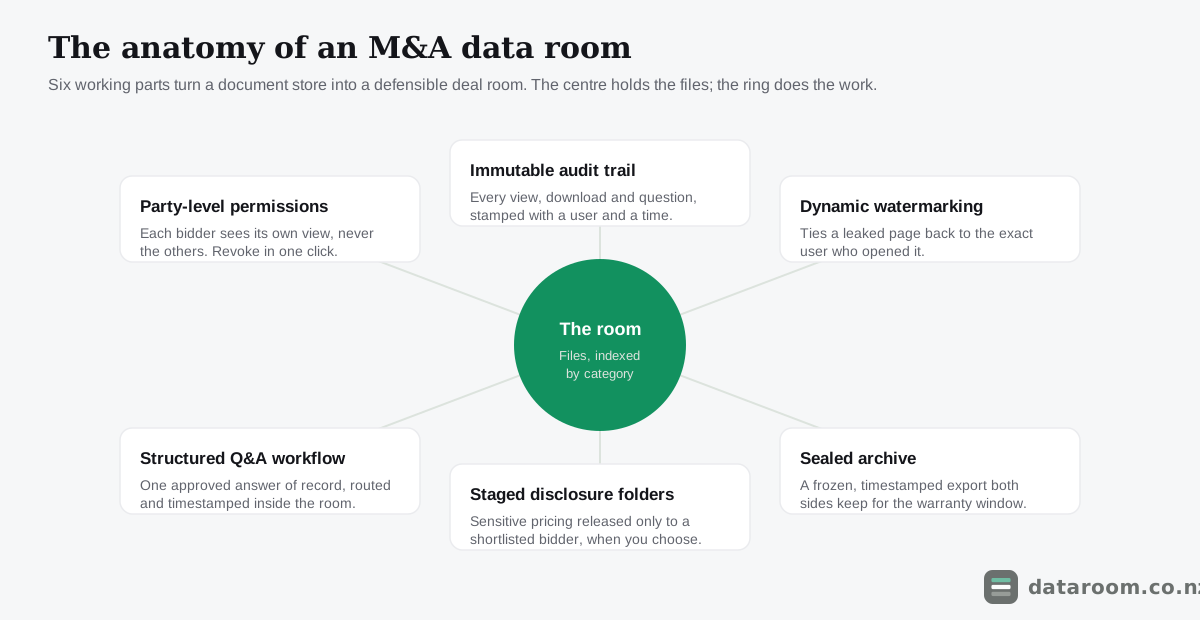
Together those parts do three things a shared drive or an email thread simply cannot.
They let several bidders run in parallel without ever seeing one another. They create an immutable record of your disclosure. And they signal professionalism, because buyers read a tidy, well-permissioned room as a proxy for a well-run company.
For the tool itself, see what is a virtual data room; for the mechanics of access and logging, how does a virtual data room work.
Why does what a buyer sees decide the price?
Price in an M&A deal is not set once. It is negotiated down through diligence, and the room is where that erosion is either prevented or invited.
Picture a Tauranga horticulture business selling to a trade buyer for around $12 million. The heads of agreement name a headline number. The binding price is whatever survives the buyer’s advisers working through the room.
Every gap they find is a lever.
An unsigned lease. An undisclosed dispute. A customer contract with a change-of-control clause nobody flagged. Each one becomes a reason to retrade the price or widen the warranties. A clean, complete, navigable room removes those levers before the buyer can reach for them.
The deeper reason to obsess over disclosure is legal, not presentational.
New Zealand share and asset sales run on a web of warranties, and a buyer who suffers a loss after settlement can bring a claim for something they say was not disclosed. Your defence, very often, is the room: proof that the document sat in a folder the buyer’s adviser opened on a given date.
That is why the audit trail matters as much as the security. A record you cannot reconstruct is a defence you do not have.
In an M&A deal the data room is not a filing cabinet, it is your disclosure record. What a buyer saw, and when, is the difference between a clean exit and a warranty fight.
Where does the room sit in the deal?
The room is not open for the whole transaction, and knowing exactly when it opens and closes is how you size the plan term.
It opens before buyers arrive, during preparation, while you build the folder tree and index documents. It stays live through diligence, negotiation and completion. It closes into a sealed archive once the money moves.
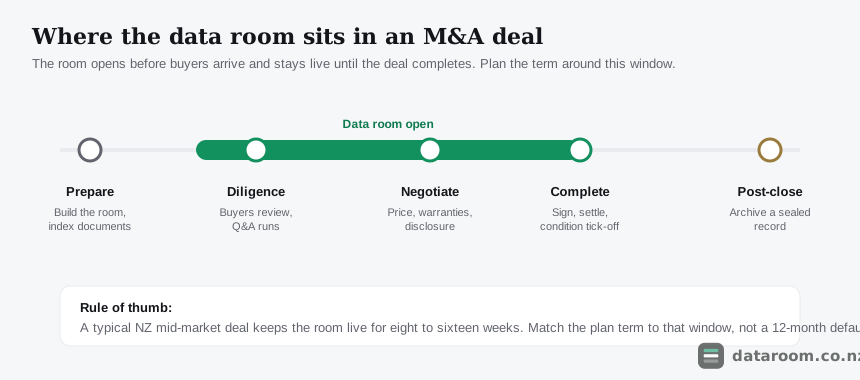
Most New Zealand mid-market deals keep the room live for eight to sixteen weeks end to end.
That window is the single most useful number for budgeting, because it tells you the term to buy. A room you need for a nine-week deal should never be locked into a default twelve-month contract. For realistic timing on the diligence stage itself, how long does due diligence take in New Zealand gives the working ranges.
What documents does an NZ buyer expect?
Buyers work from a due diligence request list, so a good room anticipates it category by category rather than waiting to be asked.
The spine below is the standard shape of an NZ M&A disclosure. Build the folder tree around it, number the folders, and a scramble becomes a system.
| Category | What buyers expect | Typical volume | NZ-specific note |
|---|---|---|---|
| Corporate | Constitution, share register, board minutes, group structure | Low to medium | Cross-check the share register against the Companies Office record |
| Financial | 3 to 5 years accounts, management reports, tax returns, forecasts | High | GST and PAYE filings; note any IRD instalment arrangements |
| Commercial | Customer and supplier contracts, key terms, concentration | High | Flag change-of-control clauses a sale could trigger |
| People | Employment agreements, key-person terms, restraints, disputes | Medium | Holidays Act compliance and any remediation history |
| Property & assets | Leases, titles, plant register, resource consents | Medium to high | Scanned leases and consents inflate page counts fast |
| Intellectual property | Trade marks, domains, software licences, IP assignments | Low to medium | Confirm ownership of contractor-created IP |
| Compliance & litigation | Insurance, permits, disputes, regulatory correspondence | Variable | Disclose known claims; silence here is where deals unwind |
Our due diligence checklist for New Zealand deals expands each request, and what documents go in a data room breaks it down by deal type.
Which categories quietly sink deals?
Three categories cause more trouble than the rest combined, and none of them is financial.
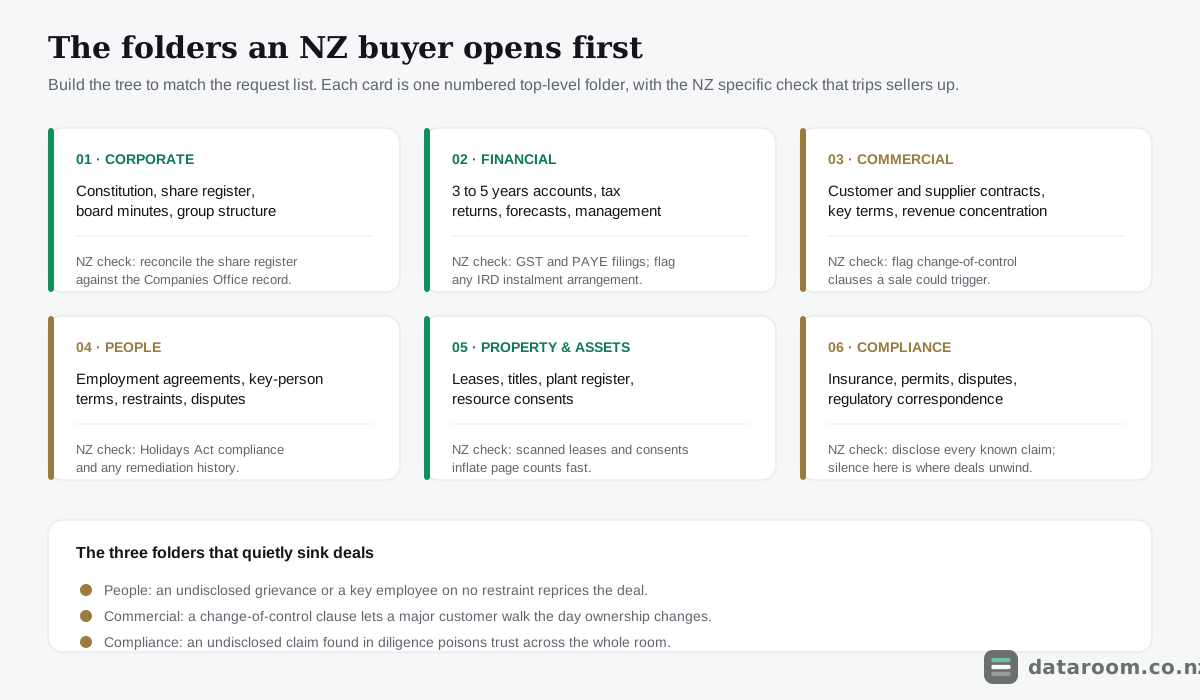
People files come first. A Holidays Act remediation history, an undisclosed personal grievance, or a key employee on no restraint at all can each reprice a deal, because the buyer is really buying the team.
Commercial contracts come second. The specific risk is the change-of-control clause, a term that lets a major customer or supplier walk the moment ownership changes. If your revenue leans on a few contracts and one can be terminated on sale, the buyer needs to know before they price, not after.
Compliance and litigation is third. The rule here is brutal: disclose every known claim, because an undisclosed one discovered in diligence poisons trust across the entire room.
The discipline that pays off is closing these holes before a buyer turns them into questions.
An empty folder labelled “employment agreements” reads worse than a full one. It tells the buyer you are either disorganised or hiding something, and both cost you leverage.
Where a document genuinely does not exist, say so plainly in the index. Do this work in preparation, while there is time and no adviser watching the clock.
What does a room cost in NZD?
Price should track the shape of the deal, not the ambition of the brochure.
A sub-$5M business sale does not need the machinery of an NZX-scale platform. A $40M transaction with several bidders will strain a single-workstream flat plan.
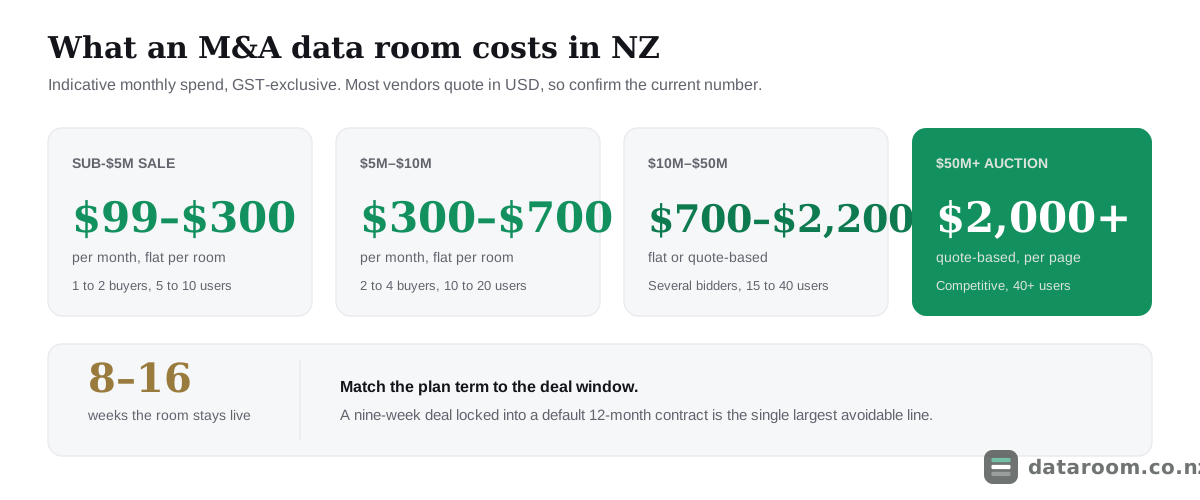
The table below maps common New Zealand M&A scenarios to a sensible spend. Every figure is indicative, GST-exclusive, and worth confirming, because most vendors quote in USD and negotiate hard on term length.
| Deal profile | Bidders / users | Charging model that fits | Sensible monthly spend (NZD) |
|---|---|---|---|
| Small business sale, sub-$5M | 1 to 2 buyers, 5 to 10 users | Flat per room | $99 to $300 |
| Lower mid-market, $5M to $10M | 2 to 4 buyers, 10 to 20 users | Flat per room | $300 to $700 |
| Mid-market, $10M to $50M | Several bidders, 15 to 40 users | Flat or quote-based | $700 to $2,200 |
| Upper mid-market, $50M+ | Competitive auction, 40+ users | Quote-based, per page | $2,000+ |
| Distressed / fast sale | Compressed timeline | Monthly rolling flat | $150 to $700 |
Our virtual data room pricing in New Zealand guide breaks the four charging models down in full, and is a virtual data room worth it weighs the spend for a small deal both ways.
How do the charging models bill you?
The number on the quote is only half the story. What matters for an M&A deal is which model the number sits inside, because that decides whether your bill is predictable or a moving target.
| Model | How it bills | Best for | The trap to watch |
|---|---|---|---|
| Flat per room | One fixed monthly fee, unlimited pages | Most NZ SME and mid-market sales | Term length; avoid a 12-month lock-in for a one-off deal |
| Per page | Charged by pages uploaded or stored | Large, predictable, low-volume sets | A scan-heavy NZ deal balloons the count fast |
| Per user | Charged by named user or seat | Small, tightly controlled bidder lists | A competitive auction with many advisers gets pricey |
| Quote-based | Custom, negotiated per deal | Upper mid-market and auctions | Opaque; get the term and page policy in writing |
The recurring M&A trap is the per-page model applied to a deal built from scanned paper.
A New Zealand small-business sale runs on leases, resource consents, historical accounts and employment files, exactly the material that balloons a page count. If you cannot predict your page count within a wide margin, choose a flat per-room plan so the cost is capped.
See which providers suit an NZ M&A deal
Compare permissions, Q&A, certification and indicative NZD pricing across every provider we track, in one table.
How do you set up the room, step by step?
You can stand up a deal-ready room in an afternoon, provided you prepare in the right order.
The sequence below front-loads the work that prevents expensive mistakes, because almost every problem an M&A room throws up is a preparation problem in disguise.
Set up the room in six steps
Prepare the content and permissions before you invite anyone. The order matters more than the speed.
- 1
Scope the deal and pick the term
Estimate your likely bidders, your timeline and how many weeks the room needs to stay open. Choose a plan whose minimum term matches that window rather than a default 12-month lock-in you will not use.
- 2
Build the folder tree first
Create a numbered structure that mirrors a due diligence request list before you upload anything. A tree built to match how buyers search saves days of re-filing once documents start arriving.
- 3
Load and index the document set
Upload by category, name files predictably, and mark any genuine gaps in the index. Fill the obvious holes now, while there is time and no buyer watching the clock.
- 4
Set permissions by party
Create separate views for your team, each bidder and their advisers. Default sensitive material to view-only with watermarking, and stage the most confidential folders for release later.
- 5
Configure Q&A and roles
Turn on the Q&A workflow, assign question owners on your side, and agree who signs off answers. This keeps diligence out of email and your disclosure in one place.
- 6
Test, then invite
Log in as a test bidder to confirm each party sees only what it should. Only then send invitations, and watch the audit trail from the first login.
The one step people skip is the second-to-last: testing the room from a bidder’s chair before anyone real is let in.
It takes ten minutes to log in as a dummy external user and confirm that Bidder A cannot see Bidder B’s folders or questions. It is the cheapest insurance in the whole process.
A permissions error discovered by a competitor is not a bug you can quietly fix. It is a disclosure you cannot take back.
For a fuller walkthrough see how to set up a virtual data room; for the seller’s whole journey, selling a business in New Zealand.
How do you run Q&A without losing control?
Diligence generates a flood of questions, and the single most common way an M&A room descends into chaos is letting those questions leak into email.
Once that happens you lose your single source of truth. Two advisers get two different answers. Nobody can reconstruct what was said. And your disclosure record grows a hole exactly where you can least afford one.
Email also breaks party separation, because a reply-all or a forwarded thread can put one bidder’s question in front of another without anyone intending it.
Run Q&A as a workflow inside the room instead.
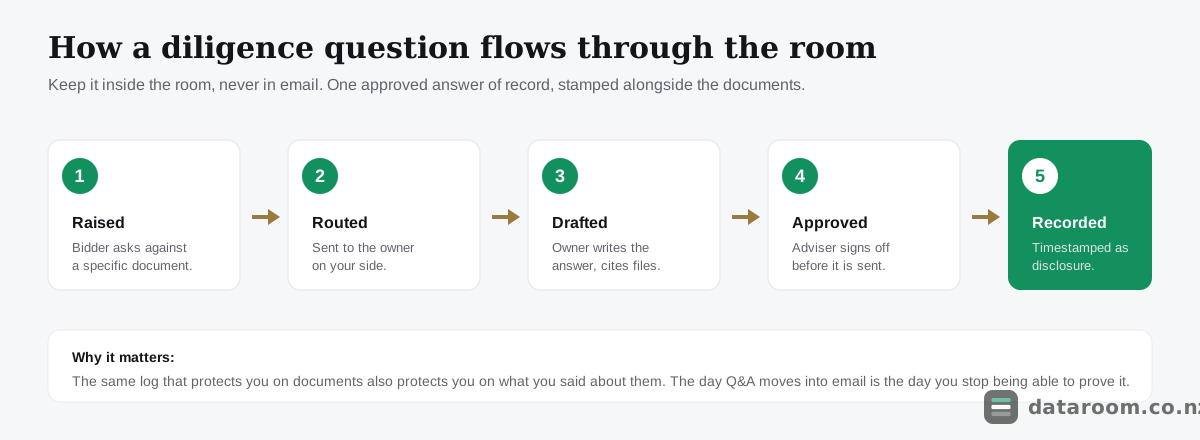
A proper Q&A module lets a bidder raise a question against a specific document, routes it to the right owner on your side, tracks its status, and records one approved answer of record, timestamped alongside everything else.
That answer becomes part of the disclosure. The same log that protects you on documents also protects you on what you said about them.
The feature is also a pricing signal. Structured Q&A tends to appear from the mid tier up, so a deal that will attract lawyers who expect it should not be run on the cheapest room. Our guide to running data room Q&A without losing control covers the roles and etiquette in detail.
The day Q&A moves into email is the day you stop being able to prove what you told a buyer. Keep every question and every answer inside the room, or your disclosure record has a gap you cannot close later.
Which capabilities actually matter?
Two rooms at the same price can offer very different protection, and the gap only shows up when a deal gets serious.
The matrix below marks the capabilities that separate a genuine deal room from a document store, and roughly where each appears as you move up the market.
| Capability | Entry (~$99 to $300) | Mid (~$300 to $900) | Enterprise (~$900+) |
|---|---|---|---|
| Party-level permissions & instant revoke | ✓ | ✓ | ✓ |
| Full immutable audit trail | ✓ | ✓ | ✓ |
| Dynamic watermarking | ✗ | ✓ | ✓ |
| Structured Q&A workflow | ✗ | ✓ | ✓ |
| Bulk upload & auto-indexing | ✗ | ✓ | ✓ |
| Staged / fenced disclosure folders | ✗ | ✓ | ✓ |
| Redaction tools | ✗ | ✗ | ✓ |
| ISO 27001 / SOC 2 certification | ✗ | ✓ | ✓ |
| Multi-bidder auction management | ✗ | ✗ | ✓ |
| Dedicated NZ-hours deal support | ✗ | ✗ | ✓ |
For a typical New Zealand mid-market sale, the two rows that decide the shortlist are structured Q&A and certification, because those are the ones a buyer’s advisers notice by their absence.
Below them, watermarking and staged disclosure are what let you release sensitive pricing or key-person salaries to a shortlisted bidder without exposing them to the whole field.
Multi-bidder auction tooling and dedicated deal support only earn their keep on a genuinely competitive process, so a bilateral deal should not pay for them.
If you want the head-to-head, Ansarada vs iDeals compares two platforms often shortlisted for NZ transactions, and best virtual data rooms in New Zealand ranks the wider field.
A flat plan sized for a straightforward NZ deal
Predictable monthly pricing, a 14-day free trial, and no per-page metering to model.
How should you structure folders and permissions?
Structure and permissions are where an M&A room diverges most sharply from a fundraising or syndication one, because you are usually running several counterparties at once. Get either wrong and the room turns from an asset into a liability.
A folder tree buyers can navigate blind
A good folder tree mirrors the due diligence request list, uses numbered top-level folders, and never buries an important document three clicks deep.
Consistency beats cleverness every time.
Number everything. Name files to a predictable pattern. Keep the depth shallow so a buyer’s junior analyst can find a lease without emailing you.
The test is simple: a buyer’s adviser who has never seen your business should be able to open the room and locate any standard document by its number and label alone, without a guided tour. Our data room folder structure template gives a tree you can lift and adapt for an NZ deal.
Setting permissions by party, not by person
Permissions in an M&A room should be set by party, not by individual, because the risk you are managing is between counterparties, not between colleagues.
- Your own side sees everything, including the admin and Q&A management views.
- Each bidder sees a clean copy of the disclosure folders and never the other bidders, their users or their questions.
- Advisers inherit their client’s view, so a buyer’s lawyer never sees more than the buyer does.
- The most sensitive material, customer pricing, key-person salaries, live litigation, defaults to view-only with dynamic watermarking, in a staged folder released only to a shortlisted bidder.
Instant revoke is what ties this together. If a bidder drops out, you close their access in one click and the audit trail still records exactly what they saw while they were in.
Tight permissions plus a complete log is the core of a defensible process.
What security should you demand?
For an M&A deal you are handing a competitor’s advisers your most sensitive information, so the security bar is not a preference. It is a precondition.
Insist on all of the following, for every single user:
- Encryption in transit and at rest.
- Granular, folder-level access control.
- Dynamic watermarking.
- A full immutable audit trail.
- Two-factor authentication.
Anything less and you are trusting the most valuable data in the business to a tool built for convenience rather than confidentiality.
Treat independent audit as a baseline, not a marketing extra. ISO 27001 and SOC 2 tell you a provider’s security has been examined by a third party instead of merely asserted on a landing page.
Our guide to ISO 27001, SOC 2 and VDR certifications explains what each one covers, and virtual data room security for a New Zealand deal sets the full checklist. If a provider cannot show you a current certification, assume the control is aspirational and price the risk accordingly.
How does New Zealand law shape the room?
There is a New Zealand legal layer that sits on top of the technical one, and it changes how you configure the room rather than just which one you buy.
Sharing personal information, employee files, customer records, anything that identifies a person, is governed by the Privacy Act 2020. Moving that data offshore or into an overseas-hosted room engages the cross-border disclosure rules directly.
The Office of the Privacy Commissioner sets out those obligations through the privacy principles, and our Privacy Act 2020 obligations guide translates them into practical room settings.
For the national baseline on protecting business data, CERT NZ is the sensible reference.
One more New Zealand specific catches otherwise careful sellers: keep your disclosure consistent with the public record.
A buyer’s lawyer will pull your company file from the Companies Register and cross-check directors, shareholding and registered charges against what is sitting in the room. A mismatch, even a wholly innocent one, reads as a red flag and slows everything down.
Ask any provider where your data is hosted, and under whose jurisdiction it sits, before you upload a single file.
What mistakes slow or sink an NZ deal?
The failures repeat across deals, and every one of them is avoidable with preparation.
- A messy or gap-ridden document set invites buyers to dig harder and bid lower.
- Loose permissions leak one bidder’s interest to another, or expose staff salaries to a direct competitor.
- Letting Q&A drift into email destroys the single source of truth that is your disclosure record.
- Signing a twelve-month contract for a nine-week deal wastes money for no benefit.
- Treating the room as an afterthought, thrown together the week diligence starts, is precisely how gaps and errors creep in under pressure.
Our 10 data room mistakes that slow down NZ deals catalogues the full list.
Do smaller or distressed deals still need one?
Yes, and often more than the seller expects.
A sub-$5M bilateral sale still generates a disclosure record you may have to defend, and a flat plan under NZD $300 a month is cheap insurance against a warranty fight that could cost multiples of the sale price.
A distressed or fast sale is the case where people are most tempted to skip the room, and the worst time to do it. Compressed timelines are exactly when permissions get rushed and disclosure gets sloppy, so a monthly rolling flat plan that keeps the record intact is worth the small spend.
The only deals that genuinely do not need a room are the very smallest, single-buyer, handshake sales with almost nothing to disclose. Everything above that is better off with the audit trail than without it.
How do you close and archive the room?
Closing the room is a step in its own right, not an afterthought once the money moves.
At completion you lock the room so no further changes can be made, then export a sealed, timestamped copy for both sides to hold.
That frozen record is the point of the whole exercise. It fixes, permanently, what was disclosed and when, which is the evidence you will reach for if a warranty question arises a year later.
Two practical points make the close cleaner.
First, agree the archive format and who holds it in the sale agreement itself, so it is not a scramble on completion day. Most platforms produce a structured export, but the parties should know in advance what they are getting.
Second, keep the archive as long as your warranty and limitation periods run, because that is the window in which the record still matters.
For a competitive process that never reached a deal, the same discipline applies in reverse. Revoke every unsuccessful bidder’s access, confirm the log shows what each of them saw, and retain that evidence too.
The room’s value does not end when the deal does. It ends when the last claim window closes.
M&A data room FAQ
Do I really need a virtual data room to sell my New Zealand business?
For anything beyond the smallest bilateral sale, yes. A data room gives you party-level permissions so bidders never see each other, and a timestamped audit trail that becomes your record of what you disclosed. That record is your best defence if a warranty claim surfaces after settlement, which a shared drive or an email chain simply cannot provide.
How much should an M&A data room cost in NZ?
Indicatively, a sub-$5M sale runs on a flat plan of about NZD $99 to $300 a month, a $5M to $10M deal around $300 to $700, and a $10M to $50M deal roughly $700 to $2,200. Figures are GST-exclusive and often quoted in USD, so confirm the current quote and watch for per-page metering on a document set built from scans.
How long should I keep the data room open?
Most New Zealand M&A deals keep the room live for eight to sixteen weeks, from preparation through diligence to completion. Match the plan term to that window and favour a monthly rolling contract for a one-off deal, rather than signing a default 12-month lock-in you do not need. Keep the sealed archive for as long as your warranty periods run.
What security certification should the provider have?
Insist on ISO 27001 or SOC 2, which mean the provider's security has been audited independently rather than just claimed. Alongside that, require encryption at rest and in transit, granular permissions, watermarking, two-factor authentication and a full audit trail, and confirm where your data is hosted for Privacy Act 2020 purposes.
How do I stop one bidder seeing another in a competitive sale?
Set permissions by party rather than by person. Give each bidder a separate view of the disclosure folders, keep their Q&A private to your side, and stage the most sensitive material so it releases only to a shortlisted bidder. If a bidder withdraws, revoke access in one click; the audit trail still records what they saw.
Can I just use Dropbox or Google Drive instead?
For a serious deal, no. Consumer file-sharing lacks the granular permissions, watermarking, structured Q&A and immutable audit trail an M&A process needs, and the missing audit trail is exactly what leaves you exposed in a dispute. See our comparisons of a data room against Dropbox and Google Drive for the full gap.