

How does a virtual data room work?
Skip the tour of features for a moment and start with the choice most New Zealand sellers actually face. When confidential documents have to leave the building, you reach for one of three tools, and only one was built to control what happens next.
Data room, shared drive or an emailed pack: which one controls disclosure?
Read the matrix before the prose. It shows, at a glance, what a purpose-built room does that the two everyday alternatives cannot.
| Capability | Virtual data room | Shared drive (Dropbox / Drive) | Emailed PDF pack |
|---|---|---|---|
| Per-folder view / download / print rights | ✓ | ✗ | ✗ |
| Dynamic per-user watermarking | ✓ | ✗ | ✗ |
| Full audit trail of every view | ✓ | ✗ | ✗ |
| Structured Q&A workflow | ✓ | ✗ | ✗ |
| Revoke access after you have shared | ✓ | ✗ | ✗ |
| Engagement analytics per bidder | ✓ | ✗ | ✗ |
| Runs in the browser, nothing to install | ✓ | ✓ | ✓ |
| Free trial available | ✓ | ✓ | ✗ |
Read the pattern, not the rows. A drive syncs files and an email attaches them; neither can hide a folder from one bidder, prove who read what, or go dark on demand.
That gap is the whole reason the category exists. Once real confidential information or more than one bidder is in play, the columns that read “no” stop being nice-to-haves and start being the thing you actually needed.
Three quick rules settle most cases:
- One trusting counterparty, a handful of pages. An emailed pack or a shared drive can be fine. We draw the exact line in virtual data room vs Dropbox.
- Several bidders, or a professional adviser on the other side. You want the control and evidence layers, full stop.
- Anything with staff or customer personal information. The audit trail is not optional; it is your compliance record.
The rest of this guide is the mechanics of that first column, in the order an administrator meets them.
So what is the actual mechanism underneath?
Most people picture a data room as a tidier Dropbox. Wrong mental model. Storage is the least interesting part of the product.
What makes a virtual data room (VDR) a data room is a thin layer of software that sits between a guest and every file. The guest never receives the document. They receive a rendered, watermarked stream of it, and the moment they open it the room writes down that they did.
If you are still deciding whether you need one at all, start with what a virtual data room is. Here we assume the “what” and go straight at the “how”.
A shared link trusts whoever holds it. A data room trusts a named person you can switch off. That difference is the entire product.
The life of one document, from upload to locked archive
Every file in the room travels the same arc. Follow one document through it and the whole system makes sense.
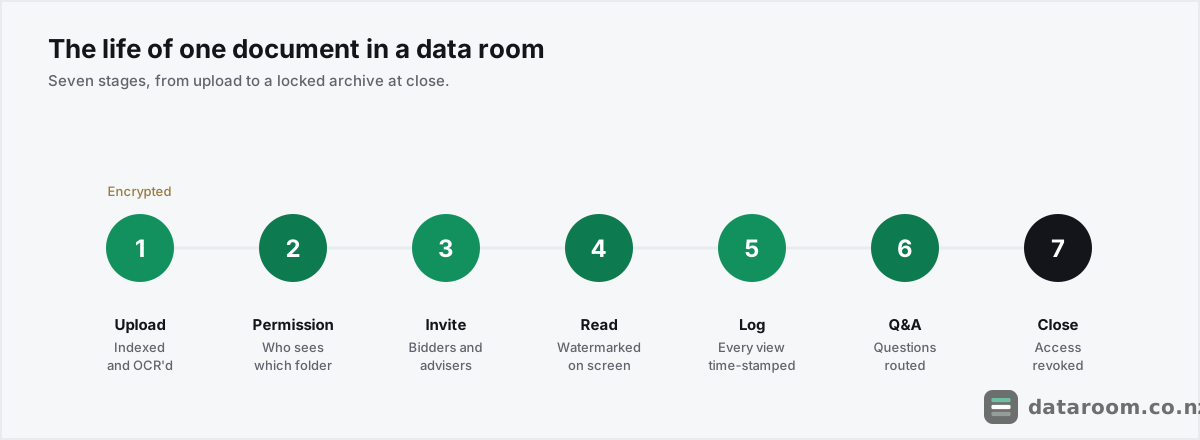
Ingest, permission, invite, read, log, answer, close. Seven stages, and an administrator touches each one deliberately. The next sections walk them in that order, but it helps to see the moves as a single checklist first.
The same lifecycle, as five moves you make
The document-level actions an administrator actually takes, start to finish.
- 1
Build the index, then upload
Set up the folder skeleton to match how buyers think, then bulk-upload. The room auto-indexes and OCRs the files so everything is searchable from day one.
- 2
Assign permissions per guest
For each user or group, choose view-only, print, or download on each folder. Hide anything a given party has no reason to see.
- 3
Invite by email or SSO
Send invitations. Guests set a password, clear two-factor, and see only what you granted. Nothing to install.
- 4
Monitor the audit trail and run Q&A
Watch who reads what, route questions through the Q&A module to the right expert, and log every answer against its document.
- 5
Export the record, then revoke access
At close, export the file index and full activity log for both sides, keep a read-only archive, and switch every guest off.
What happens the second a document lands in the room?
You bulk-upload folders straight from your computer and the platform mirrors your structure. Good rooms swallow drag-and-drop of hundreds of files at once, then build a numbered index so that document 4.2.1 is 4.2.1 for everyone who logs in.
Two things happen quietly on ingest that a shared drive never does. Optical character recognition (OCR) reads the text inside scanned PDFs and images, so a buyer can search “change of control” across three years of contracts instead of opening each file. And the file is encrypted the moment it lands on the provider’s servers, not later and not optionally, usually with AES-256.
Order of upload barely matters. A data room is organised by its index, not by upload date.
What matters is that the index maps to how buyers think, and that the files are legible to a stranger.
Habits that separate a clean room from a slow one
- Build the skeleton before you invite anyone. Empty, numbered folders first, files second.
- Name files for a stranger. “Lease_Tauranga_2019-2027_signed.pdf”, not “scan_047.pdf”.
- Split monster PDFs. A 400-page bundle scanned as one file is unsearchable and un-permissionable.
- Kill duplicates on the way in. Every stray copy is one more thing to version and, on some plans, one more page to pay for.
Getting that skeleton right before anyone is invited is the single biggest time-saver in the whole process. We keep a folder structure template for NZ deals as a starting point.
A rushed, badly labelled upload is one of the data room mistakes that slow NZ deals down. Buyers cannot find things, ask more questions, and read delay as risk.
How does the room decide who sees what?
This is the mechanism that separates a VDR from file sharing. Access is set three ways at once: per user, per folder, per action.
Permissions arrive as tiers you assign to each guest, and you pick the lowest rung that still lets a party do its job.
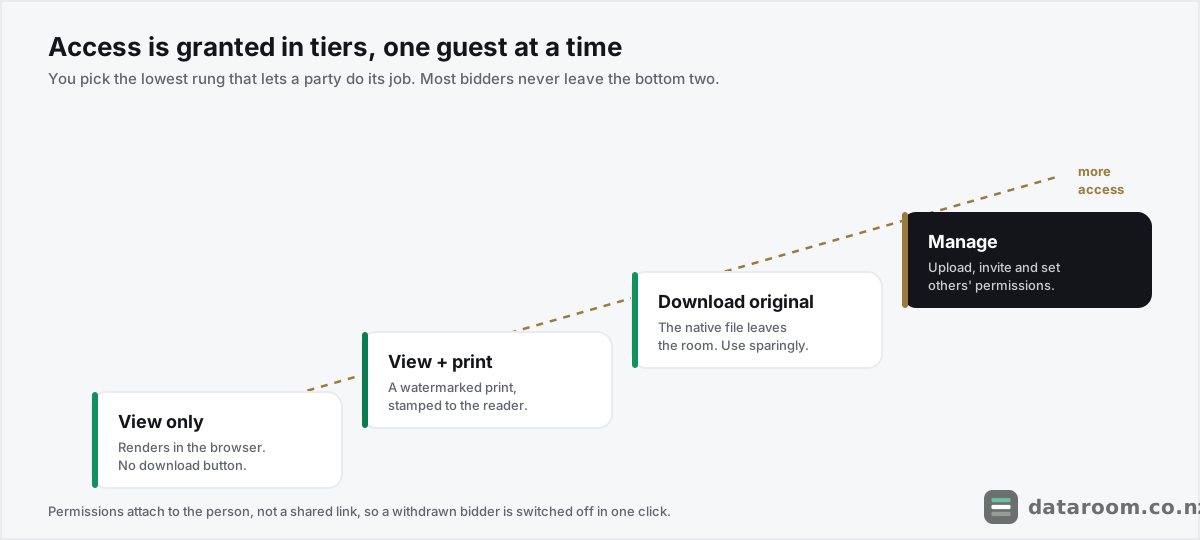
- View only. The file renders in the browser. No download button, no local copy.
- View and print. A controlled print, usually with a watermark burned onto the page.
- Download original. The native file leaves the room. Reserved for parties who genuinely need it.
- Manage. Full admin: upload, invite, and change other people’s permissions.
Because permissions attach to the person, not the link, you get things a shared password never gives you. Parallel bidders can sit in one room, each seeing a different slice, none aware the others exist. A withdrawn bidder is flipped off in a click and every file they could reach goes dark. There is no credential to rotate and no share still live in an inbox next year.
Picture a Tauranga horticulture co-op weighing two trade buyers and a private-equity suitor at the same time. Each sees a different slice, none sees the others, and the permission table, not someone’s memory, is the single answer to “who can see this”.
What is “bank-grade security” actually made of?
Treat the slogan with suspicion and ask what each layer does. Four do the real work.
The four layers that matter
- Encryption. Data is encrypted in transit (TLS, the padlock in your browser) and at rest (usually AES-256). That protects the file if traffic is intercepted or a disk is stolen.
- Dynamic watermarking. On open, the room stamps the viewer’s email, IP address and the date across the page in real time. It will not stop a determined leaker, but it makes any screenshot traceable to one person, which changes behaviour.
- Two-factor authentication. A password plus a one-time code means a leaked password alone will not open the room.
- Remote revocation. Files are streamed, not owned, so an administrator can pull access at any moment. Some rooms revoke rights on documents already downloaded.
CERT NZ recommends two-factor authentication as a baseline control for exactly this reason, and any serious VDR offers it.
Two more layers sit under the marketing and are worth asking about. Independent certification, ISO 27001 or SOC 2, means a third party has audited the controls rather than just the brochure. Data residency, where the servers physically sit, matters if your buyer or a regulator cares about offshore hosting.
The short version: encryption and 2FA are table stakes, and the audit trail is the feature that earns its keep. We go deeper on what to insist on, and what to ignore, in the guide to virtual data room security for a New Zealand deal.
How do guests get in, with nothing to install?
There is nothing to download. Entry is quick and the same on any device.
A guest receives an email invitation, sets a password, and clears the second factor. They then land in a browser view of only the folders you granted, on a laptop, tablet or phone alike.
Larger firms connect the room to single sign-on (SSO) so advisers log in with their work identity. Smaller NZ deals rarely need that; an email invite plus 2FA is plenty. Either way the guest never touches the underlying files, only a rendered, watermarked view.
There is a practical NZ wrinkle worth planning for. Deal teams here are small and often part-time on the transaction, so the same lawyer or accountant may be invited to three live rooms at once. Named-user permissions handle that cleanly: one person, one identity, three separate slices of access, none of them leaking into the others. It also means onboarding a late-arriving bidder is a two-minute job, not a re-share of a password everyone already has.
You control the front door too. Rooms let you set session timeouts, restrict access to certain IP ranges, and require re-authentication on sensitive folders, so a laptop left open in a shared office does not become an open room.
What does the audit trail actually capture?
Then the ledger starts. The moment a guest does anything, the record captures more than most people expect.
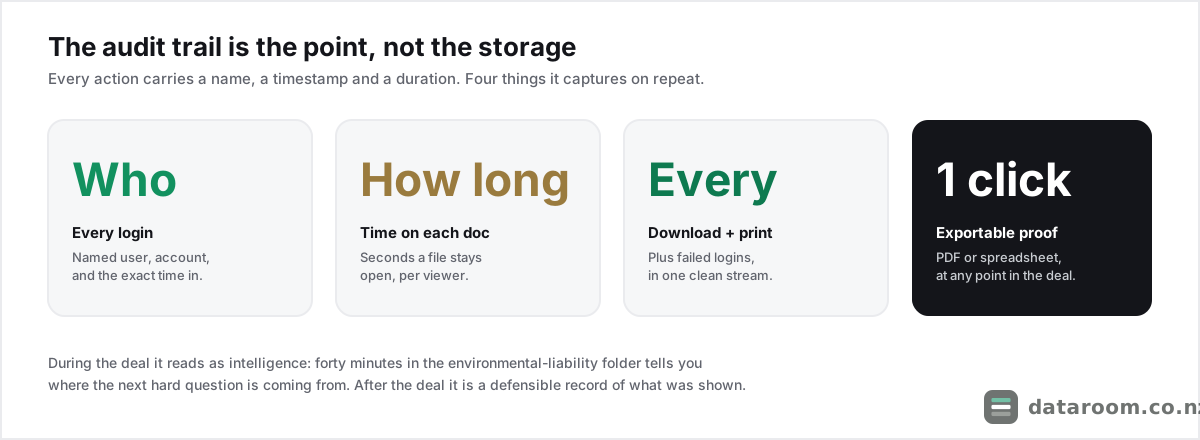
- Who logged in, from which account, and when.
- Which document they opened, and for how long it stayed on screen.
- Every download, print and failed login, in the same stream.
- Exportable evidence, as a PDF or spreadsheet, at any point in the deal.
The trail does two jobs. During the deal it is intelligence: if a buyer’s lawyer spent forty minutes in the environmental-liability folder, you know where the next hard question is coming from before it arrives.
After the deal it is proof: a defensible record of exactly what each party was shown and when, which matters if a warranty claim surfaces months later.
The analytics live here too. Engagement heat-maps show which bidder is most active, so an adviser reads genuine interest instead of guessing from polite emails.
How does structured Q&A replace a messy email thread?
During due diligence, buyers ask questions, sometimes hundreds. Run that over email and it becomes ungovernable: duplicate queries, questions sent to the wrong person, no record of what was answered.
A data room swaps the thread for a workflow. A buyer raises a question against a specific document or folder, it routes to the right subject expert on your side, and status, priority, category and a deadline keep the queue moving. The answer is logged next to the question for the audit record.
The discipline pays off in ways an inbox cannot match. No duplicates, because a question tied to a document is visible to your whole team. No leaks between bidders, because each side’s questions and answers stay walled off. And a closing pack that half writes itself, because the full Q&A log exports as part of the record.
That discipline compresses the back-and-forth that usually stretches a deal by weeks. Getting it right is a topic on its own, which is why we wrote a guide to running data room Q&A without losing control.
How does versioning cope as documents change mid-deal?
A data room is rarely static. Diligence surfaces gaps, a contract gets re-signed, last month’s management accounts arrive, and buyers keep asking for one more thing. This is where a shared drive quietly falls apart.
When you replace a file, the room keeps the old version in the background instead of silently overwriting it. The audit trail records which version each party actually saw. If a buyer later claims they were shown stale numbers, you point to the exact document, version and timestamp they opened.
Two mechanics keep that manageable at scale. A staging area lets you prepare, re-index and re-label new documents privately, then release them in a batch, so bidders are not watching a half-built folder fill up in real time. Notifications and subscriptions mean guests who follow a folder get an alert when something lands, so you are not chasing people by email.
Take a concrete case. A Hamilton manufacturer mid-sale re-signs a key supply contract in week five, and the June management accounts arrive the same week. You load both into staging, check the numbering, then release them together with a short note in the Q&A log. Every bidder sees the new versions at the same moment, the old ones stay retrievable in the background, and the audit trail can later prove which draft each party actually opened. On a shared drive that same swap would silently overwrite the file, and you would have no way to answer “which numbers did we show them” six months on.
How long does a room stay open on a typical NZ deal?
A small New Zealand transaction usually keeps its room live for six to ten weeks, then archives it. The shape of that window is fairly predictable.
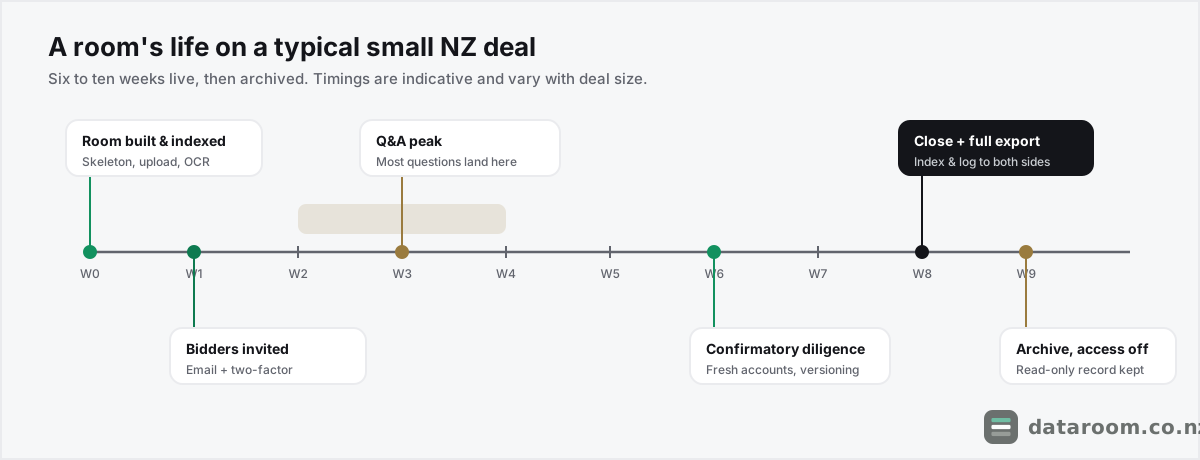
The room is built and indexed before anyone is invited, bidders come in around week one, and the question volume peaks in the first fortnight of access. Confirmatory diligence, fresh accounts and last re-signed contracts tend to land closer to the pointy end.
Then the deal ends, one way or the other, and the administrator generates a closing record.
- A full export of the file structure and the complete audit log, so both sides keep an identical archive of what was disclosed.
- A bound “data room index” PDF for the legal file, on most deals.
- A read-only archive of the closed room for your own records, without leaving it open to the counterparties.
After that, access is revoked. The moment a deal completes or collapses, every guest goes dark; nobody keeps a lingering copy on a personal drive, and there is no orphaned share sitting live months later. For a fuller view of the calendar, see how long due diligence takes in New Zealand.
What does it run to in New Zealand dollars?
Pricing turns on how the provider meters usage: by page, by user, or a flat monthly rate. For a typical small-to-mid NZ transaction the figures below are a fair guide. Treat every number as indicative and confirm the current quote, since plans and GST treatment change.
| Pricing model | How it is metered | Typical small-deal cost (NZD/mo) | Best suited to |
|---|---|---|---|
| Flat-rate | Fixed price, set storage and user caps | $150 to $600 | Predictable small deals and fundraises |
| Per-page | Charged per page uploaded, often with overage | $0.40 to $0.85 / page | Small, document-light deals |
| Per-user | Charged per named guest per month | $25 to $60 / user | Deals with a handful of reviewers |
| Per-room / enterprise | Custom, unlimited pages and users | $1,000 to $1,200+ | M&A with many bidders and heavy Q&A |
The traps live in the metering, not the headline. Per-page looks cheap until the buyer asks for board packs; a Nelson aquaculture business scanning consents, leases and plant registers can clear hundreds of pages before a single question is asked. Per-user punishes an open process, because inviting two bidders’ full teams plus advisers doubles the seat count overnight. Minimum terms outlast the deal, so a room you need for nine weeks can come locked to twelve months. And GST and currency ride on top, since most vendors quote GST-exclusive and many quote USD.
For most NZ deals a flat monthly rate is easier to budget. We break the maths down, including the overage traps, in the full guide to virtual data room pricing in New Zealand. If budget is the whole question, start with the cheapest rooms for small NZ deals.
Compare data rooms side by side
Security, features, support and pricing for the providers that serve NZ deals, in one table.
Does a data room satisfy the Privacy Act 2020 and other NZ law?
Running confidential files, especially anything with personal information about staff or customers, brings New Zealand privacy law into scope. Under the Privacy Act 2020 you must keep personal information secure and only use or disclose it for a proper purpose.
A data room helps you meet that in practice on three fronts. Permissions limit disclosure to who genuinely needs it, encryption covers the security duty, and the audit trail is your evidence of exactly what was shared and with whom.
That record matters if a buyer walks away or a dispute arises later. We cover the obligations in plain English in sharing data in a deal and your Privacy Act 2020 duties, and the government’s business.govt.nz privacy guidance is a sensible starting point.
There is a second obligation the archive quietly serves. Directors carry record-keeping duties under the Companies Act 1993, and a disclosure archive is part of showing what was represented, and when. On an NZX-bound transaction the continuous-disclosure and verification trail matters even more, which we cover in the guide to running a data room for an NZX IPO.
Who genuinely needs this machinery, and who can skip it?
Not every transaction needs all of it. The honest line is roughly here.
Skip it for a tiny, low-risk, single-counterparty sale where two people trust each other over a handful of pages. An NDA and a shared folder can carry that.
Use it the moment you have multiple parties, real confidential information, or a professional adviser on the other side. Think a Dunedin medtech Series A, a Christchurch commercial property syndication, or a family-owned exporter fielding two trade buyers at once.
The table below maps common New Zealand situations to the tool that fits, and the one reason it fits.
| Situation | Right tool | Why |
|---|---|---|
| Sole trader emailing a lease to one trusted buyer | Emailed PDF or shared drive | Low risk, one party, nothing to prove later |
| Startup raising a seed round from three angels | Virtual data room | Parallel investors, each walled off, engagement worth reading |
| Farm or orchard sale with two trade bidders | Virtual data room | Competing bidders must not see each other or each other's questions |
| Selling a business with staff and customer records | Virtual data room | Privacy Act 2020 duty needs permissions plus an audit trail |
| Board sharing papers internally each month | Shared drive or board portal | Trusted, internal, no external disclosure to evidence |
The right answer is rarely “always a data room”. It is “a data room once you have to control disclosure, prove it, or manage more than one party at a time”. Everything below that line, a folder and an NDA can carry.
The room does not just hold the documents. It remembers who saw which version, and it forgets everyone the day you tell it to.
If you are weighing it up, see who needs a virtual data room in New Zealand and, for smaller transactions, whether a VDR is worth it for a small NZ deal. When you are ready to build one, the companion piece is how to set up a virtual data room.
How a virtual data room works: FAQ
Do people I invite need to install software?
No. A virtual data room runs in the browser. Guests get an email invitation, set a password, pass two-factor authentication, and see only the folders you granted them. It works the same on a laptop, tablet or phone.
Can I stop someone seeing a file after I have shared it?
Yes. Because files are streamed rather than owned, an administrator can revoke a user's access at any moment and every document they could reach goes dark instantly. Some rooms can even revoke rights on files that were already downloaded.
What exactly does the audit trail record?
Every login, document view, download, print and failed login, each with a name, a timestamp and a duration. You can export the log at any time. It serves as deal intelligence during due diligence and as a defensible disclosure record afterwards.
How is Q&A different from just emailing questions?
A structured Q&A module attaches each question to a specific document, routes it to the right expert, tracks its status, and stores the answer next to the question in the audit record. That removes the duplicates and lost threads you get over email.
How long does a virtual data room stay open on a deal?
On a typical small NZ transaction, roughly six to ten weeks: built and indexed before invitations go out, a question peak in the first fortnight of access, then close, export and a read-only archive with access revoked. Larger deals run longer.
How much does a virtual data room cost for a small NZ deal?
Indicatively, roughly NZ$150 to NZ$1,200 a month depending on the pricing model and deal size, usually plus GST. Flat-rate plans are easiest to budget; per-page plans can spike if the document set is large. Always confirm the current quote with the provider.
Is a data room more secure than Dropbox or Google Drive?
For a confidential deal, yes. A VDR adds per-folder permissions, dynamic watermarking, a complete audit trail and access revocation that general-purpose drives do not offer. A shared drive can be fine for small, low-risk sharing, but not for controlled disclosure.