

How to set up a virtual data room: a step-by-step guide for NZ deals
What does a data room build actually cost in New Zealand, in dollars and days?
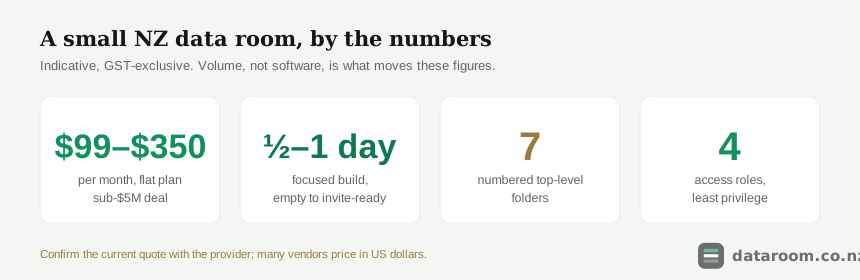
Start with the numbers, because they set every later decision. Below is the indicative spend and setup effort for the most common New Zealand deal shapes, before you read a word of method.
| Deal type | Sensible plan | Indicative NZD/mo | Setup effort |
|---|---|---|---|
| Small business sale, sub-$5M | Flat per room | $99 to $300 | Half a day to a day |
| Startup seed or Series A raise | Flat per room | $99 to $350 | A few hours |
| Property syndication offer | Flat or pooled-user | $250 to $700 | A day, plus investor onboarding |
| Mid-market M&A, $10M to $50M | Transaction platform | $700 to $2,200 | One to three days |
| NZX listing or large raise | Enterprise, quote-based | $2,000+ | A week or more, adviser-led |
Read the table, then read the caveat. Those figures move with three things, none of which is how clever the software is.
- The term. Monthly rolling billing costs more per month than an annual lock-in, but a nine-week trade sale should not be paying for a twelve-month contract to shave a few dollars.
- The exchange rate. Many vendors quote in US dollars, so a soft New Zealand dollar quietly lifts your invoice between signing and renewal.
- The volume. A lean startup raise sits at the bottom of every range; a document-heavy business sale sits at the top because the upload and redaction hours climb, not because the plan changes.
The single figure most sellers get wrong is time, and they almost always overestimate it. A data room is not an IT project. For a small deal the honest budget is a focused afternoon.
Three quick anchors before we go further, because context changes what “sensible” means.
- A flat per-room plan is the right default for a one-off transaction: one price, unlimited internal users, no meter running on every guest you invite.
- A pooled-user or transaction platform earns its higher fee only when you have multiple bidder groups, structured workstreams and a corporate adviser driving the process.
- Enterprise, quote-based pricing is for an NZX listing or a large capital raise, where the room is one line item in an adviser’s budget rather than a self-serve purchase.
For the full picture of charging models and the fees that hide in the fine print, see virtual data room pricing in New Zealand. If budget is the deciding factor, cheapest virtual data rooms for NZ small deals covers the bottom of the market honestly, including where a cheap room costs you later.
One practical tip carries into every section that follows. Start the free trial and build your real structure inside it. A trial where you upload a token file and click around teaches you nothing. A trial where you load the genuine document set and set real permissions tells you whether the room fits your deal before you sign anything.
What has to be settled before you create a single folder?
Nothing in the build is hard. The rework is what hurts, and rework comes from starting the software before you have settled three inputs. Spend twenty minutes here and you configure the room once.
First, know exactly what the deal is. The audience and the sensitivity of the material follow directly from it, and those two facts drive both the plan you buy and the structure you build.
- Selling a Hawke’s Bay winery or a Tauranga export business: acquirers are pricing warranty risk, so the legal, financial and commercial folders carry the weight and staff data needs heavy redaction.
- Raising a Series A for a Wellington medtech startup: investors are weighing upside, so the cap table, the model and the product story matter more than exhaustive coverage.
- Syndicating a commercial building: many smaller investors onboard at once, so the offer and title documents sit front and centre.
- Running a competitive trade-sale auction: a competitor may be one of your bidders, which raises the bar on staging and redaction more than any other scenario.
Our guide to who needs a virtual data room in New Zealand maps the common triggers if you are unsure where your deal sits.
Second, take a rough document inventory. You do not need every file on day one. You do need to know the categories so the structure has somewhere to put each one.
- Annual accounts and the financial model.
- Material contracts, leases and land titles.
- Employment agreements and the org chart.
- The share register, constitution and cap table.
- Resource consents, licences and insurance.
- Tax filings and IRD correspondence.
A quick pass against a due diligence checklist for New Zealand deals tells you what buyers will demand, and what documents go in a data room breaks the list down by deal type so nothing surprises you halfway through the build.
Third, set an honest timeline. Whether you need the room open for six weeks or six months decides which plan makes sense and whether a minimum term is a real problem.
- Match the plan term to the transaction, not to the calendar year.
- A nine-week trade sale should not be locked into a twelve-month enterprise term without a clear reason.
- Build in a buffer, because due diligence in New Zealand routinely runs longer than the seller’s optimistic first guess.
There is a fourth input that is easy to miss and legally loaded. Almost every deal touches personal information, which pulls the Privacy Act 2020 into the picture from the very first upload, not at the end. We come back to the mechanics in the security section, but decide now that redaction is part of the build, not a favour you do later.
How should the folder index be built for an NZ deal?
The folder index repays the most attention and usually gets the least. Get the tree right and almost everything downstream falls out of it: uploads land once in the right place, bidders self-serve, and your Q&A stays small.
A messy structure does the opposite. It breeds duplicate files, missed documents and a steady drip of “where is the lease?” questions that all land on you. Number the top-level folders so they sort predictably and so both sides refer to the same “section 4” on a call. A reliable New Zealand shape:
- 01 Corporate: company records, constitution, your current extract from the Companies Office register, shareholder agreements, cap table.
- 02 Financial: annual accounts, management reports, budgets, the financial model.
- 03 Tax: GST and income tax filings, IRD correspondence.
- 04 Legal & compliance: material contracts, litigation, insurance, consents and licences.
- 05 People: employment agreements, the org chart, key-person arrangements.
- 06 Property & assets: leases, titles, plant registers.
- 07 Commercial: customer and supplier contracts, pipeline, intellectual property.
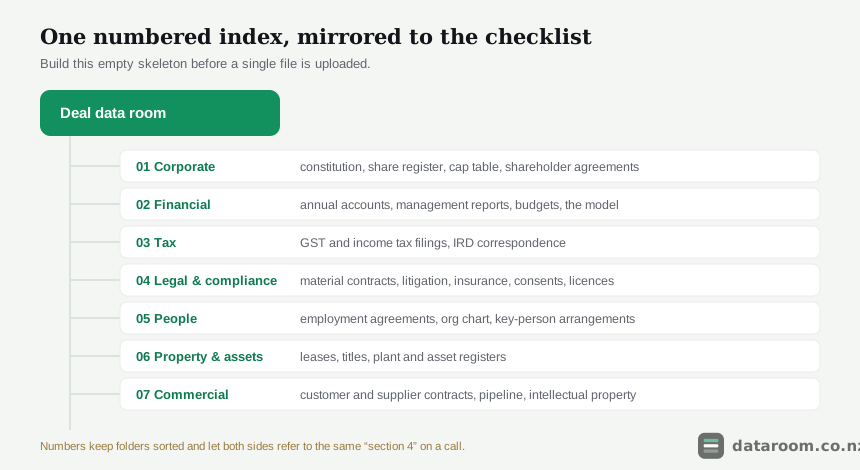
Two habits turn a decent tree into a great one.
- Build the empty skeleton first. Create all seven folders before a single file goes in. Reorganising folders after documents and permissions are attached is exactly the avoidable rework in our list of data room mistakes that slow down NZ deals.
- Mirror the checklist. If a document type appears on your due diligence checklist, it needs a home in the tree, so nothing falls between two folders and gets forgotten until a buyer asks.
Naming is the other half of the job, and it is where a tidy room quietly saves hours. Adopt a convention before the first upload and hold to it.
- Prefix with the folder number so files sort in reading order:
03-02_FY25-Annual-Accounts.pdf. - Say what the file is in the name, so a reviewer knows before they open it.
- Avoid spaces, personal initials, and versions like “final-final” that mean nothing to a bidder.
- Keep one document per file; splitting a scanned bundle into named parts is worth the ten minutes.
Our data room folder structure template for NZ deals gives a fuller tree you can copy, and it flags the folders that differ for a capital raise versus a trade sale. The difference is real: a raise leans on 01 and 02, a trade sale leans on 04 and 07, and building for the wrong emphasis is a rebuild you can skip.
The folder index is the cheapest hour and the highest return in the whole build. Get the tree right and the access model, the uploads and half your Q&A sort themselves out for free.
How do you set permissions so a competitor never sees too much?
Permissions are granted by folder, not file by file, which is exactly why the tree came first. With the structure standing, access becomes a short, auditable exercise instead of a hundred individual decisions.
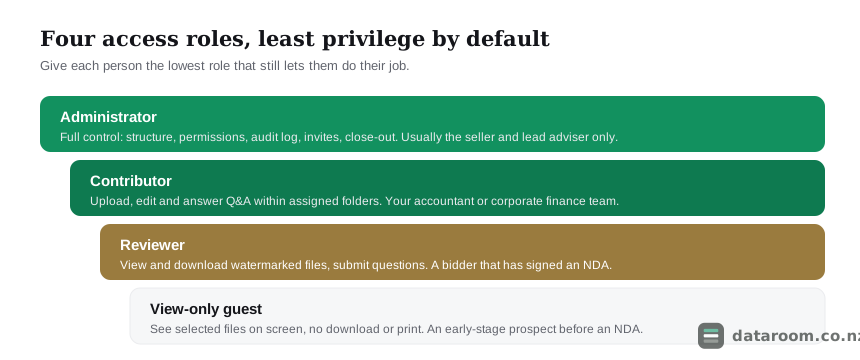
The governing principle is least privilege. Every person gets the lowest role that still lets them do their job, and not one right more. Four roles cover almost every New Zealand deal, and the matrix below shows how they typically map. Treat it as a starting template and tighten it for your situation.
| Right | Administrator | Contributor | Reviewer | View-only guest |
|---|---|---|---|---|
| View documents on screen | ✓ | ✓ | ✓ | ✓ |
| Download and print files | ✓ | ✓ | ✗ | ✗ |
| Upload and edit documents | ✓ | ✓ | ✗ | ✗ |
| Submit Q&A questions | ✓ | ✓ | ✓ | ✗ |
| Answer Q&A questions | ✓ | ✓ | ✗ | ✗ |
| Manage permissions and invites | ✓ | ✗ | ✗ | ✗ |
| See the full audit log | ✓ | ✗ | ✗ | ✗ |
In a typical deal the roles map onto real people like this.
- Administrator: you and your lead adviser only. Full control over structure, permissions, the audit log, invites and close-out.
- Contributor: your accountant and core deal team. Upload, edit and answer Q&A within assigned folders.
- Reviewer: a bidder who has signed a non-disclosure agreement. Watermarked view and questions, no editing, no admin.
- View-only guest: an early prospect you are not ready to open up to fully. Selected files on screen, download and print off.
Staging is where least privilege earns its keep, and it is not bureaucracy. It is how you keep sensitive commercial terms away from a competitor who is doing the rounds with no real intention of buying.
- Start the least-committed parties as view-only guests, before any NDA.
- Promote to reviewer once the NDA is signed, opening the folders that bidder actually needs.
- Widen access deliberately as a bidder proves genuine and progresses toward price.
- Never open the whole room to everyone at once on day one; you cannot un-see a document, and neither can a rival.
The audit trail makes this safe to run. Because every view and download is logged by user and time, you can grant access generously to a serious bidder knowing you have a complete record of what they saw and when.
Compare rooms before you build one
See indicative NZD pricing, charging models and trials for every provider we track, side by side.
What is the exact build sequence, step by step?
The thinking is done, so the mechanical build follows a fixed order, and the order is the entire point. Each step feeds the next. Resist every urge to jump ahead and invite people before the structure and the security are finished.
Set up your data room in seven steps
Follow the order. Every step skipped early costs more time later, usually while a bidder is waiting.
- 1
Scope the deal
Decide how many users you will have at the busiest point, how long you need the room open, and roughly how many documents and gigabytes are involved. These three numbers drive both the plan you buy and the structure you build.
- 2
Choose a plan and start a trial
Pick a room that matches the deal size, not the brochure. Use a free trial to build the real structure with real files before you commit to a term, and prefer monthly rolling billing for a one-off transaction.
- 3
Build the folder index
Create a numbered top-level structure that mirrors your due diligence checklist: corporate, financial, tax, legal, people, property, commercial. Get this right before you upload a single file.
- 4
Upload, name and redact
Load documents into the correct folders, use a consistent naming convention, and redact personal or commercially sensitive information now. Bulk-upload and auto-indexing tools save hours if your plan includes them.
- 5
Set permissions role by role
Assign each person the lowest access role that lets them work: admin, contributor, reviewer or view-only guest. Turn on dynamic watermarking and disable download or print for bidders who have not yet earned deeper access.
- 6
Test, then invite
Log in as a test reviewer to confirm they see exactly what they should and nothing more. Only then send invitations, ideally staged so the earliest, least-committed parties get the least access.
- 7
Run Q&A and close out
Route every question through the room's Q&A workflow, keep the audit trail clean, and when the deal ends, revoke all external access and export the full activity log for your records.
Two of those steps quietly eat hours if done carelessly, so it is worth slowing down on them.
Uploading and naming. Redact before you upload, never after. Bank account numbers, individual salaries and third-party commercial terms come out as each file lands, so you never accidentally invite someone into a room that still holds raw personal data. If your plan includes bulk upload and auto-indexing, load a structured folder tree in one pass and let the room build the index. On leaner plans you do this by hand, which is one more reason a small, well-scoped document set beats dumping everything in.
Testing before inviting. Log in as a test reviewer, or use a spare email, and confirm that role sees exactly what it should and nothing more. This one habit catches the mistake that causes most leaks: a folder left open a level too wide.
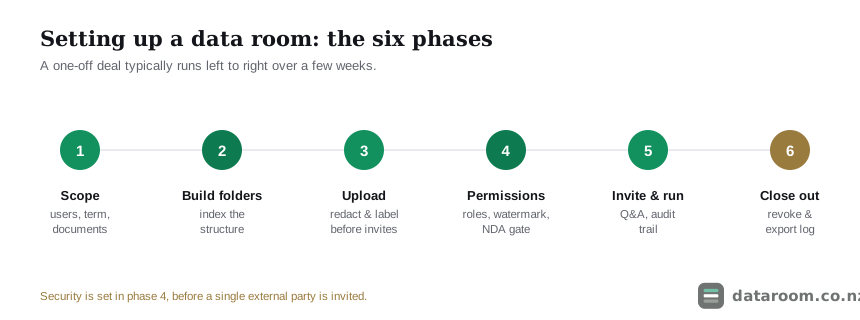
Where do the hours actually go? The table below breaks the build into phases so you can see which one scales with your deal and where time leaks if you cut a corner.
| Phase | What happens | Typical time | Where it goes wrong |
|---|---|---|---|
| Scope and plan | Confirm users, timeline and volume; start a trial | 1 to 2 hours | Guessing the busiest-week user count too low |
| Build the index | Create the empty numbered folder tree | Under an hour with a template | Uploading before the structure exists |
| Upload and redact | Load, name and redact files by folder | A few hours to a full day | Redacting after upload, not before |
| Permissions and test | Set roles, then log in as a test reviewer | About an hour | Skipping the test login before inviting |
| Invite and stage | Send staged invitations by commitment level | Minutes, ongoing | Opening the whole room to everyone at once |
The recurring lesson is that almost every time leak traces back to breaking the sequence. Uploading before the tree exists. Redacting after the fact. Inviting before the test login. Hold the order and the clock stays honest; a document-heavy business sale still runs to a full day, but it never balloons into a week of firefighting.
Which security controls must be live before the first invite?
Security is a setup step, not an afterthought, and in New Zealand it is frequently a legal obligation rather than a nicety. Every control below is switched on and tested before a single external party is invited.
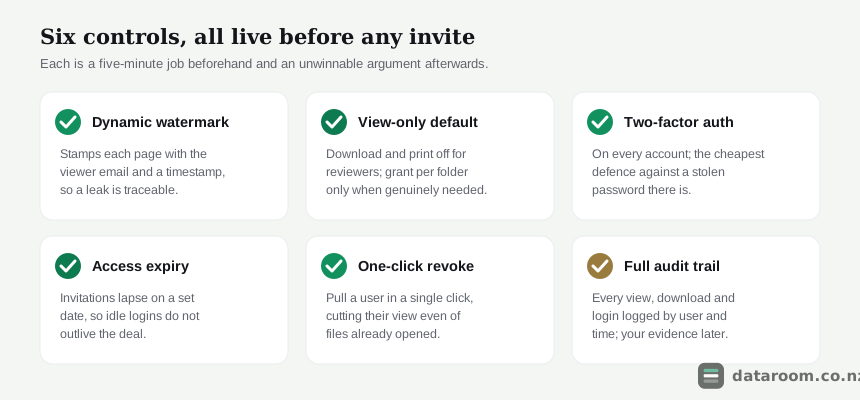
Take the six controls in the order you would actually configure them.
- Dynamic watermarking. Each viewed or downloaded page carries the viewer’s email and a timestamp, which deters casual leaks and makes the source traceable if a document escapes.
- View-only by default. Download and print stay off for reviewers. If a bidder genuinely needs a copy, grant download on specific folders rather than throwing the whole room open.
- Two-factor authentication. On every account. It is the cheapest defence there is against a compromised password, and most reputable rooms include it as standard.
- Access expiry. Set invitations to lapse on a date, so idle logins do not outlive the deal by months.
- One-click revocation. Confirm you can pull a user in a single click, which cuts their view even of files they have already opened.
- A verified audit trail. Check it logs every view, download and login by user and timestamp, because that record is both your security evidence and, later, a genuinely useful read on which bidders are engaged.
Two of these carry real legal weight, and this is where the Privacy Act stops being abstract. Almost every deal touches personal information through employment files and customer data.
- The Privacy Act 2020 requires you to protect that information with reasonable safeguards, and controlled access plus an audit trail plus redaction is how a data room helps you meet that duty.
- The Office of the Privacy Commissioner’s guidance at privacy.org.nz sets out what “reasonable” means in practice, and the Act itself is public on legislation.govt.nz.
- New Zealand’s national cyber agency, CERT NZ, publishes plain guidance on access control and two-factor authentication that is worth ten minutes before you open any room.
- If you are new to running a transaction, business.govt.nz covers the wider selling-and-compliance basics that sit around the data room itself.
For the deeper controls to demand from a provider, see virtual data room security for a New Zealand deal, and for the certifications that back those claims, ISO 27001, SOC 2 and VDR certifications explained.
Turning on watermarking and two-factor after the bidders are inside is like fitting a lock once the guests have arrived. Every control here is a five-minute job before the invites and an unwinnable argument after them.
See pricing for a straightforward NZ deal
A flat monthly plan and a 14-day free trial, so you can build the real room before you commit.
How does setup change by deal type, and how do you close the room out?
The seven steps hold for every transaction. Where you spend your setup time does not, so knowing the emphasis before you build saves a rebuild later.
- Selling a business. The room leans on the legal, financial and commercial folders, because buyers are hunting warranty exposure in the contracts, leases and employment liabilities. Redaction of third-party terms and staff data matters most here, since a competitor may be a bidder. Our walk-through of selling a business in New Zealand covers the data room side end to end.
- Raising capital. The document set is leaner and the audience is investors, so the cap table, the model and the product story carry the weight, and speed beats exhaustive coverage. A founder can often stand the whole room up in an afternoon. See NZ startup fundraising and, more broadly, capital raising in New Zealand.
- Syndicating property. Many smaller investors onboard at once, so the folder index and the view-only guest role do most of the work, with the offer and title documents front and centre. NZ property syndication sets out the structure that suits a wide investor base.
- Full M&A. The most involved build, with multiple bidder groups, staged access and structured Q&A. M&A in New Zealand covers the workstream management a competitive process needs.
Setup does not end at the first invite. A well-run room needs light-touch management through due diligence, and it comes down to two habits.
- Route every question through Q&A, not email. Questions get logged, assigned to the right answerer and kept consistent across competing bidders. Running this well is a craft of its own, and managing data room Q&A without losing control covers staging and assignment under pressure.
- Treat the audit trail as a live tool. A bidder who has not logged in for two weeks is telling you something; one who has read every legal document twice is telling you something too. Both are worth knowing before a price conversation.
As late documents arrive, add them to the existing tree rather than spinning up ad-hoc folders, so the index stays coherent and everyone keeps referring to the same numbered sections. A room that drifts into chaos halfway through is almost always one where new material was bolted on outside the structure.
Then close the room out on purpose. This is the step that separates a real data room from a shared drive, a distinction we draw out in virtual data room vs Dropbox and virtual data room vs Google Drive.
- Revoke all external access first, in one action if the room supports it.
- Export the complete audit log, your evidence of who saw what if a warranty or privacy question surfaces months later.
- Export a copy of the final document set for your own records before you let the plan lapse.
- Match the plan term to the close, so you are not paying for idle months once the deal is signed or shelved.
Do the close-out properly and the room leaves you with a clean, defensible record instead of a loose end. That, more than any single feature, is what you are paying the monthly fee for.
Setting up a virtual data room: FAQ
How do you set up a virtual data room?
Scope the deal, choose a plan and start a trial, build a numbered folder index that mirrors your due diligence checklist, upload and redact your documents, set permissions role by role with watermarking on, test as a reviewer, then invite external parties. Set security and permissions before anyone outside is let in, and close the room out by revoking access and exporting the audit log.
How long does it take to set up a data room in New Zealand?
For a typical small NZ deal, budget half a day to a full day of focused work to go from an empty room to ready-to-invite. Uploading and redacting documents is the variable part and scales with volume. A large M&A process with thousands of files can take several days and is usually adviser-led.
How much does a data room cost for a small NZ deal?
An indicative NZD $99 to $350 a month on a flat per-room plan covers most small business sales and early-stage raises, GST-exclusive. Mid-market M&A on a transaction platform runs higher, and an NZX listing is quote-based. Many vendors price in US dollars, so confirm the current figure before you commit.
What should the folder structure look like?
Use numbered top-level folders that mirror your due diligence checklist: corporate, financial, tax, legal and compliance, people, property and assets, and commercial. Build the empty structure first, then upload into it. Our folder structure template for NZ deals gives a full tree you can copy.
What access levels should I give bidders?
Give each person the lowest role that lets them work. Bidders who have signed an NDA are usually reviewers: view watermarked files on screen and submit questions, but no editing or admin. Early prospects can start as view-only guests with download disabled, and you widen access as they progress.
Do I need to worry about the Privacy Act when setting up a room?
Yes. Most deals involve personal information through employment files and customer data, and the Privacy Act 2020 requires reasonable safeguards. Controlled access, an audit trail and redaction of unnecessary personal details are how a data room helps you meet that duty. See the Privacy Commissioner at privacy.org.nz for the detail.
Can I set up a data room myself, or do I need an adviser?
For a small business sale or an early-stage raise you can absolutely set it up yourself in a day; modern flat-rate rooms are built for self-serve. Larger M&A processes with heavy document volumes and multiple workstreams usually benefit from a corporate adviser driving the setup and Q&A.