

Virtual data room security: what to demand for a New Zealand deal
A supplier forwards a draft sale agreement to a competitor. An adviser loses a laptop in the taxi queue at Auckland Airport. A password from a 2019 breach still works. A bidder who dropped out in week three still has a live login in week nine.
Four threats, four different failures. A file-sharing folder answers maybe one of them. A serious virtual data room answers all four, and it keeps the receipts.
This guide is deliberately long because the subject rewards depth. Read it top to bottom before you shortlist a provider, or jump to the table that answers your question. Every NZD figure, every law reference and every trade-off is set out for a New Zealand transaction, not a generic global one.
Which tool actually protects a New Zealand deal?
Start with the decision, not the theory. Most NZ deals come down to one question: is a purpose-built room worth it over the business file-sharing you already pay for?
On security, the gap is not subtle. General file-sharing is built for collaboration and convenience. A data room is built for controlled disclosure and proof. The matrix below is the fastest way to see where each tool class stops short.
| Security capability | Consumer file-sharing | Entry-level data room | Deal-grade data room |
|---|---|---|---|
| AES-256 at rest | ✓ | ✓ | ✓ |
| Enforced MFA for all users | ✗ | ✓ | ✓ |
| Granular per-file permissions | ✗ | ✓ | ✓ |
| Dynamic watermarking | ✗ | ✗ | ✓ |
| View-only with no download | ✗ | ✓ | ✓ |
| Page-level, tamper-evident audit log | ✗ | ✗ | ✓ |
| Document expiry and remote revoke | ✗ | ✗ | ✓ |
| Disclosed data residency choice | ✗ | ✗ | ✓ |
| Secure, walled Q&A | ✗ | ✗ | ✓ |
| ISO 27001 or SOC 2 certified | ✗ | ✓ | ✓ |
Read the “no” cells top to bottom. Those are the exact features that bite once real diligence starts.
- Consumer tools are not insecure in the everyday sense. They encrypt, they sync, they back up.
- What they cannot do is prove controlled access. There is no page-level log, no watermark, no expiry.
- Entry-level rooms close the biggest gaps: MFA, permissions, view-only, one certification.
- Deal-grade rooms add the evidence and containment layer: audit depth, residency choice, walled Q&A.
Where is the line? There is no bright rule, but a few thresholds tend to decide it in practice.
- A sub-$2m asset sale with one buyer and no personal data can survive on business file-sharing.
- Once you run a competitive process with multiple bidders, walled Q&A and per-party logging stop being optional.
- Anything with employee records, health data or a regulated counterparty pushes you to a certified room by default.
- If a bank, an NZX-listed acquirer or an offshore private-equity buyer sits on the other side, they will often mandate a real room anyway.
If your transaction is small and low-risk you might still stretch a business file-sharing plan, and we weigh exactly when a data room is worth it for smaller deals. The same reasoning drives the Dropbox comparison and the Google Drive comparison. Everything after this section is about what “deal-grade” actually means, control by control.
What exactly is virtual data room security?
Strip the marketing and it does three jobs. Nothing more, nothing less.
- It keeps outsiders out, through encryption, authentication and network controls.
- It limits what insiders can do, through permissions, watermarking, view-only mode and expiry.
- It records everything, in an audit log you can export, so access is not just restricted but provable.
A consumer file-sharing folder does the first job passably and the other two barely at all. That gap is the entire reason a data room beats Dropbox for a deal.
The word “security” gets stretched to cover uptime and privacy too, and for a transaction those do overlap. But the core is narrower. It is control and evidence. You decide precisely who can open a document, and you can later show a court, a regulator or a nervous board exactly who did.
Good data room security is defense in depth. Several independent layers, arranged so no single failure becomes a breach.
- If a password leaks, MFA stops the login.
- If a login succeeds, permissions limit the blast radius.
- If a file opens, a watermark deters redistribution and the audit log records it.
- If anyone questions the whole thing, an independent certification says the inner layers work as claimed.
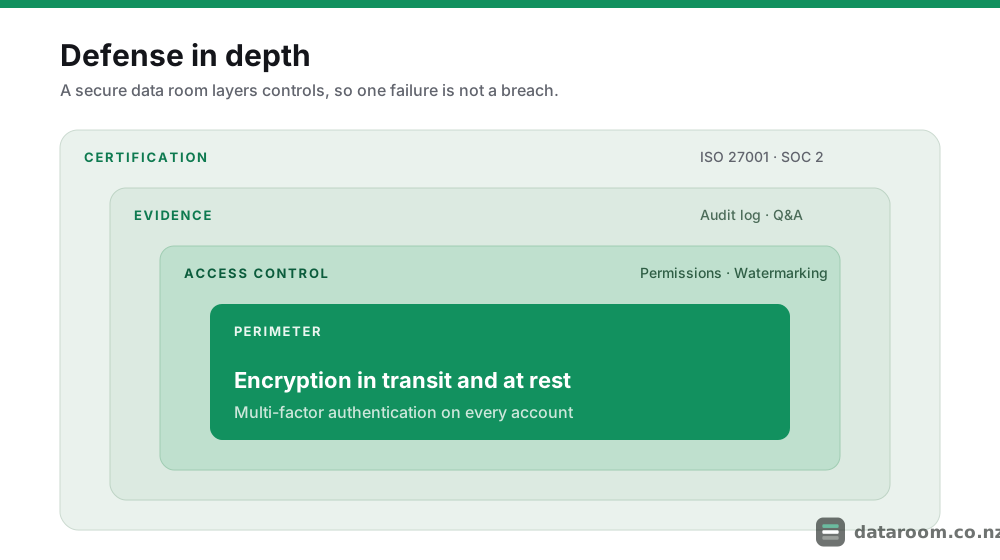
Picture the rings from the outside in. The perimeter is encrypted connections and multi-factor authentication, deciding whether you get through the door at all. Inside sits access control: which folders your group sees, and whether you can print or download. Deeper still is the evidence layer, the audit log and the Q&A workflow recording every interaction. Wrapping all of it is independent certification.
The practical upshot: you are not buying one feature called “security”. You are buying a stack, and a weak layer anywhere undermines the strong ones. A room with military-grade encryption but no MFA and no download controls is not secure. It just has a good marketing line.
Which security controls are non-negotiable for an NZ deal?
Here is the baseline. Every row belongs in a deal-grade room as standard, not sold to you as a premium extra.
Where a provider does charge more for these, fold the difference into your total data room cost rather than assuming the sticker price already includes them.
| Control | What to demand | Why it matters |
|---|---|---|
| Encryption | TLS 1.2+ in transit, AES-256 at rest | Renders intercepted or stolen data unreadable |
| Authentication | Enforced MFA on every account | Stops a leaked password becoming a breach |
| Permissions | View, print, download and expiry per group and per file | Least privilege; buyers see only their scope |
| Watermarking | Dynamic name, email and timestamp on each page | Deters and traces redistribution of documents |
| Audit log | Tamper-evident, exportable, page-level | Provable record of who saw what, and when |
| Data residency | Named storage region disclosed in writing | Meets Privacy Act obligations for offshore data |
| Certification | Current ISO 27001 and/or SOC 2 report | Independent proof the controls are real |
| Access lifecycle | Instant revocation and IP or time restrictions | Cuts off a departed adviser or a lapsed party |
If a salesperson cannot confirm every row of that table in writing, that is your answer. The differentiators between good rooms sit further up the stack, in usability, support and reporting depth. The eight controls above are simply table stakes.
The clearest way to think about them is not as a feature list but as a threat list. Each control exists to stop a specific way a deal leaks.
The controls, and the threats they answer
-
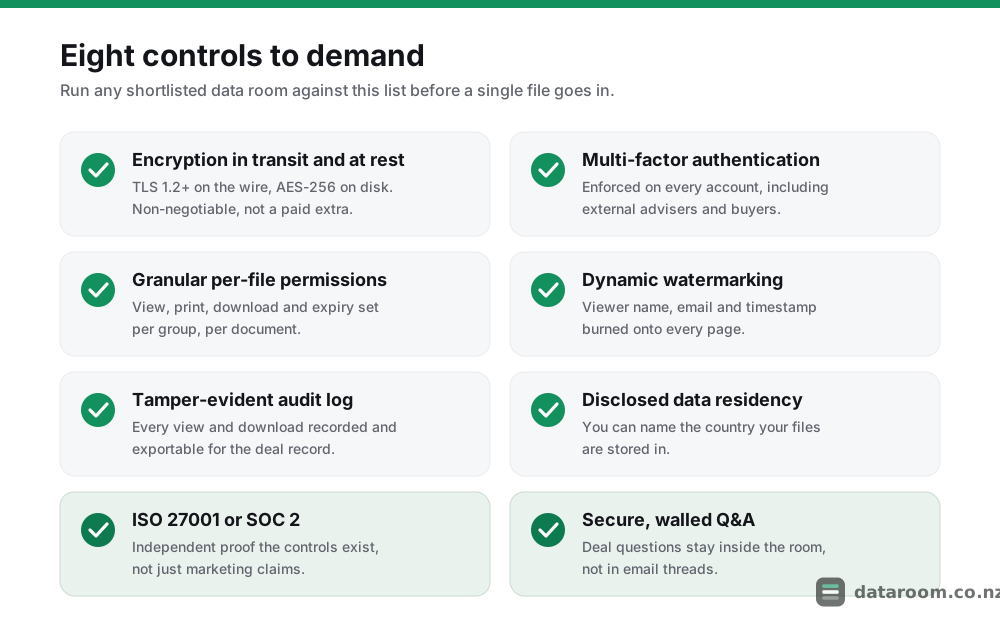
The eight-control checklist to run any shortlist against.
-
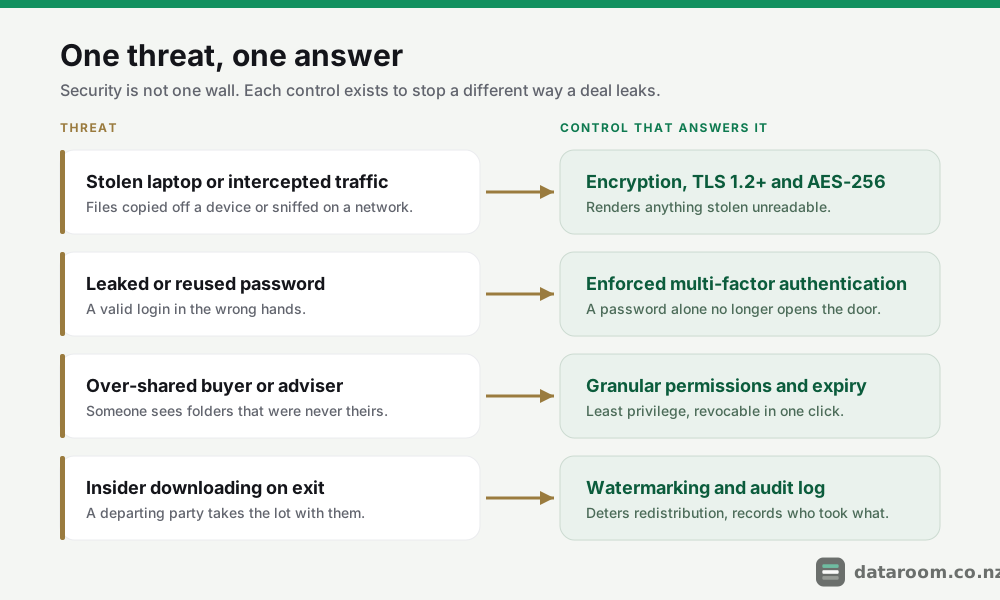
One threat, one answer: how the controls map onto real risks.
That mapping is worth committing to memory, because it tells you which control you cannot skip for your particular deal.
| The threat | The control that answers it | What it looks like in practice |
|---|---|---|
| Stolen laptop or intercepted traffic | Encryption in transit and at rest | TLS 1.2+ on the wire, AES-256 on disk; stolen data is unreadable |
| Leaked or reused password | Enforced multi-factor authentication | A second factor blocks a valid password in the wrong hands |
| Over-shared buyer or adviser | Granular permissions and expiry | Least privilege per group; access revoked in one click |
| Insider downloading on exit | Watermarking and audit log | Every page traceable; every download recorded to a named user |
| Silent tampering after the fact | Tamper-evident, exportable log | The record cannot be quietly edited, and it exports on demand |
Encryption: the boring floor, not the differentiator
“Bank-grade” and “military-grade” are marketing words, not standards. What you actually want is specific and dull.
- TLS 1.2 or higher for data moving between the browser and the server.
- AES-256 for data sitting on disk.
- Almost every credible provider clears that bar, so it is a floor to check, not a feature to celebrate.
Two follow-up questions separate the serious rooms. First, who holds the encryption keys, and are they rotated? Provider-managed keys are normal and fine for most deals; some enterprise rooms add customer-managed keys for an extra layer of control. Second, is data encrypted per customer or in one shared pool? Per-tenant separation limits what a single compromise can expose.
Encryption is rarely the weak link. The weak link is almost always a human holding a valid login, which is why authentication and permissions deserve more of your attention than the cipher suite.
Access control: least privilege, done properly
The governing principle is least privilege. Each person sees the minimum they need, and nothing more.
In practice that means permissions set per group and, ideally, per document. On a Tauranga horticulture co-op sale, the buy-side lawyers see the supply contracts, the commercial team sees grower payment data, and neither sees the folders that are not theirs yet.
A capable room gives you a spectrum of rights, not a yes-or-no switch.
- View-only opens a document in a secure viewer with no way to save it.
- Print and download are separate toggles you grant deliberately.
- Fence-view or blur hides part of a page until you release it.
- Expiry and self-destruct revoke access to a file after a set date, even one already downloaded.
Getting this right starts before access is granted, with a clean folder structure that maps neatly onto your permission groups.
Revocation matters as much as granting. When an adviser rolls off or a bidder drops out, you should cut their access in one click, across every device, at once. Rooms that only let you delete a user, losing their history, rather than suspend them, are a red flag for exactly this reason.
There is a record-keeping angle too. Under the Companies Act 1993 an NZ company must keep proper accounting and corporate records, and a deal room becomes the working copy of many of them during diligence. Suspending a departed user rather than deleting their trail keeps that record intact. On a multi-party auction, a real room lets you run staged disclosure: early bidders see the teaser and financials, the shortlist gets contracts and IP, and only the preferred party reaches the crown-jewel folders. That staging is a security control as much as a commercial one, and it maps directly onto how NZ M&A processes actually run in sectors from SaaS to agribusiness to healthcare.
Why is the audit trail the feature that decides a dispute?
Because a data room’s real product is not storage. It is evidence.
The audit log is a time-stamped record of every login, every document opened, every page viewed and every download, tied to a named user. It turns “we shared it appropriately” into something you can prove.
That evidence earns its keep in three ways.
- During the deal, it shows which bidders are genuinely engaged, based on what they actually read.
- At completion, an exported log becomes part of the permanent deal record.
- In a dispute, or a data-access request, you have a defensible account of who was granted what.
New Zealand’s national cyber agency, CERT NZ, consistently frames logging and access review as core to incident response. A deal room hands you both by default.
The audit log is the one feature nobody thinks about until a deal turns sour, and then it becomes the most important thing in the room.
Three checks separate a real audit trail from a token one.
- Look for page-level granularity, not just “opened this file”.
- Look for tamper-evidence, so the log cannot be quietly edited.
- Confirm you can export it, to CSV or PDF, without asking support.
Miss any one of those and the log stops being evidence. A record you cannot export is a record you cannot use in a dispute; a record that can be edited is a record no one will trust.
Compare data rooms on security, side by side
See how the providers we track handle encryption, permissions, audit trails and certification.
Where is my data stored, and what does the Privacy Act 2020 demand?
Almost every data room stores your files offshore, most often in Australia, the United States or the EU. That is not automatically a problem. Under New Zealand law it is your problem to manage, so you need the answer before you upload.
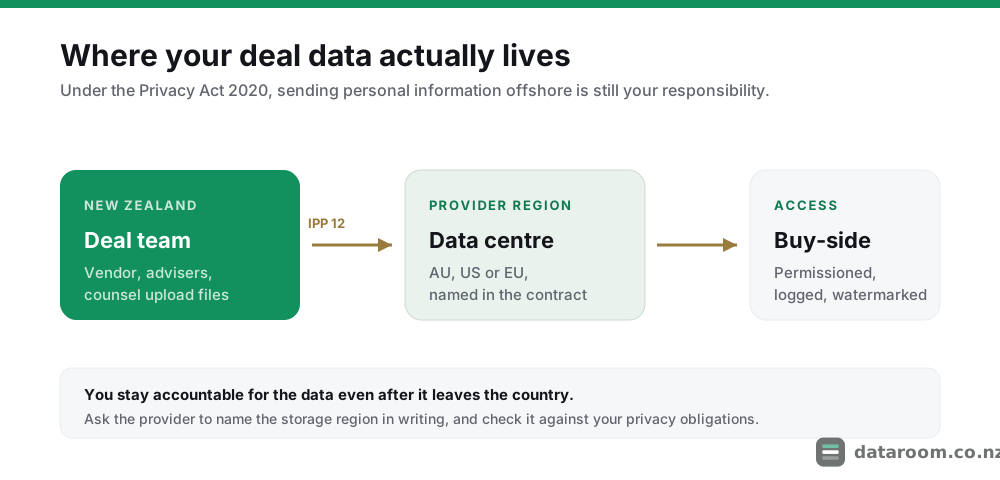
IPP 12 and cross-border disclosure
The Privacy Act 2020 governs how you handle personal information, and a deal room is usually full of it: employee records, customer lists, director details.
Information Privacy Principle 12 sets conditions on sending that information to an overseas party. In short, you have to be satisfied the data will be protected by comparable safeguards. The Office of the Privacy Commissioner explains these cross-border disclosure rules in plain terms, and they apply to you as the party doing the sharing, not just to the software vendor.
The practical steps are simple.
- Ask the provider to name the storage region in writing.
- Prefer a room that lets you choose, or at least confirm, the region.
- If the data is sensitive at a national level, weigh a provider that keeps it in Australia or offers a specific residency guarantee.
For most private-company deals, a reputable provider in a comparable-law jurisdiction is fine. The failure mode is not asking at all. Our companion guide on your Privacy Act 2020 obligations goes deeper.
There is a second angle NZX-listed vendors should note. If the deal touches material information about a listed entity, your continuous-disclosure and confidentiality obligations sit alongside the privacy ones, and a leaky room is a disclosure risk as much as a privacy one. The audit log is what lets you show the information stayed contained until announcement.
Your breach-notification duties
Security is not only about prevention. It also has to make a breach survivable and reportable.
The Privacy Act 2020 introduced a mandatory notifiable privacy breach scheme, and it applies to you as the party running the deal, not only to the vendor. If a breach is likely to cause serious harm, you must notify the Office of the Privacy Commissioner and the affected individuals as soon as practicable.
This is where the audit log stops being a nice-to-have. When something goes wrong, the first question is always “what was actually exposed, and to whom?”
- A page-level, tamper-evident log lets you answer in hours rather than guess for weeks.
- That directly shapes whether the harm reaches the “serious” threshold and what you must disclose.
- A room without that record leaves you notifying on the assumption that everything leaked, because you cannot prove otherwise.
Build the response path before you need it.
- Know who inside the deal can freeze access and pull the log.
- Keep the provider’s incident-response contact in writing.
- Keep their own breach-notification commitments in writing too, since a breach on their infrastructure can become your reporting obligation.
The government’s guidance for businesses on preparing for and responding to a cyber incident is a sensible baseline. It pairs naturally with the containment tools a deal room already gives you: instant revocation, IP restrictions and per-file expiry. Handled well, a scare stays a near miss; handled blind, it becomes a notifiable event you cannot scope.
Do ISO 27001 and SOC 2 actually prove anything?
Yes, and this is where you separate claims from evidence. Any vendor can print “enterprise security” on a web page. A current certificate means an independent auditor checked that the controls exist and are operating.
The two standards answer slightly different questions, and knowing which you are looking at matters.
| ISO 27001 | SOC 2 Type II | |
|---|---|---|
| What it certifies | A working information security management system | How specific controls operated over a period |
| Question it answers | Is there an ongoing security programme? | Did the controls actually work, over months? |
| Time frame | Point-in-time certification, audited on a cycle | Usually a 6 to 12 month observation window |
| Output you should ask for | The current certificate, with scope and date | The full report, not just the summary letter |
| The trap to avoid | An expired certificate, or a narrow scope | A Type I report (design only) sold as Type II |
Read the table left to right and the difference is clear.
- ISO 27001 certifies that the provider runs a proper information security management system, an ongoing programme rather than a one-off.
- SOC 2 Type II reports how effectively specific controls operated over a period, usually six to twelve months.
- The SOC 2 report is arguably the more revealing document, because it covers operation over time, not just design.
Ask for the actual certificate or report, note the date, and check it has not lapsed. Confirm the scope covers the product you are buying, not a sister service. We cover how to read them, and the common traps, in ISO 27001, SOC 2 and VDR certifications explained.
Certification is not a legal requirement for an NZ deal. It is the strongest independent evidence you can get that the controls above are real. For anything involving sensitive or third-party personal data, insist on at least one.
What does deal-grade security cost in New Zealand?
Security is rarely a separate line item. You pay for it bundled into the tier. The practical question is which tier includes the full control set, because entry plans sometimes omit watermarking, granular audit or residency choice.
Here is the rough shape of the market, whether you are running a Dunedin health-tech Series A or a Napier winery sale.
| Tier | Indicative NZD / month | Security features typically included |
|---|---|---|
| Entry, small deal | $150 to $500 | Encryption, MFA, basic permissions, standard audit |
| Mid, active diligence | $600 to $1,500 | Granular permissions, watermarking, full audit, secure Q&A |
| Deal-grade, enterprise | $1,500 to $3,000+ | Residency choice, IP restrictions, both certifications |
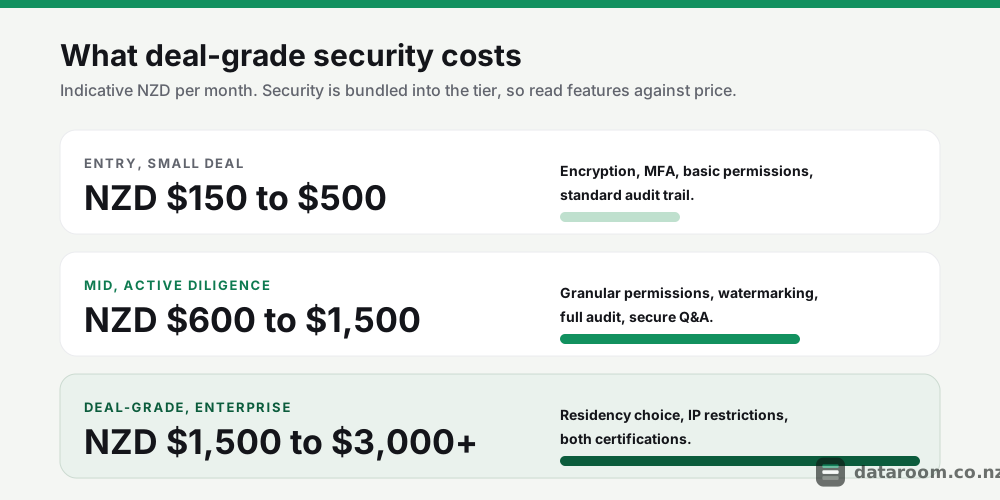
These NZD ranges are indicative only. The trap is buying on headline price and finding watermarking or the exportable audit log sits one tier up.
- Read the security features against the tier, not the brochure.
- Check that the certification you were shown applies to the plan you are quoted.
- Watch for per-page or per-user overage that turns a cheap entry plan into a mid-tier bill once diligence heats up.
What actually drives the number? Three things, and none of them is the encryption everyone asks about first.
- Data volume and page count. Some providers still price per page or per gigabyte, which punishes document-heavy diligence.
- Number of users and guests. External-guest seats for bidders and their advisers add up fast on a competitive process.
- Feature tier. Watermarking, page-level audit, residency choice and IP restrictions are the levers that move you up a band.
A short, single-buyer deal that wraps in six weeks costs very differently from a nine-month competitive auction, even at the same monthly rate, because the room stays open longer and carries more guests. Budget for the duration, not just the sticker.
For a full breakdown of what drives the number, see our NZ pricing guide. If budget is tight, the cheapest rooms for small deals still cover the encryption-and-MFA baseline; you are trading away watermarking, audit depth and residency choice, so make that trade knowingly.
How do I vet a provider, and what do most deals get wrong?
You do not need a security background to run a competent check. You need a short, deliberate process, and the nerve to ask for evidence instead of assurances.
A five-step security vetting process
Run every shortlisted provider through these steps before you upload a single file.
- 1
Ask for the certificate, not the claim
Request the current ISO 27001 certificate or SOC 2 Type II report, and check the date and scope. A vendor that cannot produce one on request is telling you something.
- 2
Confirm the encryption and MFA specifics
Get it in writing: TLS 1.2+ in transit, AES-256 at rest, and MFA enforced for every user including external parties. Enforced, not merely available.
- 3
Test the permission model in a trial
Set up two user groups and prove that view-only, no-download and expiry work as described. Try to break them; a free trial is the time to find the gaps.
- 4
Pin down data residency in writing
Ask which country stores your data and whether you can choose the region. Match the answer against your Privacy Act 2020 obligations for any personal information.
- 5
Inspect and export the audit log
Open a document, then confirm the log shows the view at page level, cannot be edited, and exports cleanly to CSV or PDF without contacting support.
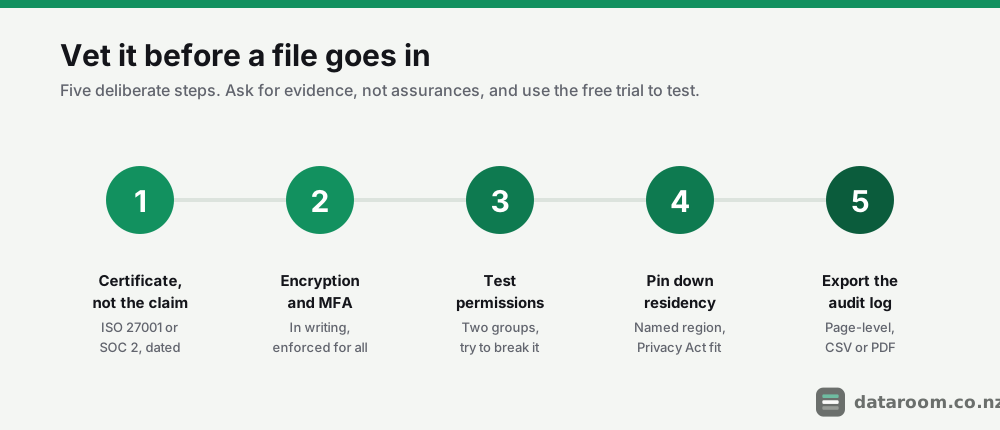
Run those five in order and you have done more diligence on the room than most vendors do on their bidders.
The controls, though, are usually fine. The habits around them are where deals actually leak. These are the mistakes we see most often on New Zealand transactions.
- Over-broad permissions. Granting a whole folder tree to a bidder who needed three files is the most common quiet exposure on any NZ deal.
- Stale access. An adviser who rolled off in week two still has a live login in week eight. Suspend, do not just plan to.
- Skipping the audit-log export. The one time you need it is the one time you did not test that it works.
- Uploading raw personal data. Employee files and customer lists that could be redacted or aggregated before they ever enter an offshore room.
- No named incident owner. When the scare comes, nobody knows who is allowed to freeze access and pull the log.
None of these is a software flaw. Each is a process gap, and each is fixable in an afternoon before the room opens. Read our roundup of data room mistakes that slow NZ deals for the full list, because several of the worst ones are security failures dressed up as admin oversights.
Get those habits right and the eight technical controls do their job. Skip them, and the best-certified room in the market still lets a deal walk out the door.
Work out what a secure room will cost you
Size your deal against real NZD pricing tiers, including the security features that matter.