

Virtual data room vs Google Drive for confidential deals
Google’s servers are not the problem. Google Drive is one of the most secure places on earth to keep a file, and none of what follows argues otherwise.
The problem is that “secure storage” and “safe disclosure” are different jobs, and Drive only does the first one well.
A confidential deal is not a storage question. It is a control question: who can open this exact file, can they take a copy, can you prove afterwards what they read, and can you shut the door the hour the deal dies. On every one of those, a shared drive comes up short by design.
This piece is short on purpose. Seven questions, real NZD numbers, and a clear line for when Drive is genuinely fine.
What is the one difference that decides it?
A shared drive stores and collaborates. A data room discloses.
That is the whole argument in six words, and it explains every row below.
Drive is optimised for frictionless sharing. That is exactly what you want when your own team is drafting an information memorandum, and exactly what you do not want when a competitor is reading your customer contracts and you may later have to prove what they saw.
A data room is built for the one situation Drive was not: handing sensitive material to people whose interests do not match yours, while keeping control of, and a record of, everything they do.
Here is the head-to-head on the controls a transaction lives or dies by.
| Capability | Google Drive | Virtual data room |
|---|---|---|
| Granular per-file, per-user permissions | ✗ | ✓ |
| View-only that blocks download and print | ✗ | ✓ |
| Dynamic, per-viewer watermarking | ✗ | ✓ |
| Page-level view analytics (who read what) | ✗ | ✓ |
| Full, exportable audit trail | ✗ | ✓ |
| Structured Q&A with assignment | ✗ | ✓ |
| Bulk upload and auto-indexing | ✗ | ✓ |
| One-click access revocation | ✗ | ✓ |
| ISO 27001 / SOC 2 scoped to the deal use | ✗ | ✓ |
| Everyday file collaboration and editing | ✓ | ✗ |
| Included with a subscription you already own | ✓ | ✗ |
The last two rows are the honest counterweight, and they matter. Drive wins on real-time co-editing and on being something you almost certainly already pay for.
Everywhere a deal creates adversarial risk, though, the room wins. If the category is new to you, our explainer on what a virtual data room is and the walkthrough of how a virtual data room works cover the mechanics behind each yes.
Can Google Drive really control who sees what?
Partly. And the gap between “partly” and “fully” is exactly where deals leak.
Drive can share with named people or with anyone holding a link. That is ample for a meeting agenda and coarse for due diligence with competing parties. Two failure modes recur, and both follow from Drive’s defaults rather than from carelessness.
Folder sharing leaks downward. Drop a bidder into a folder and they generally see everything inside it, now and later, including the file an adviser adds tomorrow without thinking about who is watching. There is no clean concept of a staged folder you reveal only to shortlisted bidders, and no reliable view that blocks download, print or a quick screenshot.
Links travel further than you meant. A link built for one adviser is trivially forwarded to a whole firm. Once it is loose you have no record of where it went and no simple way to pull it back.
A room inverts every one of those defaults. Access is closed until you open it, per person and per folder, and nested permissions do not bleed into the layers below. The shareable link becomes an invitation tied to a person, which is why revocation actually works: cut the person off and every door closes at once.
Our guide to running data room Q&A without losing control shows how a real room keeps the question thread intact from the first query to the last.
Can you prove who read what when it matters most?
This is the row that settles the argument on its own.
On a paid Workspace plan you can see some activity: who a file was shared with, and for certain file types a basic view record. What you cannot get is a defensible, page-level account of behaviour.
You cannot show which bidder opened the shareholders’ agreement, which three clauses they lingered over, how long they spent, or whether they came back the night before they dropped their price.
A data room records all of that as a matter of course, and lets you export it. So the log does two jobs across a deal’s life.
During the deal it is intelligence. A bidder who reads the litigation folder five times is telling you something worth pricing in.
After the deal it is evidence. If a warranty claim, a confidentiality dispute or a regulator’s question lands eighteen months later, the room can show precisely who accessed which document and when. A Drive folder generally cannot, and “we think it was locked down” is a poor thing to say to a lawyer.
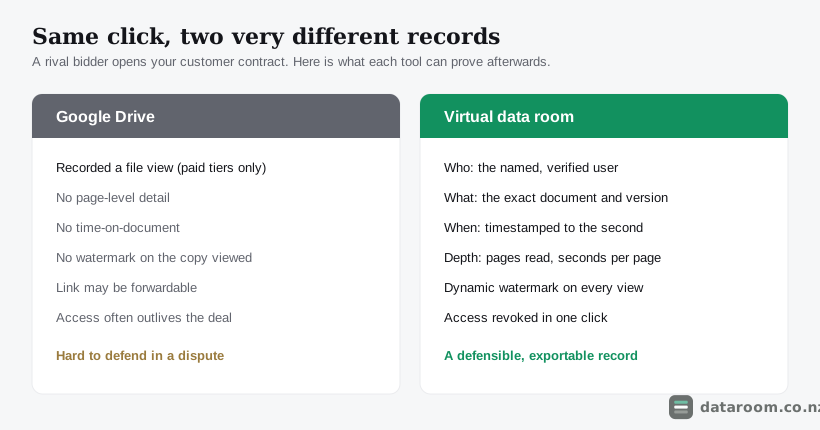
Google Drive is built to share a file and forget it. A deal needs the opposite: to share a file and remember everything about who touched it.
What does each option actually cost in New Zealand?
Cost is where Drive looks unbeatable and where the comparison quietly misleads you.
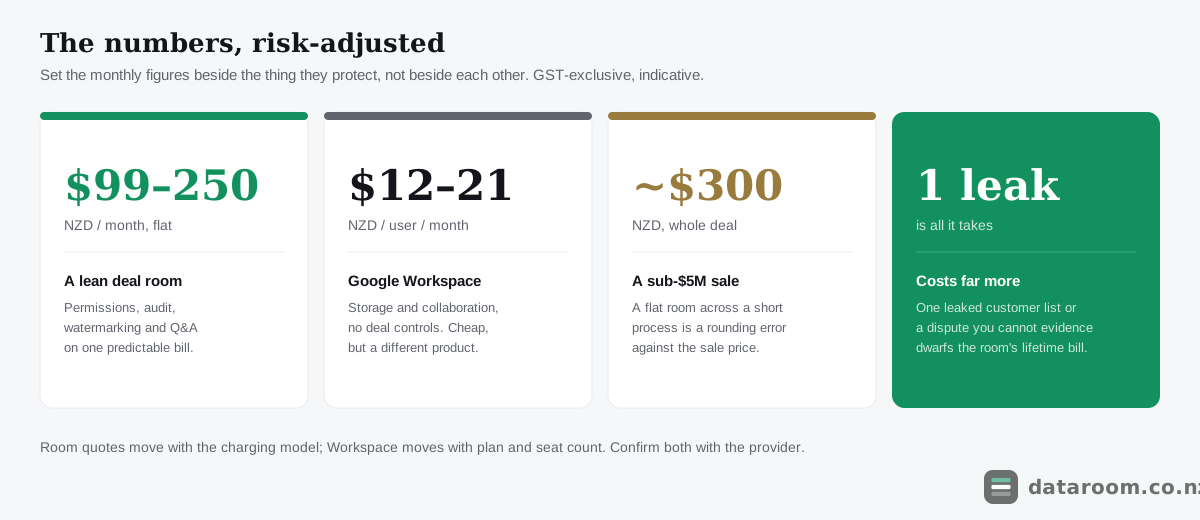
Workspace is genuinely cheap, and you may already own it. A room is a deliberate new line item. But you are not buying the same thing, so setting the monthly figures side by side compares a filing cabinet to a strongroom.
| Option | Indicative NZD cost | What you are really buying | Deal fit |
|---|---|---|---|
| Google Drive (personal) | $0 | Storage and collaboration, no deal controls | Internal drafting only |
| Workspace Business Starter | ~$12 per user / mo | Storage, basic sharing activity | Internal, small teams |
| Workspace Business Standard | ~$21 per user / mo | More storage, some shared-drive controls | Internal collaboration |
| Lean virtual data room (flat) | ~$99 to $250 / mo | Permissions, audit, watermarking, Q&A | Most small NZ deals |
| Full transaction platform | ~$430 to $2,200+ / mo | Per-page or per-user deal machinery | Mid-market and larger M&A |
Read that table risk-adjusted, not line by line. The raw monthly gap flatters Drive and hides the real question.
A sub-$5M business sale run on a $99 flat room costs a few hundred dollars over its whole life. That is a rounding error against the deal.
One leaked customer list, one bidder who quietly downloaded your pricing model, or one confidentiality dispute you cannot evidence costs far more, and often more than the sale price of the smallest asset in the room.
For the full treatment see our NZ virtual data room pricing guide. If budget is genuinely tight, the cheapest virtual data rooms for NZ small deals covers the bottom of the market without pretending the trade-offs away.
Compare data rooms side by side
Indicative NZD pricing, security features and trials for every provider we track, in one table.
What are the Privacy Act and security risks of using Drive?
Google’s infrastructure is secure, so that is not the issue. The risk lives in configuration and control at your end, and it only announces itself after something has already gone wrong.
Three failure modes recur on New Zealand deals:
- Over-broad links get created for speed and never locked down, sitting discoverable for months.
- Permission drift sets in as advisers and bidders come and go, and nobody prunes the list, so people who left keep their access.
- No revocation trail, so when a deal collapses you cannot cleanly prove that a departed bidder no longer holds, and never copied, your material.
For a New Zealand business there is a legal edge to this that lifts it above tidiness.
If your deal documents contain personal information, and most do, from employee records to customer details to director information, you carry obligations under the Privacy Act 2020 to protect it with reasonable safeguards. The Office of the Privacy Commissioner’s guidance on keeping personal information secure is clear that what counts as reasonable scales with sensitivity. A loosely shared Drive folder is hard to defend as reasonable for a full due diligence dataset.
Certification is the other trap. Workspace holds ISO 27001 and SOC 2, and Google will happily point you to them, so on paper Drive is certified. But those cover Google’s platform, not the way you configured one shared folder for one deal. A counterparty’s lawyers are not asking whether Google is secure; they are asking whether you can demonstrate controlled, audited, revocable access to this specific dataset.
Our deep dive on your Privacy Act 2020 obligations sets out what good looks like, CERT NZ’s advice on protecting your business online reinforces the access-control basics, and ISO 27001, SOC 2 and VDR certifications explained unpacks the acronyms.
Which deals can survive on Drive, and which cannot?
Deal type is the fastest way to make the call, and being fair to Drive matters here. The wrong lesson is to buy a room for everything.
Small, friendly, low-stakes transfers can stay on Drive with no drama: selling a website to a known buyer, or sharing a handful of documents with one trusted party under an NDA you both respect. Drive is also the right home for the work before the deal, the drafting, the model, the internal collation, and its real-time co-editing is something a room deliberately does not do.
The line is not confidential versus not. It is internal versus external, and audited versus not.
The calculus flips the instant you add competing bidders, regulated parties, or a dataset large enough that a single stray file could leak. An M&A process with multiple trade buyers, a startup raise shown to a dozen investors, a property syndication opened to a hundred prospects, or anything heading toward the FMA or an NZX listing needs the room from day one.
Run this three-question test before you decide.
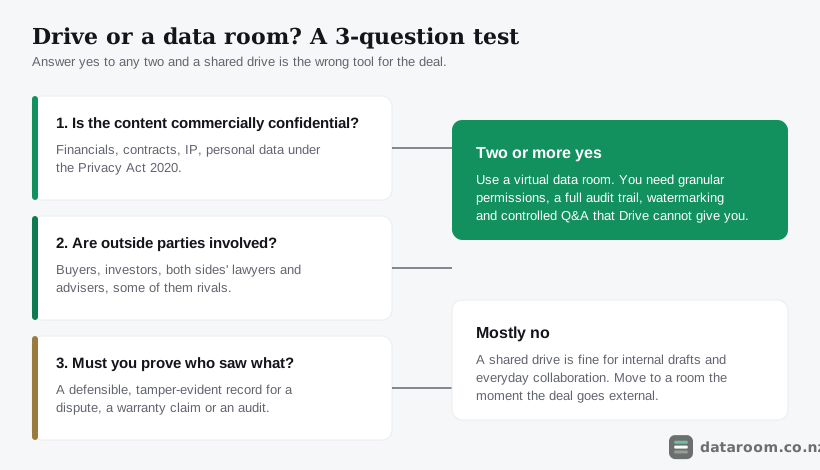
Many New Zealand deals live happily on Drive right up to that line, then move the disclosure set into a room. That is a perfectly good workflow, provided you actually make the move. If you are weighing your own threshold, is a virtual data room worth it for a small NZ deal? works through it.
Do you have to leave Google to use a data room?
No. Assuming you do is what keeps some sellers on Drive longer than they should be.
A data room sits alongside Drive, it does not replace it. Your team keeps drafting in Google Docs and Sheets exactly as before. You export the final versions into the room for disclosure. Most rooms preview Google and Office formats without conversion, so reviewers see clean renders while your originals stay untouched.
The mental model that keeps it straight is two rooms in one house.
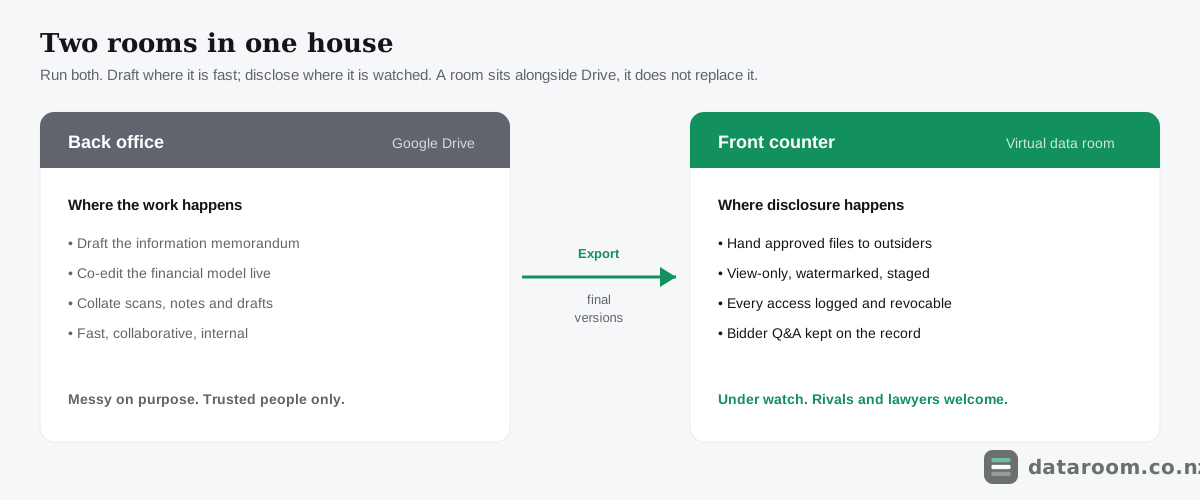
Drive is the back office where the work happens: messy, collaborative, fast. The data room is the front counter where you hand approved documents to outsiders, under watch and on the record.
Nobody serious runs the whole business out of the front counter. Nobody serious runs a competitive deal out of the back office.
If you are still comparing tools, virtual data room vs Dropbox makes the same case against the other big file-sharing option, and virtual data room alternatives for NZ businesses surveys the wider field. When you are ready to open disclosure, our how to set up a virtual data room guide and the data room folder structure template turn the move into an afternoon’s work.
See pricing for a straightforward NZ deal room
A flat monthly plan with a 14-day free trial, so you can pilot it with real documents before you commit.
Data room vs Google Drive FAQ
Is Google Drive secure enough for a business sale?
Google's platform is secure, but the controls a business sale needs, such as view-only access that blocks download, dynamic watermarking, page-level view logs and staged permissions, are not there. For a sale involving outside bidders and confidential financials, a virtual data room is the right tool. Drive is fine for preparing documents internally beforehand.
Can I just use a Google Drive link for due diligence?
You can, but it is risky. Drive links can be forwarded, folder permissions tend to leak to everything inside, and you get no defensible record of who read which document. For due diligence with competing parties, that lack of control and audit trail is exactly what a virtual data room is built to fix.
How much more does a data room cost than Google Workspace?
Indicatively, a lean flat-rate data room runs about NZD $99 to $250 a month, against roughly $12 to $21 per user a month for Workspace. You are buying different things: Workspace is storage and collaboration, a room is controlled, audited disclosure. All figures are GST-exclusive and indicative; confirm current pricing with the provider. Our NZ pricing guide has the full picture.
Does using Google Drive for deal documents breach the Privacy Act 2020?
Not automatically, but it can. If your documents contain personal information and you share them without reasonable safeguards, you may fall short of your obligations under the Privacy Act 2020. A loosely shared Drive folder is hard to defend as reasonable for a full due diligence dataset. See the Office of the Privacy Commissioner's guidance and our Privacy Act guide.
Can I keep working in Google Docs and still use a data room?
Yes. A data room complements Drive rather than replacing it. Your team keeps drafting in Google Docs and Sheets, then exports final versions into the room for disclosure. Most rooms preview Google and Office formats without conversion, so reviewers see clean renders without touching your originals.
When should a small NZ business move off Drive to a data room?
The moment the documents go to outside parties you do not fully trust, or the moment you would need to prove who saw what. For a quiet transfer to a single trusted buyer under an NDA, Drive may be enough. For a competitive sale, a raise or a syndication, move to a room from day one.