

Virtual data room alternatives for NZ businesses
| Capability | Consumer cloud | SharePoint / Teams | Lean VDR | Enterprise VDR |
|---|---|---|---|---|
| Granular per-document permissions | ✗ | ✓ | ✓ | ✓ |
| Audit trail of who viewed each file | ✗ | ✓ | ✓ | ✓ |
| Dynamic watermarking | ✗ | ✗ | ✓ | ✓ |
| Structured Q&A workflow | ✗ | ✗ | ✓ | ✓ |
| Revoke or expire access after sharing | ✗ | ✗ | ✓ | ✓ |
| Built for many external bidders | ✗ | ✗ | ✓ | ✓ |
| Priced for a single short deal | ✓ | ✓ | ✓ | ✗ |
That grid is the whole argument in one screen, so start there rather than with prose. The tools you already own are cheap and quick but blind: they cannot tell you who opened the shareholders’ agreement, and they cannot stop a departed bidder keeping a copy. A real room, lean or enterprise, closes those gaps in full. And the enterprise tier’s one weakness for a small New Zealand deal sits in the bottom row, because it is rarely priced or termed for a nine-week transaction. Hold that last cell in mind, because it decides the second half of this guide.
Can consumer cloud or email stand in for a data room?
You can run a real deal on Dropbox or a shared Google Drive folder. Plenty of New Zealand businesses do, right up until it costs them something they cannot recover.
It is worth being clear-eyed about what these tools do well before listing the gaps, because overselling the risk is its own mistake. For an internal document collection, or sharing a handful of non-sensitive files with your own accountant, a shared folder is entirely adequate and you are probably already paying for it. Syncing files fast with people you trust is exactly the job these products were built for, and a founder pulling together a first draft of a data pack has no reason to spin up a formal room to do it. If the deal in front of you carries no outside party and nothing a leak could damage, the laptop tool is the sensible choice and anything heavier is wasted money and setup time.
The trouble starts the moment the folder meets a live transaction with outside parties.
A shared link has no idea who opened it or when, so there is no view-level audit trail and you cannot prove which bidder saw which version of the earnings model. Permissions are folder-shaped and blunt rather than document-shaped and granular, which makes it fiddly and risky to show one bidder the customer contracts while hiding them from another. There is no watermarking to deter a leak, no way to revoke a file once downloaded, and no structured place for questions that does not end with half the deal copied on an email thread. None of that is a knock on the products. They were built to sync your files, not to run a competitive process, and our deeper comparisons on virtual data room vs Dropbox and vs Google Drive walk the gaps document by document.
Email and USB drives are the same problem in an older form, and they still surface in NZ deals more often than you would expect. Once an attachment leaves your outbox you have no control, no audit, no recall, and no idea how many inboxes and personal devices it now lives on. A USB handed across a table adds the risk that hardware gets lost on the way to the meeting. The old physical data room, a locked room of paper binders, solved control by brute force but is hopeless for a modern deal: picture a Dunedin manufacturer being sold with the buyer in Auckland, the adviser in Sydney and the lawyer in Wellington, and nobody flying to Otago to read a folder. The whole spectrum, from a risky email to a deal-grade room, looks like this.
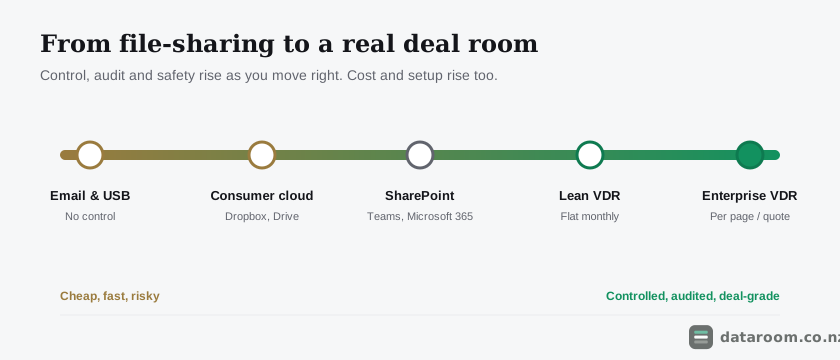
If the term itself needs unpacking first, our plain-English guide to what a virtual data room is sets the definition every route above is measured against.
Is SharePoint the serious middle option?
SharePoint is the strongest of the general-purpose tools, for one clear reason: if your business runs on Microsoft 365 you already have it, and it is a proper document management system rather than a sync folder.
It offers granular permissions, version history and access logging out of the box, which puts it a real step above consumer cloud on the controls that matter. For a Christchurch professional-services firm running an internal restructure inside its own tenant, SharePoint is often all the room the job needs, and paying for a second platform would be hard to justify. This is the honest middle of the market, and it deserves more credit than it usually gets in vendor comparisons.
Where it falls short is the deal layer that sits on top of storage.
SharePoint has no built-in dynamic watermarking, no structured question-and-answer module, no fence view, and no bidder-friendly guest experience for people outside your organisation. Making it behave like a data room means configuring permissions by hand, and every manual permission is a fresh chance to expose a folder to the wrong party at the wrong moment. That administrative burden is the hidden cost, and it lands on whoever is least equipped to carry it, usually the seller who is already busy running a sale. It works best when the deal is internal, the parties are already inside your tenant or genuinely trusted, and nobody will argue later about who saw what. For a competitive sale with rival bidders, SharePoint quietly asks you to become the security team, and most sellers should decline that job.
What does each route cost, and what does the price hide?
Cost is where the decision usually gets made, so here are indicative monthly figures in New Zealand dollars with the risk attached rather than stripped out. They are GST-exclusive; confirm the current quote with each provider, and remember many international vendors bill in US dollars, so the NZD figure drifts with the exchange rate over a long deal.
| Route | Indicative NZD/mo | Best for | Main limitation |
|---|---|---|---|
| Email / USB | $0 | One or two non-sensitive files | No control, no audit, real leak risk |
| Consumer cloud (Dropbox, Drive) | ~$20 to $30 per user | Internal sharing, low-stakes files | No view audit or watermarking |
| SharePoint / Teams (on Microsoft 365) | ~$18 to $30 per user | Internal, low-risk deals on M365 | No Q&A, watermarking or fence view |
| Lean VDR (flat plan) | ~$99 to $350 flat | Most small to mid NZ deals | Fewer enterprise extras |
| Enterprise VDR | ~$900 to $2,200+ | Large, controlled transactions | Priced and termed for big deals |
Read that table with the exposure in mind, not just the number in the second column.
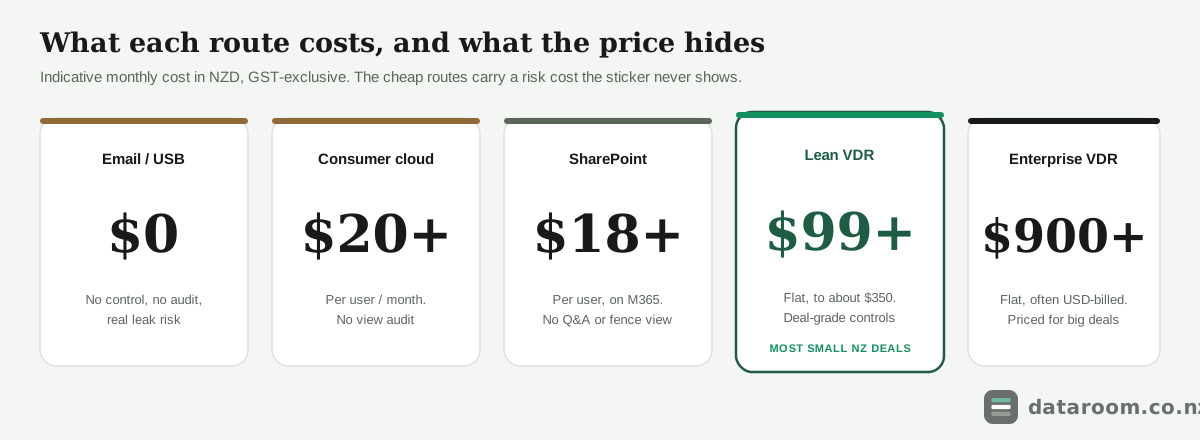
The zero-cost routes carry a cost that only appears when something goes wrong, and it can dwarf the price of any room. A single leaked customer list, or a disclosure you cannot prove you made, can cost a multiple of a year’s subscription and, worse, the deal itself. The interesting middle is the lean VDR: for roughly the price of two extra Microsoft seats you get the deal-grade controls the cheaper routes lack, with no enterprise commitment and no sales process to sit through. Our full breakdown of virtual data room pricing in New Zealand sets out the charging models behind these ranges, and the cheapest virtual data rooms for NZ small deals guide drills into the bottom band where the false economies hide.
Are the lean rooms the real alternative to the enterprise brands?
Yes, and this is the alternative most buyers never think to consider.
There is a persistent myth that the household enterprise names are the only serious option and everything cheaper is a toy for people who do not understand deals. For a syndicated banking transaction with a curated document set and a room full of lawyers, that framing holds. For the overwhelming majority of New Zealand deals it does not, and believing it is how sellers end up paying five figures for capability their transaction never touches. The real choice for most local deals is not enterprise against consumer cloud at all; it is a lean room against an enterprise one, and the gap between them is usually features a short deal will never open.
A consumer file-sharing tool is not a cheaper data room. It is a different product that happens to share files, and the difference is exactly the part a deal depends on.
A modern flat-rate room delivers the controls that genuinely decide a deal: granular permissions, a full audit trail, watermarking, a structured Q&A workflow and recognised certification you can point a buyer’s lawyers to. What it typically leaves out are the extras a very large transaction leans on, such as per-page metering, redaction suites and a dedicated onboarding team, none of which a $4 million winery sale in Hawke’s Bay is ever going to use. The gap between a lean room and an enterprise one, put plainly, is often a set of features you will never touch, priced at a level a short deal cannot justify. For the specifics, see our roundups of the best virtual data rooms in New Zealand and the best rooms for NZ startups, plus the head-to-head on Ansarada vs iDeals if you are weighing two enterprise names.
Which alternative fits which NZ deal?
You can settle this in about twenty minutes with three honest questions asked in order, and the first one that raises real risk is your signal to move up a tier.
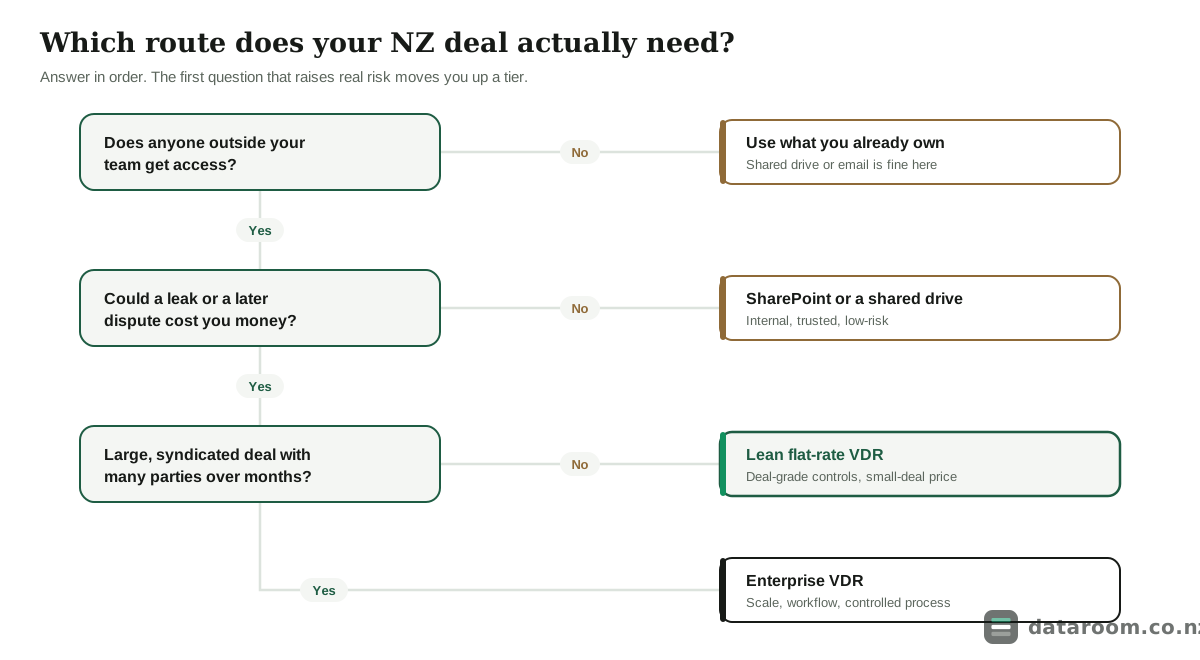
Start with access. If the documents never leave your business, a tool you already own is almost always fine, and forcing a Nelson consultant’s three proposals for a long-standing client through a formal room would be faintly absurd. If an outside bidder, investor or adviser needs in, move to the second question: could a leak or a later dispute actually cost you? A modest capital raise to two angels you have known for years can start life in a shared drive; a competitive trade sale with confidential financials cannot.
The third question is only about scale.
Most external, higher-risk NZ deals land on a lean room rather than the enterprise tier, and it is worth seeing why through real shapes. A sub-$5M business sale to trade buyers needs a real room even though it is small, because the risk lives in the outside bidders and the confidential financials, not the dollar value; a Northland trade sale worth a fraction of a listing can carry every bit as much dispute risk per document. A startup seed or Series A raise points the same way, with several investors and clean access analytics that matter to how you read interest. A property syndication to many investors adds a large guest count and disclosure obligations under the Companies Act on top. Only a genuinely large, multi-party process, a $50M+ merger or an NZX listing, justifies the enterprise machinery and the sales process attached to it. Deal shape decides, as our guides to selling a business in New Zealand and running M&A in New Zealand both stress at length.
Compare the rooms side by side
See indicative NZD pricing, charging models and the 14-day free trial for every provider we track, in one table.
Where does your deal data live, and what does the Privacy Act require?
Two New Zealand-specific questions sit underneath every option above, and the general-purpose tools answer both of them poorly.
The first is where your documents physically live. A consumer cloud plan or a global VDR may host your files in the United States, the EU or Australia, which can quietly pull a New Zealand deal’s confidential information into another country’s disclosure regime without anyone choosing that on purpose. For most private sales this is a footnote, but it stops being one the instant the set includes health information, government-linked records or anything a larger buyer’s lawyers will raise a hosting question about. A real room, lean or enterprise, states its hosting region and certification in writing; a consumer tool usually buries that in a terms page you will not read until it is too late. business.govt.nz treats knowing where your business data is stored and how it is protected as basic risk management rather than a nice-to-have.
The second question is the legal duty that travels with the documents whichever tool you choose.
Under the Privacy Act 2020, a New Zealand business that holds personal information must take reasonable steps to keep it secure, and sharing it in a deal does not suspend that obligation for a moment. The Office of the Privacy Commissioner’s guidance on keeping personal information secure makes the safeguards your responsibility, not the recipient’s, and CERT NZ’s practical advice on protecting your business treats access control and monitoring as the basics. Both are exactly what email and shared folders handle worst. If your set includes employee files, customer records or health information, the choice between a shared link and an audited room is not only deal hygiene; it is part of meeting a legal standard, and our guide to your Privacy Act 2020 obligations when sharing data covers where the line falls.
Data room alternatives FAQ
What is the best alternative to a virtual data room?
It depends on the deal. For an internal, low-risk share, Microsoft SharePoint or the consumer cloud tools you already own are fine. For any deal with external parties and confidential documents, the best alternative to an expensive enterprise VDR is a lean flat-rate data room, not a downgrade to Dropbox or email, because you keep the audit trail and granular permissions a deal needs.
Can I use Google Drive or Dropbox instead of a data room?
For low-stakes internal sharing, yes. For a live deal they fall short: no view-level audit trail, no per-document permissions, no watermarking and no way to revoke a shared file. Our virtual data room vs Google Drive and vs Dropbox comparisons cover the gaps in detail.
Is SharePoint good enough for a deal?
It can be, if you already run Microsoft 365, the parties are internal or trusted, and the deal is low-risk. SharePoint gives you granular permissions and access logs but lacks watermarking, a structured Q&A workflow and fence view, and it puts the security configuration on you. For a competitive sale with rival bidders, a purpose-built room is safer.
How much cheaper are the alternatives?
Consumer cloud and SharePoint run around NZD $18 to $30 per user a month and email is free, but the saving is offset by the risk they carry. A lean data room at roughly $99 to $350 a month flat is the middle ground: deal-grade controls without enterprise pricing of $900 or more. All figures are indicative and GST-exclusive; confirm with the provider.
When do I actually need a proper data room?
When outside parties get access, when a leak or dispute would hurt, when several bidders run over weeks, or when you may need to prove later who saw what. If any of those apply, the audit trail and permissions of a real room are worth the spend, even on a small New Zealand deal.
Do the cheaper rooms meet the Privacy Act 2020?
A reputable lean VDR with recognised certification and a full audit trail supports your obligation to keep personal information secure far better than a shared folder or email. The Privacy Act duty rests with your business, so access control and monitoring matter regardless of price. See our Privacy Act guide for where the line sits.