

Virtual data rooms for small businesses in New Zealand
Start with the money, because that is the question every owner actually has. Here is what a small-business room costs in the real world, by scenario.
| Scenario | Outside parties in the room | Sensible monthly spend | Typical room life |
|---|---|---|---|
| Cafe or trades sale, sub-$2M | 1 to 3 buyers plus advisers | $99 to $200 flat | 6 to 10 weeks |
| Owner-operator sale, $2M to $5M | 3 to 6 buyers plus advisers | $99 to $300 flat | 8 to 14 weeks |
| Seed or angel raise | 5 to 15 investors | $99 to $350 flat | 1 to 3 months |
| Bank refinance or restructure | Bank plus accountant | $99 to $250 flat | 3 to 8 weeks |
| Small property syndication | 20 to 60 investors | $250 to $600 | 1 to 4 months |
Read that as a range, not a price list. Two things move the number: the exchange rate, since many vendors quote in USD, and whether you pay per room or per something you cannot predict.
The headline is how small the absolute figure is. A Taranaki engineering firm selling for $3 million might run a room for ten weeks at about $150 a month flat, roughly $375 all in. Less than a single hour of the corporate adviser billing the same deal.
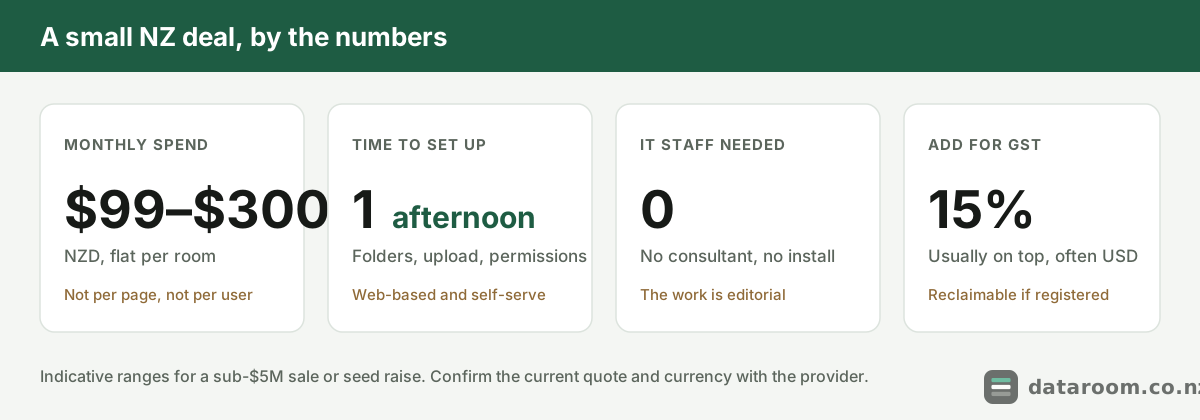
What does a small-business room cost, and what do you get for it?
Less than most owners fear, and more control than they expect.
Enterprise platforms built for bank-led acquisitions run to thousands a month. You do not need that. Flat per-room plans exist for exactly your situation: one monthly fee, a generous user count, and enough storage for a small firm’s document set.
The trap is not the flat plans. It is the two charging models that look cheap and are not.
- Per page. You pay for every page you load. Tidy in theory, brutal in practice. One scanned commercial lease, or a Bay of Plenty orchard’s pile of resource consents and plant registers, runs to hundreds of pages before you have uploaded a single financial statement.
- Per named user. A real deal invites a crowd: your lawyer, your accountant, the buy-side adviser, and every bidder’s team. Each login is a line item, and the count only grows.
A flat per-room plan caps both. Pages and users are included, so a filing cabinet of scans costs the same as a tidy folder. If you cannot forecast your page count within a wide margin, that predictability is the entire point.
Two costs hide behind the sticker price.
- GST. New Zealand’s 15% generally sits on top of the published figure. A GST-registered business can usually claim it back, but it still moves cash flow mid-deal.
- Currency. A plan billed at USD $150 a month is not a fixed NZD number, and a swing across a twelve-month term can move annual spend by hundreds of dollars. NZD billing on a rolling term is worth real money on a short transaction.
For the full picture of how vendors charge, virtual data room pricing in New Zealand breaks down the four models, and cheapest virtual data rooms for NZ small deals drills into the bottom of the range.
So what does the fee actually buy? Not bulk. A short list of non-negotiables. Treat the first four as your buying test: miss any of them and you have a file-sharing folder wearing a data-room label.
- Granular, revocable permissions. View, download or preview rights per folder and per person, pulled in one click when a bidder walks.
- A complete, exportable audit trail. Every view, download and question timestamped. In a dispute or a privacy query, the log is your evidence.
- Dynamic watermarking and view-only mode. A buyer’s name and the time stamped across sensitive pages, which deters casual forwarding.
- A structured Q&A workflow. Questions routed through the room, not your inbox, so answers stay logged and consistent.
- Honest small-deal billing. A flat per-room plan, a genuine 14-day free trial, and no per-page meter.
- Credible security. Recognised certification such as ISO 27001 or SOC 2, plus encryption and two-factor login as defaults.
That last point is where owner-operators over-worry or under-check. You do not have to audit a data centre; you do have to confirm the basics are there. Our guide to virtual data room security for a New Zealand deal sets out what to demand, and certifications, explained tells you which badges mean something.
Are you really too small to need one?
Almost certainly not, because size was never the trigger. Sensitivity is.
A room earns its keep the moment more than one outside party needs to see documents you would not email to a stranger. A $2 million cafe group sale still exposes three years of financials, supplier contracts, lease terms and staff records to two or three prospective buyers and their advisers.
That is precisely the situation a room exists for: one place, granular permissions, and a log of who opened what.
The confusion is the word “room” itself, which conjures a boardroom of bankers. In practice the small end of the market is the fastest-growing part of it. Three beliefs keep small sellers exposed, and each is half true, which is why it survives.
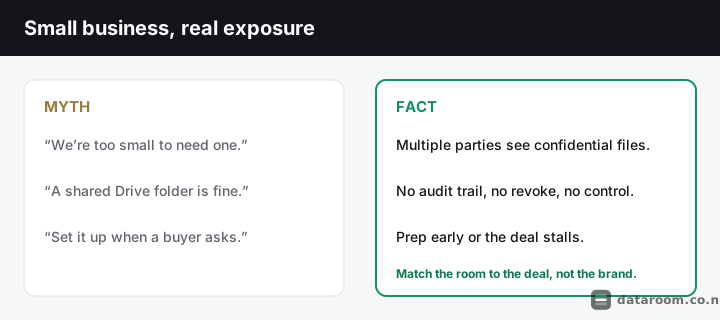
- “I only need a room once the buyer’s lawyers ask.” By the time they ask, you are on the back foot. Due diligence runs on momentum, and a two-week gap while you dig out leases and chase tidy financials is where deals cool and buyers renegotiate on price.
- “Just dump everything in and let buyers sort it out.” A document dump reads as a disorganised business. It invites more questions, more delay, and more suspicion something is buried, and on any metered plan you pay to host the mess.
- “Any staff member can be given access to help.” A sale is usually confidential. Staff learning the business is for sale before you are ready can trigger resignations, supplier nerves and customer flight.
The fix for all three is the same: prepare early, structure tightly, and grant narrow, revocable access that follows need, not seniority.
There is a legal edge to this too, and it does not care how small you are.
The Privacy Act 2020 covers almost every New Zealand business regardless of headcount or turnover. There is no small-business exemption. Deal documents almost always carry personal information: employee records, customer details, contractor contracts. Handing a rival buyer an unredacted staff list through an uncontrolled link is not merely careless. It can be a breach.
This is where a room stops being a convenience and becomes a control. Permissions let you share the commercial substance while withholding or redacting personal data until the deal is genuinely advanced, and the audit trail records that you handled information responsibly. The Office of the Privacy Commissioner sets out the privacy principles in plain language, and if something does go wrong, CERT NZ is where you report a security incident.
For a small business the room is not paperwork a buyer demanded. It is the difference between negotiating from strength and scrambling from weakness.
A bank refinance or a restructure rarely feels like a “deal”, yet it still puts your full financial picture in front of a lender and an accountant reviewing the file. The information is just as sensitive. If you are unsure whether your situation qualifies, who needs a virtual data room in New Zealand? walks the common triggers.
Compare small-deal data rooms side by side
Indicative NZD pricing, charging models and trials for every provider we track, in one table.
How do you stand one up in an afternoon?
Faster than assembling the documents that go in it.
Modern rooms are web-based and self-serve. If you can organise files into folders and send an email invitation, you can run one. The work is not technical. It is editorial: deciding what goes in, and who sees it.
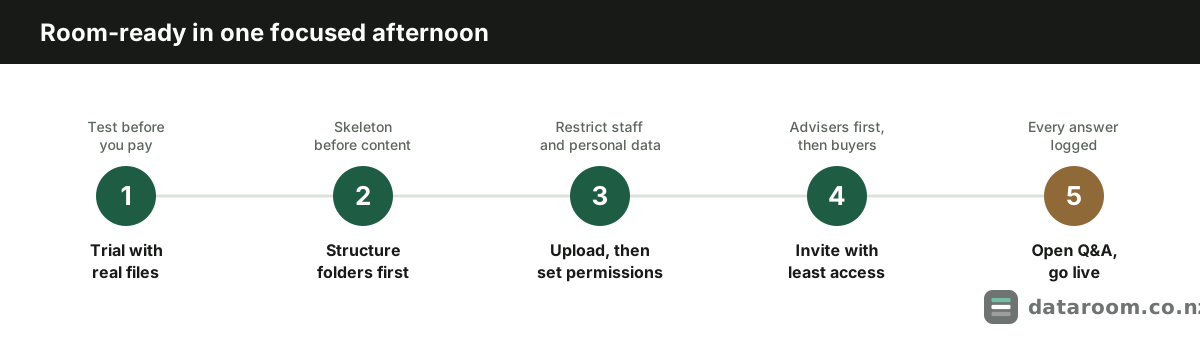
Set up your small-business room in five steps
No IT project, no consultant. A focused afternoon gets a small deal ready to go to market.
- 1
Start a free trial with real documents
Pick a flat per-room plan and open a 14-day free trial. Load a handful of real files first so you can test permissions and watermarking before you commit a cent.
- 2
Build the folder structure first
Create your folders before you upload: corporate, financial, contracts, property, staff, and so on. Structure before content saves hours of buyer questions later.
- 3
Upload, then set permissions per folder
Load your documents and set who can view, download or only preview each folder. Keep personal and highly sensitive data restricted until the deal advances.
- 4
Invite parties with the least access they need
Send invitations to your advisers first, then buyers, each scoped to their stage. Turn on watermarking for sensitive files.
- 5
Open the Q&A channel and go live
Route buyer questions through the room's Q&A rather than scattered emails, so every answer is logged and controlled. Then invite the first bidder.
That is the whole job. A Nelson aquaculture supplier and a Dunedin software consultancy run exactly these five steps; only the folder names change.
The slow part is never the software. It is finding the missing minute book, the unsigned contract, the lease that quietly expired. Preparing early forces those gaps into the open while you still have time to fix them.
For the deeper version across any deal type, how to set up a virtual data room is the full walk-through, what documents go in a data room tells you what to gather, and our data room folder structure template gives you the skeleton to fill.
Would a shared Drive folder do the same job?
It looks similar and behaves nothing alike.
A consumer file-sharing folder was built to help you collaborate, not to control disclosure in a deal. In a sale that gap becomes concrete: you cannot prove who saw a document, cannot stop a bidder who walked away from keeping a copy, and cannot show different buyers different things.
| Capability | Shared Drive folder | Virtual data room |
|---|---|---|
| Granular per-file permissions | ✗ | ✓ |
| Full audit trail of every view | ✗ | ✓ |
| Dynamic watermarking | ✗ | ✓ |
| Revoke access after sharing | ✗ | ✓ |
| Structured Q&A workflow | ✗ | ✓ |
| Separate views per bidder | ✗ | ✓ |
| Expiry and view-only documents | ✗ | ✓ |
Keep the free tools for internal drafts. The moment a document crosses to an outside party in a deal, it belongs in a room with an audit trail. We wrote both comparisons up in full: virtual data room vs Dropbox and virtual data room vs Google Drive.
One more reason the folder fails a New Zealand deal is the paper trail a buyer’s lawyer will expect. Under the Companies Act 1993 a buyer reviews your statutory records and current filings, and they will cross-check them against the Companies Office register. A room lets you present those records cleanly and log that they were disclosed. A shared folder gives you neither.
How do you keep the spend genuinely small?
Not by hunting for the cheapest logo. By matching the plan to the deal and refusing to pay for scale you will never use.
Three habits do most of the work.
- Organise before the meter runs. Upload the right documents once instead of paying to host a mess you will re-sort later.
- Match the term to the deal. A Christchurch physiotherapy group’s nine-week sale should never sign a twelve-month lock-in. Ask what a rolling monthly option costs before you accept a minimum term.
- Use the free trial as a real pilot. Load real files, set real permissions, and test the audit log before you commit a cent.
The saving hiding in plain sight is timing. A single transaction has a natural window, so a monthly rolling plan you close on settlement almost always beats an annual term you forget to cancel. If a vendor pushes a twelve-month minimum for a nine-week sale, that is a reason to ask questions, not to sign.
Do not, on the other hand, save money by dropping below the protection your deal needs. As every myth above shows, the cheap shortcut is usually the expensive mistake in disguise. The government’s business.govt.nz guidance on buying or selling a business is a sound, neutral starting point for the wider process, and if you want to read the statute a buyer’s adviser is working to, the Privacy Act 2020 is on the New Zealand legislation site in full.
If you are still weighing whether the spend is justified, is a virtual data room worth it for a small NZ deal? argues both sides honestly, and selling a business in New Zealand: the data room part sets out where the room fits in the wider sale.
See pricing for a straightforward small-business deal
A flat monthly plan, a 14-day free trial, and no per-page metering to model.
Small-business data room FAQ
Does a small business really need a virtual data room?
If more than one outside party will review confidential documents, such as a buyer, an investor, a bank or their advisers, then yes. Size is not the trigger; sensitivity is. A sub-$5M sale still exposes financials, contracts and staff records, which is exactly what a room is built to control.
How much does a data room cost for a small NZ business?
Indicatively, from about NZD $99 to $300 a month on a flat per-room plan for a typical small-business sale or raise. Figures are usually GST-exclusive and often billed in US dollars, so confirm the current quote with the provider. Our pricing guide breaks down the charging models.
Can I just use Google Drive or Dropbox instead?
For a real deal, no. Consumer folders lack per-file permissions, an audit trail, watermarking and the ability to revoke access after sharing. That is a compliance and disclosure risk. See virtual data room vs Google Drive for the full comparison.
Does the Privacy Act 2020 apply to my small business in a sale?
Yes. The Privacy Act 2020 applies to almost every New Zealand business regardless of size, and deal documents usually contain personal information about staff and customers. A room lets you stage disclosure and log access. See the Office of the Privacy Commissioner's privacy principles.
When should I set up the data room?
Before you go to market, not after a buyer asks. Preparing early keeps deal momentum, surfaces gaps while you still have time to fix them, and lets you negotiate from strength. A focused afternoon is usually enough for a small deal.
Is setting up a data room complicated?
No. Modern rooms are web-based and self-serve, with no IT team required. If you can organise files into folders and send an invitation, you can run one. The work is deciding what goes in and who sees it, not technical setup.