

Virtual data room vs Dropbox for a deal
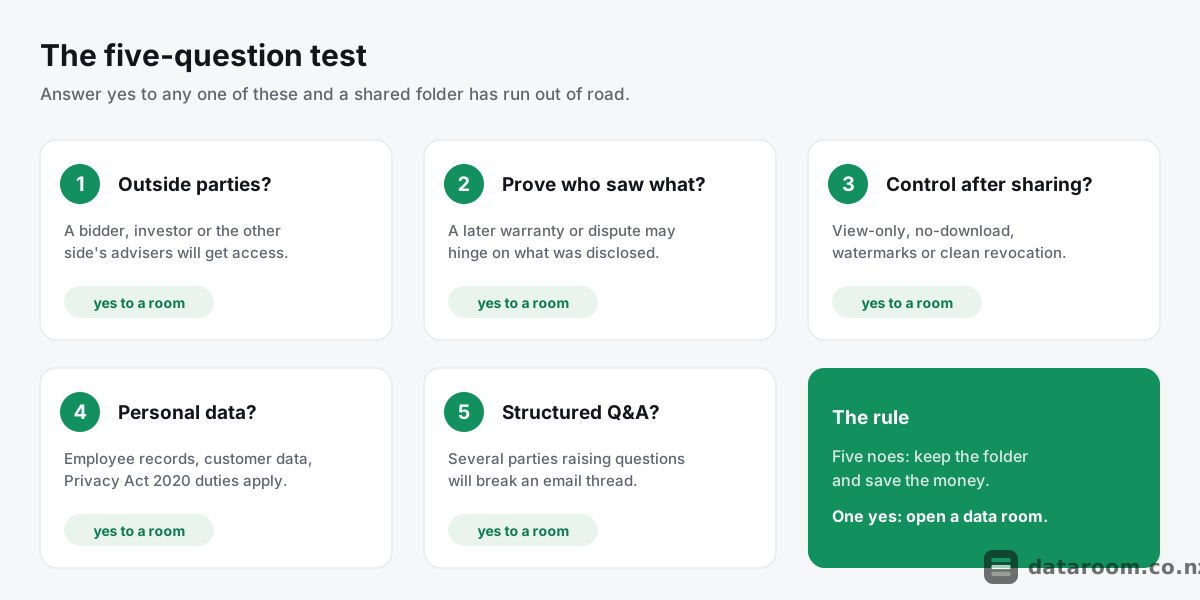
Skip the theory. Here is the checklist that decides it, and you can run it on the deal in front of you right now.
- Outside parties will get access. A bidder, an investor, the other side’s lawyers.
- You may need to prove who saw what. A warranty, a disclosure, a dispute later.
- You need control after the file leaves your hands. View-only, no-download, watermarks, revocation.
- There is personal or confidential information in the pile. Employee files, customer data, sensitive contracts.
- Several parties will run questions at once. A competitive process with real Q&A.
Five noes and a shared folder is genuinely fine. Keep it and save the money.
One yes and the folder has quietly become a liability. Everything below is the reasoning behind that line, section by section.
Run the five checks before you argue about tools
Take the checks one at a time, because each maps to a specific thing a folder cannot do and a room can.
Check one, outside parties. This is the trigger that flips everything else. While documents live inside your own trusted circle, Dropbox is a fine, fast, cheap home for them. The moment a file is meant for someone on the other side of the table, you have crossed into disclosure, and disclosure needs control and evidence a folder was never built to give.
Check two, proof. New Zealand deals run on warranties. The seller’s shield against a later claim is showing a risk was fairly disclosed before signing, and the buyer’s shield is showing exactly what they were and were not given. Both need a record of viewing, not just a record of sending.
Check three, control after sharing. A shared link is a one-way door. Once someone opens it, the file can usually be saved, forwarded and kept. A room lets you show a document without letting anyone hold a copy, and lets you pull access back when a party walks.
Check four, personal information. Almost every deal moves employee records, customer data and director details. The Privacy Act 2020 expects you to keep that information secure and share it only as far as necessary, and you want to be able to show you did.
Check five, questions. A quiet single-buyer deal can run its questions over email. A competitive process with three or four bidders cannot, because answers scatter across inboxes and nobody holds the single view of what is outstanding.
Notice what the checklist is not. It is not “Dropbox is insecure.” It is not “always pay for the fanciest tool.” It is a sorting rule: internal and low-stakes on one side, disclosed and evidence-sensitive on the other. Get the sort right and the tool chooses itself.
Most sellers get the sort wrong in one predictable way. They start in the folder because it was already open, then let it drift into being the disclosure channel because moving felt like effort. The checklist exists to catch that drift before it costs you.
People also ask where the line sits for a genuinely tiny deal, say a $300,000 sale of a cafe with one buyer and a friendly accountant on each side. Run the same five checks. If the buyer is the only outside party, the diligence is a shoebox of leases and a couple of years of accounts, and nobody is running a competitive Q&A, then a password-gated folder plus a signed confidentiality agreement can genuinely be enough. The checklist does not push everyone into a room; it just makes the decision honest rather than habitual. The mistake is treating “small” and “informal” as the same thing, because a small deal can still carry a Privacy Act 2020 duty over staff records and a real warranty on the accounts.
For the full primer on the category, see what is a virtual data room. For the plumbing behind permissions and logging, how a virtual data room works walks it end to end.
Data room vs Dropbox, capability by capability
Now the head-to-head, stripped to the essentials before any more prose.
The matrix below maps the capabilities a live deal actually leans on against what a standard Dropbox Business plan gives you out of the box, and what a purpose-built virtual data room gives you.
| Capability a deal relies on | Dropbox Business | Virtual data room |
|---|---|---|
| Store and sync documents | ✓ | ✓ |
| Password-protected share links | ✓ | ✓ |
| Granular per-file, per-user permissions | ✗ | ✓ |
| View-only with download disabled | ✗ | ✓ |
| Dynamic per-user watermarking | ✗ | ✓ |
| Full audit trail of every view | ✗ | ✓ |
| Instant, provable access revocation | ✗ | ✓ |
| Structured Q&A workflow | ✗ | ✓ |
| Bulk upload and auto-indexing | ✗ | ✓ |
| Fence view / screenshot deterrence | ✗ | ✓ |
| Reporting for warranty and disclosure | ✗ | ✓ |
Read the table honestly and the shape of the answer appears at once. The two tools overlap only at the very top: both store files, and both can put a password on a link.
Everything below that line, the control, the proof and the workflow, sits on the data room side and nowhere else.
That is not a knock on Dropbox. It is a statement about what each product was built to do.
Dropbox was designed to make files easy to reach across devices and easy to hand to someone by link, and it is world-class at that job. A data room was designed to make disclosure controlled, watermarked, logged and reversible.
Those are different jobs. The one picture below is the difference stated as plainly as it gets: a shared link travels wherever the recipient sends it, while a room keeps every viewer inside a permissioned, logged space.
The gap in one picture
-
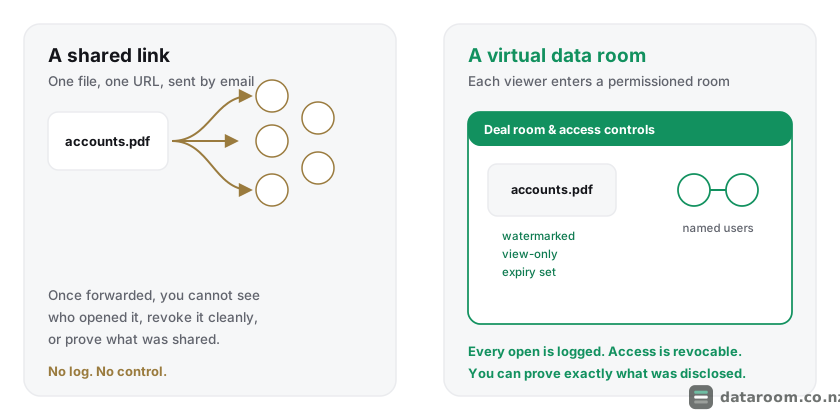
A shared link travels wherever the recipient sends it. A data room keeps every viewer inside a permissioned, logged room.
Here is the distinction in two words you can carry through the rest of this guide: control and evidence.
When you drop a file in Dropbox and send a link, you have shared a document, and that is where your power ends. When you load a file into a data room and grant a named user access, you have shared a document and kept the ability to watermark it, stop the download, see the exact minute it opened, and cut access the instant the deal changes.
If a dispute later turns on “did the buyer see the contamination report”, a room answers with a timestamped log. A folder answers with a shrug.
There is a quieter difference too, and it bites in the middle of a deal rather than at the end. A sync tool gives everyone the same live copy, which is a virtue for a team drafting together and a hazard the moment outsiders are reading. A late edit or an accidental overwrite propagates to every viewer instantly, so a bidder can be looking at accounts you have already superseded without anyone noticing.
A room instead publishes controlled, versioned documents into a fixed index. What a party sees is deliberate, not whatever the folder happened to contain at that second.
Where a shared folder still earns its place
Let us be fair to Dropbox, because “always use a data room” is lazy advice that no seasoned adviser actually follows. There is a real zone where a shared folder is the right, cheaper, faster call.
That zone is your internal working circle.
Dropbox is a perfectly good home for the draft information memorandum your own team is editing, the running task list, and the folder your accountant and lawyer share while they assemble the disclosure set. Inside a trusted circle, where nobody is a counterparty and nothing is formally disclosed, the friction of a full room adds cost and little else.
Plenty of New Zealand deals keep their internal workspace in Dropbox right up until the room goes live. That sequencing is sensible, not sloppy.
There is even a speed argument in Dropbox’s favour early on. Preparing a sale is messy: files get renamed, restructured and re-scanned a dozen times before anything is fit to disclose, and doing that churn inside a permissioned room is slower than it needs to be.
Use a shared folder for the rough assembly, then promote only a clean, final set into the room when the process opens. It keeps the room’s log free of the noise of your own drafting.
The picture below marks the exact point where that logic flips.
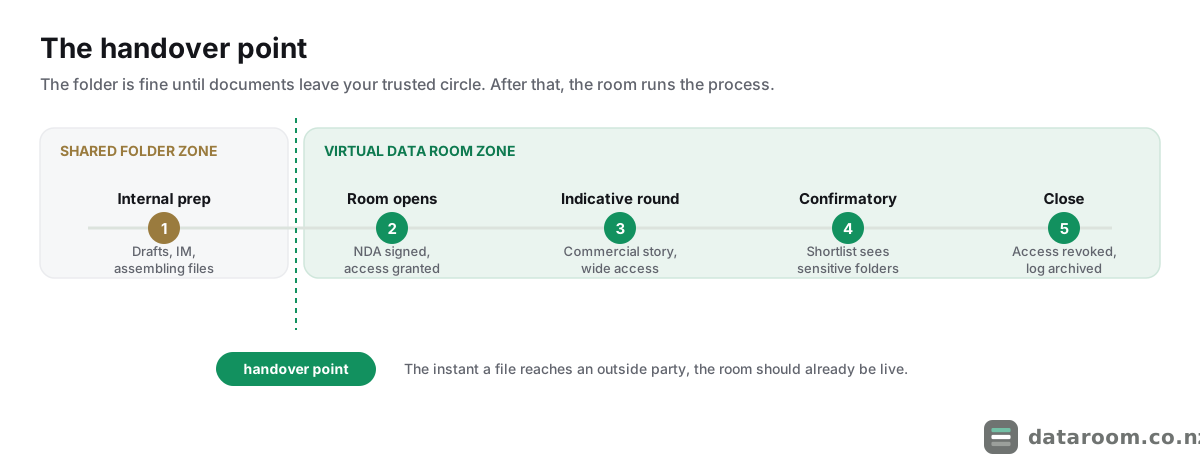
Where it stops being fine is the handover. The instant a document leaves your trusted circle and reaches a bidder, an investor or the other side’s lawyers, three risks appear together.
- You lose sight of where the file travels.
- You lose the ability to pull it back cleanly.
- You lose the record you will want if the deal ever sours.
A password on the link fixes none of those. It gates the first open. It does nothing about the second forward, the saved copy, or the “we were never sent that” argument eighteen months later.
The trap is never using Dropbox. The trap is forgetting to make the switch, and letting the working folder become the disclosure channel by default. Draw the handover line early, tell your advisers where it is, and hold it.
Why the audit trail decides disputes
If you take one thing from this comparison, take this. The audit trail, the complete timestamped log of every user, every document and every view, is the single feature that most justifies moving off Dropbox for a real deal.
New Zealand share and asset sales run on warranties and disclosure.
In a sale and purchase agreement, the seller’s protection against a later warranty claim is disclosure: proving a risk was fairly put in front of the buyer before signing. A room log is that proof. It shows the buyer’s advisers were granted access to the exact folder holding, say, the resource consent or the historical accounts on a specific date, and that someone on their team opened it.
Dropbox can show a file sits in a folder. It cannot reliably reconstruct who on the other side actually opened which version, and when.
The same log cuts the other way for a buyer, who can show precisely what was and was not made available during due diligence. That is why corporate lawyers running an M&A process treat the audit trail as non-negotiable, and why a shared folder makes them visibly nervous.
The log is not a nice-to-have report. It is the paper trail the deal may one day be argued over.
Record-keeping here is not just prudent; parts of it are a legal duty. A New Zealand company must keep proper records of its affairs under the Companies Act 1993, and a clean disclosure log is a natural extension of that discipline through a sale.
When a buyer’s lawyer later asks what the target actually put in front of them, “here is the timestamped index of everything opened” is a far stronger answer than a folder whose contents and sharing history have both drifted. The log protects the directors personally, too, because it lets them show the process was run with care rather than reconstructed from memory after the fact.
Dropbox tells you a file was shared. A data room tells you who opened it, when, for how long, and whether they tried to download it. In a dispute, only one of those is evidence.
One more thing the log quietly buys you: leverage during the process, not just after it. When you can see which bidder has spent two hours in the financials and which has not opened them at all, you learn who is serious before you spend a fortnight of your advisers’ time on them. A folder tells you nothing of the sort.
Think about how that plays out on a real claim. A Hawke’s Bay orchard sells, and a year later the buyer alleges the seller hid a dispute with a packhouse over supply volumes. If the correspondence sat in a folder labelled “commercial”, the seller is arguing from memory about who had the link and whether anyone opened it. If it sat in a room, the seller pulls the export: the buyer’s lead adviser opened that exact document twice in the week before signing, for a combined nineteen minutes. The claim rarely survives contact with that record. That asymmetry, memory on one side and a timestamped export on the other, is why advisers treat the log as the deciding feature rather than a reporting nicety.
At close, the whole log matters as much as any single entry. A good room lets you export the complete index and access history and archive it alongside the signed agreement, so the evidence outlives the subscription. Keep that export with your deal file; it is the record you will reach for if a warranty period runs two or three years and a question surfaces late.
What a room can lock down that a folder cannot
Beyond the log sit a cluster of controls a sync tool was never designed to offer. Together they are why a room feels like a different category of product once real bidders arrive.
Granular permissions. You decide, per user or per group, who sees which folder and which file. A bidder can be shown the commercial contracts but not the personnel files until they clear the first round. In Dropbox, sharing is essentially folder-level and binary, in or out, and recreating tiered access means a sprawl of separate folders and links that turns unmanageable the moment more than a couple of parties are involved.
Dynamic watermarking. A room stamps each page, on screen and on any permitted download, with the viewer’s name, email and a timestamp. That single feature changes behaviour: a document carrying a person’s own details is far less likely to be forwarded or leaked. Dropbox has no equivalent.
View-only and download control. You can let a party read a sensitive document without ever holding a copy of it, and some rooms add “fence view”, which masks parts of the page and deters photographs of the screen. A Dropbox link, once opened, generally means the file can be saved.
Instant revocation. When a bidder walks, you revoke access, and on a well-built room even documents already downloaded can be remotely restricted. Revoking a Dropbox link does nothing about copies already pulled down.
Staged access is where these controls really earn their keep.
A well-run process opens in rounds. Indicative bidders see the commercial story; only shortlisted parties who have signed a confidentiality agreement reach the sensitive material such as customer contracts, employment files and the tax position.
A room lets you hold folders back and release them to named groups on the day the round changes, without re-sending a single link or rebuilding a folder tree.
Picture a leak going the other way. A disgruntled underbidder forwards a Dropbox link to a competitor, and with a shared folder you would never know it happened. In a room, the same document is watermarked with that bidder’s own name and the attempt shows up in the log. That is both a deterrent and, if it ever matters, a lead.
There is a compliance layer under all of this. A New Zealand deal almost always moves personal information: employee records, customer data, director details. Under the Privacy Act 2020 you must keep that information secure and share it only as far as necessary, and the Office of the Privacy Commissioner’s guidance on keeping personal information safe points to reasonable security safeguards.
Granular permissions and an audit trail make those safeguards demonstrable in a way a shared folder cannot. CERT NZ likewise treats access control and logging as basic hygiene for sensitive data.
None of this means Dropbox breaches the law. It means a room makes it far easier to prove you handled personal information responsibly, which is exactly the position you want if anyone ever asks. Our guide to data room security for an NZ deal sets out what to demand.
Redaction is the control sellers most often forget they need until it is too late. A folder forces an all-or-nothing choice: either the supplier contract goes across with the customer’s pricing and personal contact details intact, or it does not go at all. A room lets you redact the sensitive lines and disclose the rest, so a bidder sees that a key contract exists and runs to a certain term without seeing the counterparty’s private data. On a deal in a tight sector, a Christchurch engineering firm selling to a competitor, for instance, that difference between “disclosed enough to satisfy diligence” and “handed a rival your whole customer book” can decide whether you are comfortable running the process at all.
What each option really costs an NZ deal
Cost is where many sellers talk themselves into a shared folder, and it is usually a false economy.
A serious Dropbox setup is not free either. Business plans bill per user per month, and once you add several advisers and a couple of bidder teams, the seat count climbs fast.
Now do the arithmetic on a real transaction rather than a brochure.
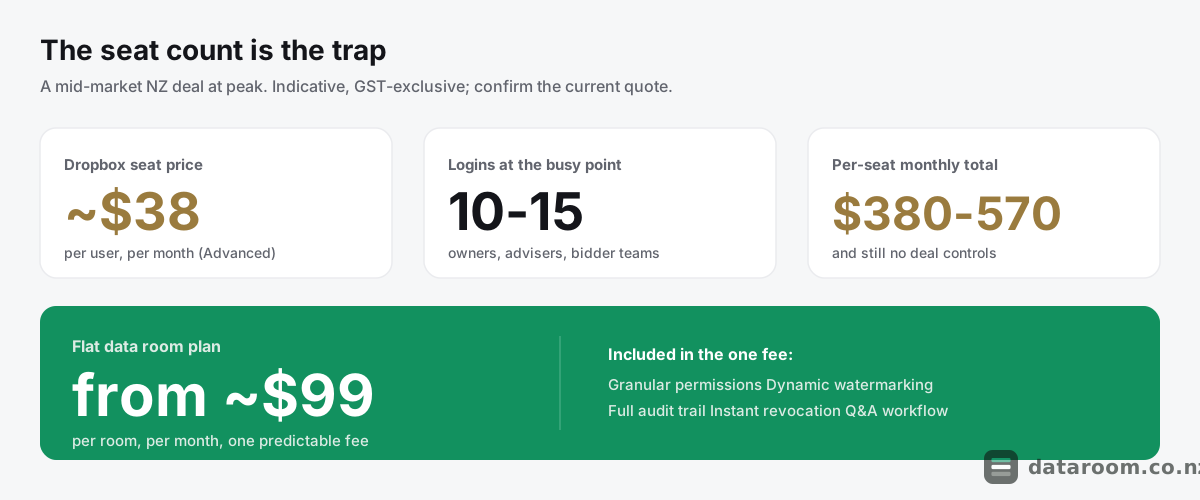
Picture a Marlborough vineyard and winery going to market at about $12 million, with two owner-directors, a corporate adviser, a law firm on each side, and three trade buyers running diligence. That is easily ten to fifteen logins at the busy point.
On Dropbox Business Advanced at roughly NZD $38 a seat, ten to fifteen users is $380 to $570 a month, and for that money you still have none of the permissions, watermarking or audit trail the deal needs. A flat data room plan from about $99 a month gives you all of it for one predictable fee.
Against total transaction costs, the difference is a rounding error, which is the point our guide to whether a data room is worth it keeps returning to.
The per-seat maths gets worse, not better, as the audience grows.
Consider a property syndication opening a commercial building to fifty or a hundred prospective investors, each of whom wants to read the trust deed, the valuation and the product disclosure statement. On a per-user tool every one of those readers is another seat, and the bill balloons precisely when you most need clean permissions and analytics on who has actually reviewed the offer.
A flat per-room plan absorbs that crowd for the same monthly fee. That is why syndicators and fund managers almost never run an offer out of a shared folder once the investor list runs past a handful.
There is a hidden cost on the Dropbox side that the seat price hides. Someone has to build and police the folder-per-bidder structure, chase the stale links, rebuild access when a round changes, and keep the manual log current, and that someone is usually a partner or a senior associate billing by the hour. A day of that time across a live deal can cost more than a month of the room you were trying to avoid buying. The flat plan is not just cheaper on the invoice; it removes the labour that the workaround quietly creates.
The same logic scales down to a modest small-business sale and up to an NZX-bound raise, where the controls stop being optional. For the full picture, see virtual data room pricing in New Zealand.
The table below sets out indicative New Zealand figures. All are GST-exclusive; confirm the current quote with each provider.
| Option | Indicative NZD cost | Billing model | Fit for a confidential deal |
|---|---|---|---|
| Dropbox Basic sharing | Low, per user | Consumer / per user | Internal files only |
| Dropbox Business Standard | ~$27 per user/mo | Per user, annual | Working files, not disclosure |
| Dropbox Business Advanced | ~$38 per user/mo | Per user, annual | Better admin, still no deal controls |
| Lean flat-rate data room | ~$99 to $300/mo | Flat per room | Small to mid NZ deals |
| Mid-market data room | ~$300 to $900/mo | Flat or tiered | Competitive M&A, syndication |
| Enterprise VDR | ~$900+/mo or quote | Per page / per user | Large, controlled transactions |
Pricing for a straightforward NZ deal
A flat monthly plan with permissions, watermarking, a full audit trail and a 14-day free trial, with no per-page metering to model.
The Dropbox workarounds that fail, and how to decide
When budget pressure meets a confidential deal, teams often try to bolt data room features onto Dropbox rather than pay for a room. It is worth knowing why each patch falls short before you stake a transaction on it.
Four come up again and again.
Password-protected and expiring links. These gate the first open and can time-limit a share, but they do nothing once a file has been downloaded, and they produce no per-user record of who read what. An expired link is not a revoked document, and it cannot tell you whether a copy still sits on a bidder’s laptop.
A manual access-log spreadsheet. Some sellers track disclosure by hand, noting who was sent which folder and when. It beats nothing, but it records what you sent, not what the other side opened. It evidences delivery rather than viewing, and a hand-kept log is exactly the kind of self-serving record a dispute picks apart.
Watermarking files before upload. You can stamp a PDF with a generic “Confidential” mark, but a static watermark is not tied to the individual viewer. It neither deters forwarding nor identifies a leaker the way dynamic, per-user watermarking does.
A folder per bidder. Cloning folders to fake tiered access works for two parties and collapses under a competitive process, where a single misfiled document or a stale link quietly exposes the wrong party to the wrong file.
Each patch rebuilds a fraction of one data room feature while leaving the audit trail, the true differentiator, unsolved. business.govt.nz’s guidance for New Zealand businesses stresses keeping accurate records through a sale, and a bolt-on Dropbox rig is a fragile way to clear that bar.
The patches also cost real hours to maintain across a live deal, which quietly erodes the very saving that motivated them, as our roundup of data room mistakes that slow NZ deals sets out.
Structured Q&A is the other thing they never recreate. A competitive process with several bidders raising questions by email scatters answers across inboxes, drifts versions, and leaves nobody with a single view of what is outstanding.
So when the patches tempt you, run the ordered version of the checklist instead. Work through these in sequence, and the answer is usually obvious by the second or third.
Decide in five checks
Work through these questions in order. If you answer yes to any of the last four, a shared folder is no longer the right tool.
- 1
Are outside parties involved?
If the documents will only ever be seen by your own trusted team, Dropbox is fine. If a bidder, investor or the other side's advisers will get access, treat that as the trigger to reconsider.
- 2
Do you need to prove who saw what?
If a later warranty, disclosure or dispute could hinge on exactly what a counterparty was shown and when, you need an audit trail. Dropbox cannot provide deal-grade evidence of viewing.
- 3
Must you control the document after sharing?
If you need view-only access, no-download, watermarking or the ability to revoke a copy that has already gone out, that is data room territory. A link cannot claw a file back.
- 4
Is there confidential or personal information?
Employee records, customer data and commercially sensitive contracts carry Privacy Act 2020 obligations and real leak risk. Granular permissions and logging make your safeguards demonstrable.
- 5
Will several parties run structured Q&A?
If a competitive process means multiple bidders raising questions, an email-based Q&A will break down. A built-in Q&A workflow keeps the negotiation organised and attributable.
If every answer points back to a small, internal, low-stakes exchange, keep the folder.
If the deal is confidential, competitive or evidence-sensitive, the folder has done its job and it is time to move up. Dropbox is a fine general-purpose store and a poor deal room, because it was never meant to be one. A data room is a poor everyday drive and an excellent deal room for exactly the same reason.
Founders raising capital hit this line fast, as data rooms for NZ startup fundraising explains. If you want the wider field, our data room alternatives for NZ businesses guide lays out everything between a folder and a full VDR, and the same test run on the other common default is in Google Drive versus a data room.
See every provider side by side
Compare permissions, watermarking, audit trails and indicative NZD pricing for the data rooms we track, in one table.
Data room vs Dropbox FAQ
Can I just use Dropbox for a small business sale?
You can for internal working files, but not for the disclosure set once bidders are involved. A small sale still needs granular permissions, watermarking and an audit trail to protect both sides, and a flat data room plan from about NZD $99 a month provides them for one predictable fee. Confirm the current quote with the provider.
Is Dropbox secure enough for confidential documents?
Dropbox encrypts data and supports multi-factor login, so it is not insecure at a technical level. The gap for a deal is control and evidence: it lacks per-file permissions, dynamic watermarking, a full audit trail and clean revocation, which are the safeguards a confidential transaction and the Privacy Act 2020 effectively demand.
What can a data room do that Dropbox cannot?
Set granular per-user permissions, apply dynamic watermarks, allow view-only access with downloads disabled, log every single document view with a timestamp, revoke access instantly, and run a structured Q&A workflow. Dropbox stores and shares files; a data room controls and evidences them.
Does a data room really cost more than Dropbox?
Often not, once you count seats. Dropbox Business is billed per user, so ten to fifteen logins across your team, advisers and bidders can reach NZD $380 to $570 a month, with none of the deal controls. A flat data room plan from about NZD $99 a month includes them. Figures are indicative and GST-exclusive.
When is Dropbox actually the right choice?
When the files stay inside your trusted circle: internal drafts, your own team's working folder, or a low-stakes exchange where nobody is a counterparty and nothing is being formally disclosed. The moment outside parties, confidential documents or warranty exposure enter, switch to a data room.
Why is the audit trail so important?
In a New Zealand deal, a seller's protection against a later warranty claim is proving a risk was disclosed before signing. A data room log shows exactly which party opened which document and when, which is evidence. Dropbox can show a file exists in a folder but cannot reliably prove who on the other side viewed it.