

How to choose a virtual data room: a buyer's guide
Here is the whole decision on one page. Print it, and tick each line as you close it out; the rest of this guide is just the reasoning behind each tick.
- Size the deal on paper. Peak user count, rough page and gigabyte volume, real months open.
- Fix your NZD band. Throw out anything priced an order of magnitude away from your deal in either direction.
- Set your must-have security list. Granular permissions, exportable audit trail, watermarking, structured Q&A.
- Check your Privacy Act 2020 position. Know where the data lives and how you close access at the end.
- Shortlist to about five, score on a weighted card. Turn a fuzzy comparison into two clear front-runners.
- Reduce every quote to one number. All-in landed cost in NZD, GST included, for the length of your deal.
- Trial the top two, then sign on the right term. A demo is the vendor’s best case; a trial is yours.
None of these steps is hard on its own. The mistake is skipping the paper sizing at the top and letting a polished demo or a headline price make the decision instead. Work down the list in order and the market sorts itself out quickly.
Why match the room to the deal, not the brand?
The single most useful thing you can do is stop asking “which is the best data room” and start asking “which is the smallest room that covers my deal without a gap.” Across the New Zealand market, a room for sharing confidential deal documents runs from roughly NZD $20 a month for a light document-sharing tool to well past $2,000 a month for a quote-only enterprise platform sold through a sales team. That is two orders of magnitude for the same broad job, and most of that spread is charging model rather than quality. A sub-$5M business sale usually sits under $300 a month flat, a startup seed round lands in the same band, a mid-market M&A process climbs to $700 to $2,200, and only an NZX listing or a large capital raise genuinely needs the top tier.
The room that fits a $30M Auckland software acquisition would be wildly over-specified for a two-director orchard sale in Cromwell, and the reverse leaves you exposed on the one axis you cannot fix later. Brand-led shopping gets this backwards because it starts from the logo and works towards the deal. Deal-led shopping starts from the deal, sets a hard band and a must-have list, and lets those two filters do the heavy cutting before you ever open a demo. That is why the checklist above starts with a pen and a page, not a browser tab.
What does a ten-minute weighted scorecard look like?
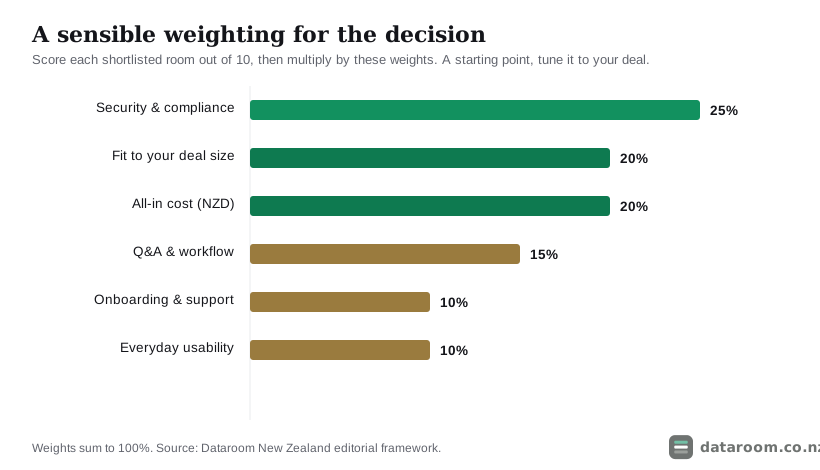
A weighted scorecard is the cheapest insurance you can buy against the most common buyer error, which is over-indexing on one visible thing, usually price or a pretty interface, and under-weighting the things that only bite later. Give each criterion a percentage of the decision, score every shortlisted room out of ten against it, multiply by the weight, and total the columns. The point is not false precision; it is forcing yourself to look at the criteria you would otherwise skim past. Security and compliance carry the most weight because a gap there is the one mistake you cannot undo after the fact, and cost and fit to deal size share second place because paying enterprise rates for a $3M sale is a real, avoidable loss even when nothing goes wrong.
How should you tune the weights?
Treat the default weighting as a starting point, not scripture. A fundraise leans harder on engagement analytics, because knowing which investor lingered on the financials changes how you follow up, so you might lift analytics into the security-adjacent tier. A competitive trade sale leans harder on Q&A and permission granularity, because you are running several bidders through the same documents without letting any of them see the others. The weights are there to make your priorities explicit before a salesperson makes them explicit for you. Spend ten minutes on the card and the two front-runners usually separate from the pack on the numbers alone.
What are you actually choosing between?
Every option in this category does the same core job: it gives outside parties controlled, logged access to confidential files. The differences that matter are depth of security, how the vendor charges, and how much deal workflow wraps around the documents. Picture the market in three bands. At the bottom sit consumer file-sharing tools that bolt light permissions onto storage. In the middle sit purpose-built rooms with real audit trails, dynamic watermarking and structured Q&A, priced as a flat monthly fee. At the top sit enterprise transaction platforms built for banks and listed-company deals, priced per page and sold through account managers.
Choosing well is mostly a matter of landing in the right band, then picking the best value inside it. The cheapest mistake is confusing a file-sharing service with a data room, because a folder link with no watermark, no granular permissions and no exportable log is a false economy the moment a dispute or a disclosure obligation appears. As our comparison with Dropbox sets out, that gap stays invisible right up until the moment you need to prove who saw what, and then it is the only thing that matters.
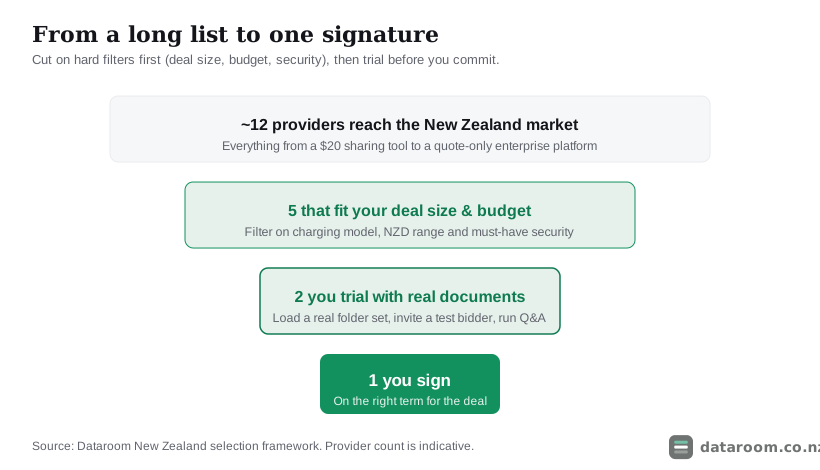
The funnel is deliberately narrow at the bottom. You cut a crowded market on hard filters first, price band and must-have features, so you only spend real time on the two or three rooms that could genuinely win. A beautiful room that lacks an exportable audit trail is not a close second; it is the wrong room, and the funnel should drop it early rather than let it charm its way into your final two.
What should a straightforward NZ deal actually pay?
Before you compare logos, throw out anything priced two orders of magnitude away from your deal. The table below maps deal type to a sensible monthly spend and the charging model that fits, so you can bin the obvious mismatches before you waste a demo slot on them. Read it as a sizing tool rather than a price list: your exact quote will move with users, volume and term, but the band is what stops you shopping in the wrong aisle entirely.
| Your deal | Typical users | Sensible spend (NZD/mo) | Charging model that fits |
|---|---|---|---|
| Small business sale, sub-$5M | 5 to 10 | $99 to $300 | Flat per room |
| Startup seed or Series A raise | 10 to 25 | $99 to $350 | Flat per room |
| Property syndication offer | 20 to 100 investors | $250 to $700 | Flat or pooled-user |
| Mid-market M&A, $10M to $50M | 15 to 40 | $700 to $2,200 | Per room or per page |
| NZX listing or large capital raise | 40+ | $2,000+ (quote) | Per page, enterprise |
Two lessons fall straight out of it. First, four of the five rows are served by a flat, self-serve plan under $700, so the quote-only enterprise tier is a minority sport rather than the default. Second, it is the users column, not the brand, that moves the number, because per-user and per-page metering is where budgets quietly blow out. A property syndication that invites a hundred prospective investors will be punished by per-seat pricing and rewarded by a flat or pooled-user plan. Our pricing guide for New Zealand breaks the four charging models down in full, and if you are at the bottom of the market, the cheapest rooms for NZ small deals compares what you keep and what you give up.
Why is security the criterion you score first?
Security is where you should be least willing to compromise, and it is also where the marketing gloss is thickest, so it deserves the first and hardest look on the card. A serious room stacks four layers, and a gap in any one undoes the layers above it. Encryption in transit and at rest is the floor. On top of that sits access control: granular folder-and-file permissions so you can give one bidder view-only access to one folder and nothing else, plus two-factor login and instant revocation. Above that sits accountability, meaning a complete exportable audit trail and dynamic watermarking that stamps each viewer’s identity across every page. At the top sits independent proof, because a certificate an auditor checked is worth more than a claim on a sales page.
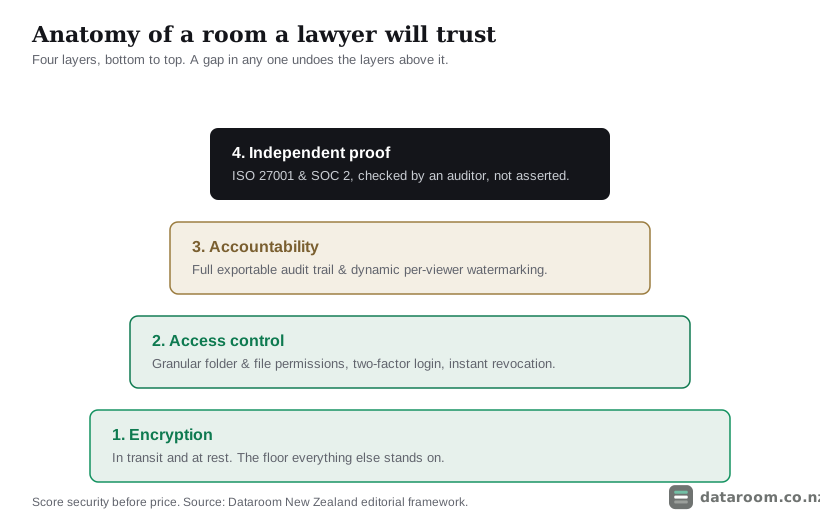
Certification is the shorthand for all of that being independently checked rather than merely asserted. Look for ISO 27001 and SOC 2, which our certifications explainer unpacks in plain English, and treat a room that cannot produce either as unproven rather than simply cheap. New Zealand’s national CERT publishes sensible baseline guidance on protecting sensitive business data, and CERT NZ’s advice is a good sanity check on whether a vendor’s claims are more than a logo. Our fuller security checklist for NZ deals turns all of this into a demand list you can hand a vendor and watch them either satisfy or dodge.
Choosing a data room is not about finding the best product on the market. It is about finding the smallest room that covers your deal without a gap, at a price the deal can justify.
What actually ships at your deal size?
Two rooms at the same price can protect you very differently, and a cheap plan is sometimes cheap because it quietly dropped the one feature your deal needs. The matrix below shows what tends to come standard as you climb the ladder, and it rewards reading in both directions. Check that a budget option has not skipped an essential such as watermarking or a Q&A workflow, and check that a premium option is not billing you for redaction and per-page metering your deal will never touch. Most New Zealand transactions land in the middle column, so that is the one to read closely.
| Capability | Entry (~$20 to $100) | Mid (~$250 to $700) | Enterprise (~$900+) |
|---|---|---|---|
| Granular folder and file permissions | ✓ | ✓ | ✓ |
| Full, exportable audit trail | ✓ | ✓ | ✓ |
| Dynamic watermarking | ✗ | ✓ | ✓ |
| Structured Q&A with assignment | ✗ | ✓ | ✓ |
| Bulk upload and auto-indexing | ✗ | ✓ | ✓ |
| ISO 27001 / SOC 2 certification | ✗ | ✓ | ✓ |
| Redaction tools | ✗ | ✗ | ✓ |
| Dedicated NZ-hours support desk | ✗ | ✗ | ✓ |
| Per-page or per-user metering | ✗ | ✓ | ✓ |
Watermarking, a proper Q&A workflow and independent certification all appear from the mid tier, and those three are the difference between a document store and a room a bidder’s lawyers will take seriously. If your deal expects structured Q&A and your plan does not have it, you will feel the gap on day one, and running Q&A without losing control explains why that workflow earns its place. Notice too that per-page or per-user metering switches on at the mid and enterprise tiers. That is not a feature you want; it is a cost model to price carefully, which is exactly where the fair-comparison work begins.
What do your Privacy Act 2020 duties add to the choice?
Choosing a room is not only a technical decision; it is part of meeting your legal duties, and that reframes several features from nice-to-have into load-bearing. The moment a data room holds personal information, employee files, customer records, director details, the Privacy Act 2020 applies to how you store, share and dispose of it, and the responsibility stays with you even though a vendor runs the software. Two points steer the choice. If any part of the room, or its support team, sits offshore, you are relying on the cross-border rules in the Act, so you need to know where the data lives and who can reach it. And you need to close access cleanly at the end, because holding personal information longer than you need it is its own breach.
The Office of the Privacy Commissioner’s guidance on the privacy principles is the authority to read before you sign, and our Privacy Act walkthrough for deals translates it into data-room terms. When in doubt the source text sits on legislation.govt.nz. The practical upshot is that a room which lets you set data location, revoke access instantly and archive-then-delete at close is not just more secure; it makes your Privacy Act position far easier to defend if anyone ever asks how the information was handled.
How do you compare price fairly across vendors?
Sticker prices do not compare, because vendors quote in different currencies, on different models, with different things bundled, and the only fair unit is the all-in landed cost in NZD, GST included, for the exact length of your deal. Getting to that number means asking four questions of each vendor and writing the answers down, rather than trusting the headline rate. A room that looks $100 cheaper a month can cost more once a setup fee and a long lock-in are added, and the only way to see that is to force every quote through the same four filters.
| Ask this | Why it moves the number | What good looks like |
|---|---|---|
| What is the monthly rate, in NZD? | USD quotes hide the exchange rate and 15% GST on top | NZD billing, or a locked rate you can budget |
| Is there a one-off onboarding or setup fee? | A lump sum can dwarf a cheap monthly rate on a short deal | No setup fee, or a small, disclosed one |
| What is the minimum term? | A 12-month lock-in bills long after a 9-week deal closes | Monthly rolling for a one-off transaction |
| What triggers overage? | Per-user, per-page or per-GB metering blows budgets quietly | A flat plan, or generous, named allowances |
Most published prices are GST-exclusive, and many overseas vendors quote in US dollars, so 15% GST and the exchange rate both sit on top of the headline. If your business is GST-registered the tax is usually claimable as an input, but it still affects cash flow during the deal, and business.govt.nz on GST covers the basics. The practical move is to prefer NZD billing on a monthly rolling term for a one-off transaction, which removes both the currency risk and the lock-in in a single stroke.
Put two realistic quotes for the same twelve-week trade sale side by side and the gap stops being a rounding error. A flat mid-tier plan at $199 a month, billed rolling, runs for the three months you actually need it: a subtotal of $597, plus $90 GST, an all-in landed cost of about $687. An over-specified enterprise platform at $1,500 a month on a standard twelve-month minimum, with a $2,500 one-off onboarding fee, comes to a $20,500 subtotal, plus $3,075 GST, an all-in figure closer to $23,575.
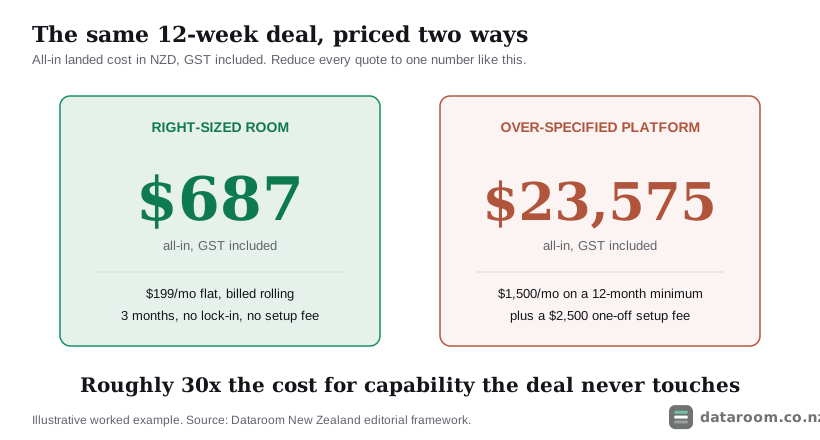
Same twelve-week deal, roughly thirty times the cost, with the extra capability sitting idle and the lock-in billing long after close. The enterprise room is not worse; on an NZX-scale raise it earns every dollar. It is simply the wrong tool bought for the wrong deal. Because the term you pay for is set by how long diligence actually takes, how long due diligence takes in New Zealand is worth reading before you accept any minimum term, and is a virtual data room worth it for a small NZ deal runs the same maths from the other direction.
How do you actually choose, step by step?
You can de-risk the whole decision with a structured process that ends in a genuine trial rather than a leap of faith. Filter hard on the numbers first, then let a real trial break the tie between your two front-runners.
See our pricing for a straightforward NZ deal
A flat monthly plan, a 14-day free trial, and no per-page metering to model.
Choose your room in six steps
Filter hard on the numbers first, then let a real trial break the tie.
- 1
Size the deal on paper
Write down your peak user count, rough page and gigabyte volume, and the true number of months you need the room open. These three figures set your price band and rule out the wrong charging models before you talk to anyone.
- 2
Set your must-have list
Mark which capabilities are non-negotiable, typically granular permissions, an exportable audit trail, watermarking and a Q&A workflow, and which are merely nice to have. Do not pay an enterprise tier for one feature a mid plan also includes.
- 3
Shortlist to about five
Apply your band and must-have list to cut the market down to a handful of rooms that genuinely fit. Anything priced an order of magnitude away, in either direction, comes off the list now.
- 4
Score them on the weighted card
Rate each shortlisted room out of ten on security, fit, cost, Q&A, support and usability, then apply the weights. This turns a fuzzy comparison into two clear front-runners.
- 5
Trial your top two with real documents
Use each free trial to load a real folder set, invite a colleague as a test bidder, set permissions and run a live Q&A thread. A demo shows the vendor's best case; a trial shows yours.
- 6
Get the winner itemised in NZD plus GST
Confirm the monthly rate, onboarding fee, overage rates, minimum term and support hours in writing, in NZD where you can. Compare the all-in landed cost, not the headline, then sign on a term that matches the deal.
The trial step is the one buyers skip and later regret. A free trial run with your own documents surfaces the friction a demo hides: how long a bulk upload really takes, whether your folder structure survives the import, whether the Q&A tool routes questions the way your advisers actually work. If you have not built the room yet, our setup guide and a ready folder-structure template make that trial far more realistic, and far more revealing.
How do you match the room to your deal type?
The right room for a fundraise is not the right room for a trade sale, so the last move before you shortlist is to weight your scorecard to the job in front of you. The same six criteria apply to every deal; what changes is which two or three you push to the top. The decision tree below follows the four deal types most New Zealand buyers bring to us and shows where each one should spend its weighting, with security and an exportable audit trail staying non-negotiable in every branch.
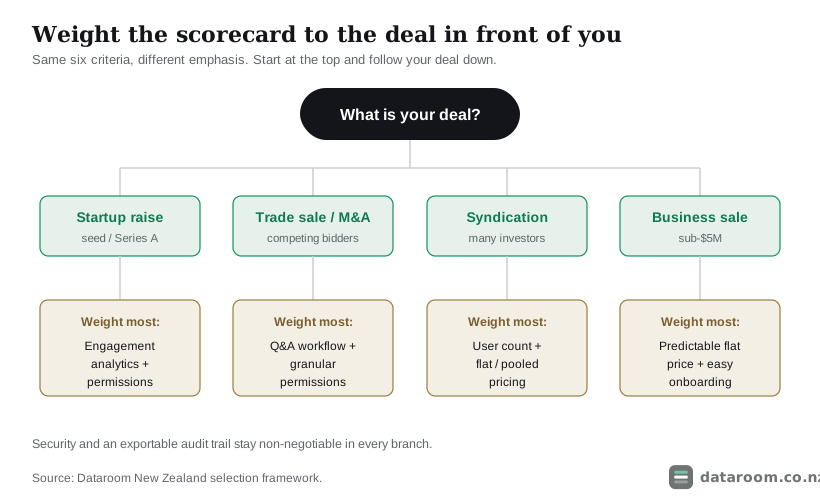
| Deal type | Weight most | Charging model that fits |
|---|---|---|
| Startup seed or Series A raise | Engagement analytics and airtight permissions | Flat per room |
| Trade sale or mid-market M&A | Q&A workflow and permission granularity | Flat, or per room |
| Property syndication offer | User count and predictable per-head cost | Flat or pooled-user |
| Small business sale, sub-$5M | Predictable flat pricing and easy onboarding | Flat per room |
For a startup raise, analytics matter more than almost anything else, because you want to see which investors opened the deck and lingered on the financials, so a room with clean engagement tracking and airtight permissions beats a heavier platform. Choosing a room for NZ startup fundraising goes deeper on that, and the best rooms for NZ startups shortlists the value picks. For a trade sale or mid-market M&A, the Q&A workflow and permission granularity carry the most weight, because you run several competing bidders through the same documents at once. For a property syndication, user count is the driver: a hundred prospective investors rules out per-seat pricing. And if you are simply selling a business in New Zealand, predictable flat pricing and easy onboarding usually beat every advanced feature on the brochure.
What are the red flags in a vendor pitch?
A good pitch answers your questions plainly; a bad one steers you away from them, and once you know the tells they are hard to unsee. The grid below pairs the warning sign with the answer a straight vendor gives, so you can run a pitch against it in real time rather than reconstructing your unease afterwards.
| What you are testing | Red flag | Green flag |
|---|---|---|
| Pricing transparency | Won't put a price in writing before a discovery call | Sends an itemised NZD quote on request |
| Contract term | Long minimum term pitched as a discount | Monthly rolling available for a one-off deal |
| Independent proof | Only a claim that the room is secure | Produces the ISO 27001 or SOC 2 certificate |
| Live testing | Dodges loading your own documents in a trial | Hands you a trial and helps you fill it |
| Data location | Vague about where your data physically sits | Names the region and the support hours |
Two of these matter especially for New Zealand buyers. Support that runs only on US or European hours can leave you stranded during a live Q&A push at the sharp end of diligence, and a vendor vague about where your data physically sits makes your Privacy Act position harder to defend. None of these is automatically disqualifying, but each is a reason to ask one more question before you sign. Our roundup of data room mistakes that slow NZ deals collects the ones that cost real time, most of which trace back to a red flag someone chose to overlook.
What else do buyers ask before they commit?
A handful of sub-questions come up in almost every buyer conversation, and they are worth answering plainly before the FAQ.
Can you switch rooms mid-deal if you get it wrong?
You can, but it is costly in the one currency a live deal cannot spare, which is time. Re-uploading, re-indexing and re-inviting every party mid-diligence burns days and rattles bidders, so the practical answer is that the trial exists precisely to stop you needing to. Get the choice right before diligence opens and switching never comes up.
Do you need a data room for a small deal at all?
Often yes, and for a smaller reason than people expect: it is the exportable audit trail, not the storage, that earns its keep. Even a sub-$5M sale benefits from being able to prove who saw what and when if a warranty claim surfaces after close, and a flat plan under $300 a month makes that protection cheap relative to the risk.
How many people should touch the decision?
Keep it small. One person sizes the deal and runs the scorecard, the deal lawyer sanity-checks the security and Privacy Act line, and the person who will actually build the room runs the trial. A decision by committee tends to drift towards the most-marketed brand rather than the best-fit room.
So how much does the choice really matter?
More than the price gap suggests, and less than the enterprise brochures imply. The wrong room in the cheap direction, a bare file-share with no audit trail, exposes you to a breach you cannot prove you contained. The wrong room in the expensive direction, a per-page platform on a twelve-month lock-in for a nine-week deal, quietly costs you thousands for capability you never use. The right room sits in between, sized to the deal, and it is usually easy to find once you have done the paper sizing at the top of this guide. If you want the market already sorted, the best virtual data rooms in New Zealand for 2026 applies exactly this framework across the providers we track, and the comparison table lets you filter on the criteria that carry the most weight for your deal.
Compare every room we track, side by side
Indicative NZD pricing, charging models, certifications and trials for each provider, in one table.
Choosing a virtual data room: FAQ
How do I choose a virtual data room?
Match the room to your deal, not to a brand. Size the deal on paper first (peak users, document volume, months needed), set your must-have security features, shortlist about five rooms in the right NZD band, score them on a weighted card, then trial your top two with real documents before you sign. For most New Zealand deals a flat per-room plan is the right target.
What is the single most important factor?
Security and compliance. It carries the most weight in our framework because a gap there, a missing audit trail, no watermarking, no independent certification, is the one mistake you cannot fix after the fact. Score it out of ten before you look at price, and treat a room that cannot show ISO 27001 or SOC 2 as unproven.
How much should I expect to pay in New Zealand?
Indicatively, a sub-$5M business sale or an early-stage raise runs under NZD $300 a month on a flat plan; a property syndication sits around $250 to $700; mid-market M&A lands at $700 to $2,200; only NZX-scale work needs a quote-only enterprise platform. Figures are GST-exclusive and indicative, so confirm the current quote with the provider.
Do I really need a trial, or is a demo enough?
Trial, every time. A demo shows the vendor's polished best case; a free trial with your own documents surfaces the friction that actually matters, how bulk upload behaves, whether your folder structure holds, how the Q&A tool routes questions. Trial your top two rooms before committing, and prefer a monthly rolling term for a one-off deal.
Can I switch data rooms in the middle of a deal?
You can, but it is expensive in time: re-uploading, re-indexing and re-inviting every party mid-diligence burns days and unsettles bidders. That is exactly why the trial step matters. Get the choice right before diligence opens and you should never need to switch.
Does my Privacy Act 2020 duty affect the choice?
Yes. Once a room holds personal information, the Privacy Act 2020 applies to how you store, share and dispose of it, and the responsibility stays with you even though a vendor runs the software. Prefer a room where you know the data location, can revoke access instantly and can close the room cleanly at the end. The Office of the Privacy Commissioner's guidance is the authority to read first.