

Data room folder structure: a template for NZ deals
A data room folder structure is the top-level filing system that organises every document a buyer, investor or lender opens during due diligence.
Unpack that and two things fall out. It is a filing system, so its only job is retrieval. And it is top-level, so it is the map a reviewer reads before they open a single file.
Get the map right and your room disappears into the background, which is exactly where it belongs.
Get it wrong and every reviewer pays a small tax, every day, for the four to eight weeks the room stays open.
This is a mid-length build guide, not an encyclopaedia. Six sections: what the structure is, the copy-and-use template, the afternoon build, the naming rules, which folders matter by deal type, and how to keep the whole thing alive once bidders are inside.
Not chosen a platform yet? Our guide on how to set up a virtual data room covers that. This one is about what goes inside. Newer still to the idea? Start with what is a virtual data room?
What is a data room folder structure, exactly?
Start with the honest part. There is no official New Zealand folder structure you can be marked down for missing.
No statute prescribes one. No regulator publishes a template. There is nothing to comply with.
What exists instead is a convention. A shape a lawyer, an accountant and a trade buyer all read fluently, because they have seen it on the last twenty deals.
That is freeing, not frightening. You get to build something clear rather than something bureaucratic.
But freedom has a failure mode. Left to grow on its own, a room sprawls.
You have seen the result. The cap table sits in three places. The lease is nowhere obvious. Half the folders are called “Misc” and the other half end in Final_v3_REALfinal.
Most rooms are not slow because the platform is slow. They are slow because nobody can find the lease.
And slow costs money. A mid-market NZ business sale, say the NZD 2m to 50m enterprise-value band, runs on adviser time billed by the hour. Every question a bidder emails because they cannot find a document is a chargeable round trip on both sides.
The structure below fixes that. It is the shape most New Zealand advisers already carry in their heads, written down so you can build it in an afternoon.
One framing point before the template. The folder tree and the permission model are two halves of one design, not two separate jobs. Build the tree so staged access is easy, and the hard part of running a room gets easy too. We come back to that in the last section.
The eight-folder template you can copy today
Here is the copy-and-use version. Create these eight top-level folders, in this order, and any NZ adviser will recognise the room on sight.
- 01 Corporate and constitution: who owns the company and how it is governed.
- 02 Financial and tax: the numbers, historical and forecast, plus Inland Revenue.
- 03 Commercial and customers: the contracts that generate revenue.
- 04 People and employment: the team, their agreements and entitlements.
- 05 Assets, property and IP: what the business owns or leases.
- 06 Legal and litigation: disputes, claims and material legal matters.
- 07 Regulatory and compliance: consents, licences and sector rules.
- 08 Privacy and data: how personal information is handled, under the Privacy Act 2020.
Eight is not a magic number. It is small enough to hold in your head and wide enough that nothing important shares a home with something unrelated.
Collapse 06 and 07 for a tiny services business. Split 05 into separate property and IP branches for an asset-heavy one. The spine stays the same.
The table below is the same skeleton with the sub-folders that usually hang off each branch. Treat the right-hand column as a starting menu, not a mandatory list.
| # | Top-level folder | What goes in it | Typical sub-folders |
|---|---|---|---|
| 01 | Corporate & constitution | Ownership and governance | Constitution, share register, cap table, board minutes |
| 02 | Financial & tax | Numbers and IRD | Annual accounts, management reports, forecasts, GST & tax returns |
| 03 | Commercial & customers | Revenue-generating contracts | Top customers, suppliers, standard terms, partners |
| 04 | People & employment | The team | Org chart, employment agreements, contractors, leave & entitlements |
| 05 | Assets, property & IP | What the business owns | Leases & titles, plant register, trade marks, insurance |
| 06 | Legal & litigation | Disputes and claims | Litigation register, correspondence, settlements |
| 07 | Regulatory & compliance | Sector rules | Consents, licences, health & safety, industry compliance |
| 08 | Privacy & data | Personal information | Privacy policy, data map, breach register, processor agreements |
Two folders do most of the heavy lifting, so a word on each.
Folder 01 answers the buyer’s opening question: who owns this, and can they actually sell it? Load the constitution, share register, current cap table, shareholder and founders agreements, and board minutes. Add a current extract from the Companies Office register so a reviewer can reconcile the public record against your documents in one place.
The constitution matters more than founders expect. Pre-emptive rights, drag-along and tag-along clauses under the Companies Act 1993 shape who has to consent to a sale, and a buyer’s lawyer reads them early.
Folder 08 is the one people forget. Sharing a room is itself a disclosure of personal information about staff, customers and directors, so you carry Privacy Act 2020 duties as the discloser. Keep a privacy policy, a simple data map, a breach register and any processor agreements here, and treat the folder as live, not decorative.
Here is the whole tree on one page. Sometimes the fastest way to agree a structure with your adviser is to look at it.
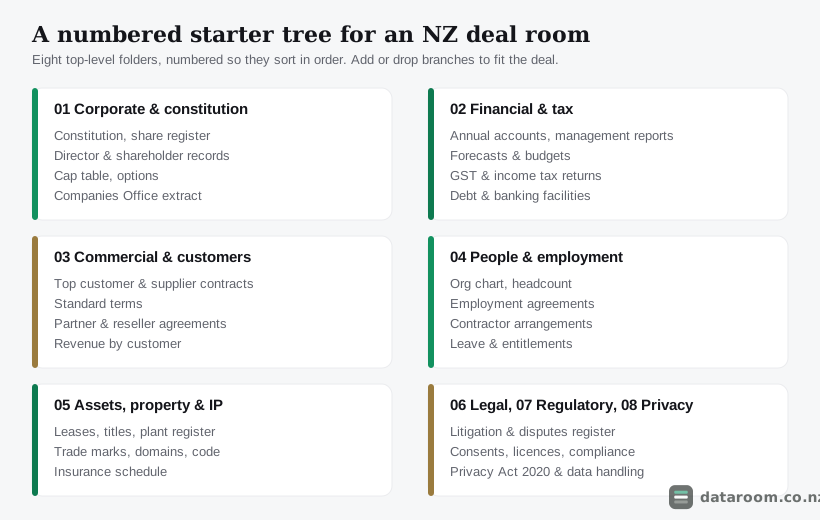
Notice how shallow it is. Every document a bidder wants sits at most three clicks from the front door, and every top-level folder announces itself with a number and a plain noun.
How do you build the skeleton in an afternoon?
Faster than you fear. The skeleton is an afternoon’s work, not a week’s.
The trick is sequence. Build the folders empty, review the shape, then pour documents in.
Reshuffle a live room while bidders watch and confidence leaks out of the deal. Bidders read improvisation as risk.
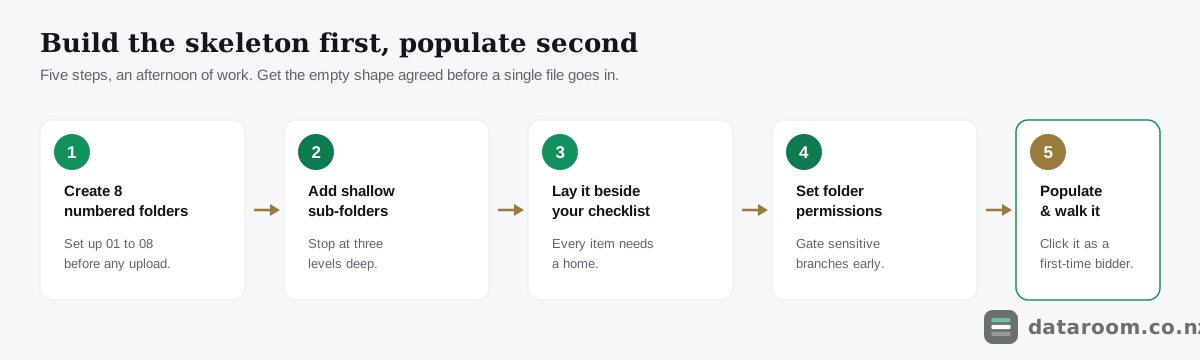
The five-step build
Create the structure first and populate it second. A room reshuffled mid-diligence looks improvised, and improvisation reads as risk to a buyer.
- 1
Create the eight numbered top-level folders
Set up 01 to 08 exactly as listed above before uploading anything. Numbering first guarantees the room reads in order for every reviewer, on every device.
- 2
Add shallow, consistent sub-folders
Under each folder, add only the two-digit sub-folders your deal needs. Stop at three levels deep so nothing can hide two clicks down.
- 3
Lay the tree beside your checklist
Put your due diligence checklist next to the empty tree and confirm every item has a home. A gap in the tree is a gap a buyer will find.
- 4
Set folder-level permissions and access groups
Decide who sees each branch, sell-side, advisers and bidders, before a single invite goes out. Gate the sensitive branches for later stages.
- 5
Populate, name by convention, then walk it
Upload into the right folders, apply the ISO-date and noun-first naming rules, then click the room as a first-time bidder to catch anything misfiled.
That is the whole method. A couple of practical notes make it stick.
Do the checklist step for real, not in your head. Open your due diligence checklist for NZ deals beside the empty tree and tick each item into a folder. The gaps you find at this stage cost minutes. The gaps a bidder finds cost trust.
And leave the folders genuinely empty on the first pass. The temptation is to upload as you go, but a half-filled tree hides its own flaws. You want to judge the shape before any document distracts you from it.
Still deciding where to build the room? Purpose-built platforms for a single SME deal run from roughly NZD 150 to 900 a month, and most let you save the empty tree as a reusable template. That last feature matters more than it sounds, and we return to it at the end.
Which naming rules actually carry the weight?
Four rules carry almost all the value. They cost nothing and they pay for themselves in the first week of a six-week process.
The reason is boring and decisive: data rooms sort alphabetically. Without a system, your folders appear in an order that matches nobody’s mental model of a deal.
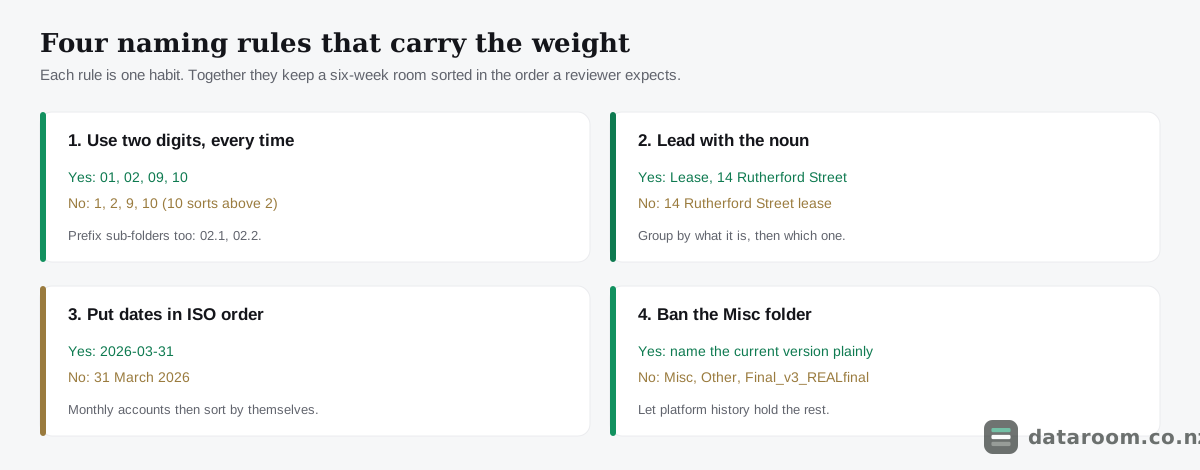
Numbering is not bureaucracy. It is the difference between a bidder finding the shareholders agreement in ten seconds and emailing your adviser to ask where it is.
Use two digits, every time. Write 01, not 1. The moment you reach folder 10, a single digit sorts it above folder 2 and the room reads out of sequence. Prefix sub-folders too: 02.1 Annual accounts, 02.2 Management reports. The whole tree then reads top to bottom in the order a reviewer expects.
Lead with the noun, not the detail. “Lease, 14 Rutherford Street” beats “14 Rutherford Street lease” the moment a folder holds twenty leases. Group by what the document is, then which one it is. The same logic sorts contracts by counterparty, titles by property, and agreements by employee. The noun comes first because the noun is what a reviewer scans for.
Put dates in ISO order. Write 2026-03-31, never 31 March 2026. ISO dates sort chronologically on their own. A folder of monthly accounts then lines up in the right order with zero effort, and the same rule quietly fixes board minutes and any file set that repeats over time.
Ban the “Misc” folder. A miscellaneous folder is where documents go to be forgotten. So is “Other”. So is anything ending in Final_v3_REALfinal. Version noise in a filename undermines trust before a bidder has opened the file. If it is the current version, name it plainly and let the platform’s history hold the rest.
One rule sits above the four: keep it shallow. Three levels suits almost every NZ deal, and each extra level is a click a bidder has to guess. If you find yourself going four or five deep, the top-level structure probably needs another folder instead.
Get these habits into the empty skeleton before you upload and they hold for the length of the deal. Bolt them on afterwards and you are renaming files while bidders watch.
Which folders draw the most scrutiny, by deal type?
The eight folders are the spine; the emphasis shifts with the transaction. A seed raise of NZD 500k to 2m barely touches property or litigation but lives on its cap table. A full business sale populates everything.
The matrix maps which top-level folders draw the heaviest scrutiny across four common New Zealand scenarios. Read “yes” as expect close reading here.
| Top-level folder | Business sale (M&A) | Startup raise | Property syndication | Capital raise |
|---|---|---|---|---|
| 01 Corporate & constitution | ✓ | ✓ | ✓ | ✓ |
| 02 Financial & tax | ✓ | ✓ | ✓ | ✓ |
| 03 Commercial & customers | ✓ | ✓ | ✗ | ✓ |
| 04 People & employment | ✓ | ✗ | ✗ | ✗ |
| 05 Assets, property & IP | ✓ | ✓ | ✓ | ✗ |
| 06 Legal & litigation | ✓ | ✗ | ✗ | ✓ |
| 07 Regulatory & compliance | ✓ | ✗ | ✓ | ✓ |
| 08 Privacy & data | ✓ | ✓ | ✗ | ✓ |
Read that as a starting point, not a licence to leave folders empty. A “no” means the folder is usually lighter, not absent.
The pattern comes alive with real New Zealand businesses.
A Dunedin med-tech raising a Series A lives and dies on folder 01. A clean, reconciled cap table is worth more than any pitch deck, and it is the one document every investor checks line by line. Our guide to a startup fundraising data room shows what a VC opens first.
A Central Otago winery selling to a trade buyer sees the constitution’s pre-emptive rights come under the microscope instead, plus folder 05 for its land titles and any resource consents.
A Tauranga logistics firm whose largest contract terminates on a change of ownership has a folder 03 problem. Change-of-control is the clause that can sink a sale, so add a one-page contract summary schedule at the top of that folder, listing each agreement’s term, renewal date and change-of-control trigger. A buyer will find the bad one fast; better it comes from you.
A Christchurch fintech turns on folder 05 and the IP ownership chain. The assignments from founders and contractors into the company are the first thing a diligence lawyer checks, and a gap there can stall a deal.
A Nelson aquaculture business puts its most valuable page in folder 07: a marine farm consent and its expiry date. A property syndication leans on the same folder for its offer documentation and any Financial Markets Authority requirements, as our guide to a property syndication data room sets out.
The through-line: match the depth of each folder to your checklist and your sector, then work the full set against what documents go in a data room so nothing important sits empty by accident. For the wider M&A process, this is the structure most advisers already have in their heads.
Compare data rooms that make folder permissions easy
See indicative NZD pricing, security features and trials for every provider we track, side by side.
How do you keep the structure alive: permissions, upkeep and reuse?
A structure is only as good as the discipline that keeps it that way. Three things decide whether your careful tree survives contact with a live deal: how you gate it, how you maintain it, and whether you save it.
Gate one tree in stages, do not duplicate it
The classic mistake is to build a beautiful structure and hand every user the keys to all of it.
Plan access group by group. The sell-side team sees everything. External advisers see most of it. Each bidder sees only what their stage of diligence warrants.
Because permissions attach to folders, a numbered structure makes staging simple. You gate branches of the one tree; there is no need to duplicate it.
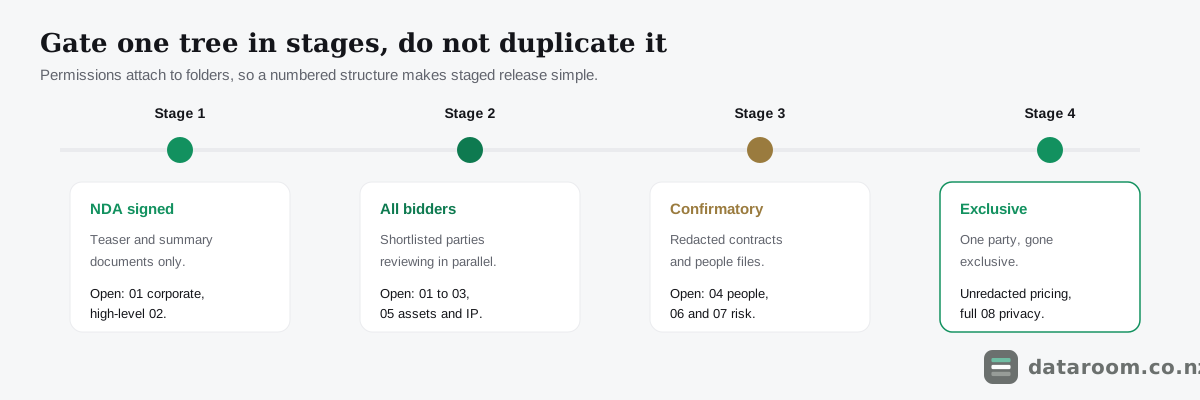
Open 01 and a high-level 02 on NDA. Widen to 01 through 03 and 05 for all shortlisted bidders. Hold the customer pricing in 03 and the employment detail in 04 behind a later gate, and release the unredacted versions only when a party goes exclusive.
A shallow, three-level tree is far easier to reason about here than a tangle six levels deep, where a single wrong permission can expose the very thing you meant to protect. Watermarking, folder-level access and a full audit log are exactly what a purpose-built room gives you over a shared Dropbox link, a case we make in virtual data room vs Dropbox.
Stop the structure decaying mid-deal
New documents surface mid-deal: a fresh contract, an updated forecast, a board resolution signed last week. And bidders request documents through the question-and-answer process, which is where most late uploads come from.
If every new file lands wherever the last person happened to click, your tree unravels within days. A small set of rules, agreed with your adviser before the room opens, holds it together.
- Route new files to their numbered home, never the root. An updated forecast belongs in 02 beside the others, not floating at the top level.
- Supersede, do not stack. When a document is replaced, mark or remove the old version rather than leaving three files a bidder has to reconcile. Lean on version history.
- Give Q&A documents a consistent path. File any document that comes with an answer into its numbered folder and reference it in the response, so the room and the Q&A thread stay in step.
- Log a redaction decision, not just the redaction. Keep both the redacted and unredacted versions on a controlled path and note who sees which, so your Privacy Act 2020 position and your negotiating position both stay defensible.
A weekly ten-minute walk of the room, as a first-time bidder, catches drift before it compounds. On a longer process, knowing how long due diligence takes in New Zealand helps you budget for that upkeep, and sidestepping the common data room mistakes does the rest.
Save it for the next deal
The empty numbered skeleton is an asset, not a throwaway. Save it as a template the moment this deal closes.
The next raise or sale then starts in minutes rather than hours, and it starts already organised. Most platforms let you clone a folder structure or an index directly.
Keep a short “start here” note at the top level too, pointing a new reviewer at the highlights. It costs five minutes and it is the first thing an experienced buyer appreciates.
A closing word on the law, because folders 04 and 08 both hold personal information. Employment files, customer records and director details all sit inside the room, so the Privacy Act 2020 travels with them. The Office of the Privacy Commissioner’s guidance at privacy.org.nz is the plain-English reference, and CERT NZ covers the security side if a breach ever occurs. Control who sees those branches, keep the audit trail, and the structure protects your compliance position as well as your deal.
Start with a room built for clean structure
A flat monthly plan, folder-level permissions and a 14-day free trial to build your tree before you commit.
Data room folder structure FAQ
What is the standard data room folder structure?
There is no single legal standard, but the widely used pattern for an NZ deal is eight numbered top-level folders: corporate and constitution, financial and tax, commercial and customers, people and employment, assets and property and IP, legal and litigation, regulatory and compliance, and privacy and data. Number them 01 to 08 so they sort in reading order, and keep sub-folders shallow.
How many folder levels should a data room have?
Three levels is enough for most New Zealand deals: a numbered top-level folder, a numbered sub-folder, then the files. Deeper nesting hides documents and makes permissions hard to reason about. If you find yourself going four or five levels deep, the top-level structure probably needs another folder instead.
Should I number my data room folders?
Yes. Data rooms sort folders alphabetically, so without numbers your folders appear in an order nobody expects. Prefix each folder with two digits (01, 02, and so on) so the room reads top to bottom in the logical order a lawyer or buyer anticipates. Use two digits so folder 10 does not sort before folder 2.
Where do privacy and personal information sit in the structure?
Keep a dedicated privacy and data folder (08) for your privacy policy, data map, breach register and processor agreements. Remember that employment and customer folders also hold personal information, so sharing them triggers your Privacy Act 2020 obligations. Control access to those branches and rely on the audit trail. See privacy.org.nz for the regulator's guidance.
Do I need a different structure for a fundraise versus a sale?
The eight-folder spine stays the same; the emphasis shifts. A fundraise leans on corporate records, the cap table and financials, and touches property and litigation lightly. A business sale populates every folder, especially people, commercial contracts and legal. Match the depth of each folder to your due diligence checklist.
Can I reuse the same folder structure for the next deal?
Yes, and you should. Save the empty numbered skeleton as a template so the next raise or sale starts in minutes, not hours. Most data room platforms let you clone a folder structure or an index, which is one of the practical time-savers covered in how to set up a virtual data room.